OrBI – A Hands-free Virtual Reality User Interface for Mobile Devices
Paulo Victor de Magalhães Rozatto, André Luiz Cunha de Oliveira and Rodrigo Luis de Souza da Silva*
Computer Science Department, Federal University of Juiz de Fora, Brazil
E-mail: paulo.rozatto@ice.ufjf.br; andreoliveira@ice.ufjf.br; rodrigoluis@gmail.com
*Corresponding Author
Received 14 January 2022; Accepted 22 March 2022; Publication 01 July 2022
Abstract
The purpose of this paper is to present OrBI, a framework for developing hands-free user interfaces for interacting with low-cost Virtual Reality systems through mobile devices. The proposed implementation was developed and used in various Virtual Reality apps. To assess OrBI’s precision and ease to use, we submit the framework to a quantitative and qualitative evaluation. The findings indicate that the proposed interface model is easy to use and have a suitable precision. The findings also showed that the framework might be challenging for older people to use and, in some cases, tiresome.
Keywords: Virtual reality, user interface, hands-free.
1 Introduction
Immersive virtual reality (VR) commonly uses visualization devices as Head-Mounted Displays (HMDs) capable of generating 3D scenes and tracking the user’s head movement. The Oculus Quest, Oculus Rift, and PlayStation VR are examples of such equipment. Despite significant advancements in HMDs and other VR technologies over the last decade, specialist hardware remains financially out of reach for a large portion of the world’s population. As a result, the short- and medium-term popularization of virtual reality is dependent on lower-cost alternatives. Assuming that mobile devices are already widely adopted, the usage of low-cost HMDs that use mobile devices to produce 3D apps and keep head-tracking, such as Google Cardboard, may be a key to the democratization of virtual reality.
The problem of interaction is a barrier experienced while using these low-cost options. In contrast to the previously mentioned high-end HMDs, which contain sophisticated six degrees of freedom hand controls that the user may use to interact with virtual environments, low-cost HMDs often have at best a few standard physical buttons that are limited in what they can offer.
The creation of effective in-app controls can help compensating the lack of physical controls. That in-app control could take form of a User Interface (UI), which mediates the user’s interaction with the virtual world. Ideally, the UI should be straightforward, simple to use, and adaptable to many applications. From the developer’s point of view, creating applications that are independent of the HMD model to be used by users is an advantage.
The main contribution of this work is a novel orbital based virtual reality UI, focusing on mobile devices. The UI is composed by a positioning system created relative to the user, similar to an orbital system, in which the user is at the center of a virtual sphere and the UI may be moved around using the mobile device’s head tracking and some auxiliary virtual buttons attached to it.
2 Related Work
Various approaches have been discussed in recent years to improve user interaction with VR while requiring nothing more than a low-cost HMD and a smartphone. A first approach, described in the framework proposed in [1], would be to use the cell phone accelerometer to detect false steps and translate them to movement in the virtual world, while interaction with objects would take place through gaze, where a cursor can be placed on the screen indicating where the user is looking, and after looking at an object for a certain time, some action is performed. This technique is known as Dwelling.
However, alternatives to the Dwelling approach for interacting with virtual objects are being explored. The sound of the user’s hand passing over the surfaces of a Google Cardboard can be used to recognize interactive gestures [2], the mobile device’s camera can be used to recognize the user’s hand gestures [3][4] and voice commands can be used to toggle between interaction modes like translation or rotation [5].
For applications such as drone control, flight simulation, and so on, a user interface based on body tilt can improve user experience and the precision of their movements [6].
Text input is also challenging. Using Dwelling can be stressful and exhausting for the user, as well as less efficient than using eye blinking as a command [7]. Low-cost HMDs, however, do not include eye-blinking sensors so far. In [8], a circular UI made of an inner empty circle contained by an outer ring containing characters is proposed, in which selecting a character is as simple as glancing at the chosen letter and then gazing to the inner circle for confirmation, requiring no dwelling time.
Recent researches use non-conventional hands-free interfaces like facial expression [9, 10] and brainwaves [11, 12, 13] interpretation, but both classes require special equipment to be used.
The related work presented above does not address how to move a user interface around the environment. In fact, some approaches, such as the swipe over the HMD surface [2] and the body lean [6] do not render user interfaces within the application, but they each have their own limitations. The former may need specific training for each type of HMD, while the latter is application specific. Our framework can be used in any virtual reality application (with the same base technology) and the UI can be moved around the environment in an easy and versatile way.
3 Fundamentals
According to [14], the main sources of hands-free interaction with virtual reality studied in the literature are voice recognition, eye tracking, and head tracking. Usually, voice recognition is accomplished by the recognition of keywords (e.g., select, start, pause) or through natural language processing. Nowadays, most HMDs and mobile devices have microphones, and well-established speech recognition systems, such as Google’s and Microsoft’s, are available. These factors make creating speech interfaces for VR possible and simpler. Speech interfaces have the advantage of not requiring head or body movements from the user, which can be tiring, and they do not take up screen space. However, there are a few drawbacks. For example, it can be inconvenient to voice out loud in public places such as cafes and libraries, and discovering the functionalities is not as straightforward as in other types of interfaces.
Eye tracking can be used to assess where the user is looking in the virtual environment without the user having to turn her head. As a result, the user can interact with virtual reality menus and objects by simply looking at them. The disadvantages of this approach are non-intentional interactions, which can be resolved by incorporating more steps (e.g., the user must look and speak a command to interact with an object), and HMDs with eye tracking sensors may not be accessible.
Head tracking is fairly common in VR systems. Virtually all HMDs support it, and mobile devices typically have gyroscopes that can be used to maintain head tracking. Its primary application is to look around in a virtual world, but it can also be used to make selections: a cursor is positioned in the middle of the screen and can be used to select objects as the user moves his/her head. To help preventing involuntary interactions, a timer is normally set when the cursor is over an object (dwell time), so the interaction occurs only when the timer expires.
Besides the sources of interaction, there are mainly three types of UIs for virtual reality: 2D, 3D, and speech interfaces. In 2D UIs, the user interacts with flat surfaces such as buttons, much like in non-VR environments. On the other hand, 3D UIs attempt to abstractly imitate real-life activities in order to replace 2D UIs. For example, instead of selecting a color for an element in a 2D menu, the user must catch a paint bucket and a brush tool somewhere in the virtual environment and then paint the element. The workflow for speech user interfaces has already been outlined; the user does not interact with visual elements, but rather speaks the actions to be performed.
In [15], the three types of user interface are investigated. Their results suggest that 3D UIs are more pleasant and immersive, 2D UIs perform better when many items must be manipulated quickly and precisely, and speech interfaces are the easiest to learn and the best choice when several texts must be entered. It should be noted, however, that their research does not employ hands-free implementations; in fact, 3D interfaces hardly fit into a hands-free approach.
The OrBI (Orbit-Based Interface) framework extends the hands-free approach, which employs most frequently 2D UIs with head tracking, by including movement components for these types of UIs. As mentioned in the previous section, approaches for dealing with moving 2D UIs have not received much attention yet, regardless of the fact that it is a key aspect in VR since the user interface may hide an important part of the application.
4 OrBI Framework
In VR applications that make use of low-cost equipment such as Google Cardboard-like HMDs, head tracking is usually the primary source of interaction, and it may be the only one. In this case, a user interface is needed to mediate the actions that the user can take in the virtual environment.
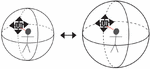
Since the UI would be used for the majority of activities, it makes sense for the UI to be placed relatively to the user and to follow the user if there is any movement. As the UI can hide certain parts of the virtual world, it is important that a method for moving it to a different location exists. The OrBI framework approach considers the user to be in the center of an imaginary sphere, with the UI positioned at some point on the sphere’s surface. This allows for the creation of a simple way to move the UI using head tracking: the user triggers the mode to re-position the UI, and it is positioned in the imaginary sphere at the point where the user is looking. The principle of adjusting the distance between the user and the UI is also straightforward; simply increase or decrease the radius of the imaginary sphere (Figure 1).
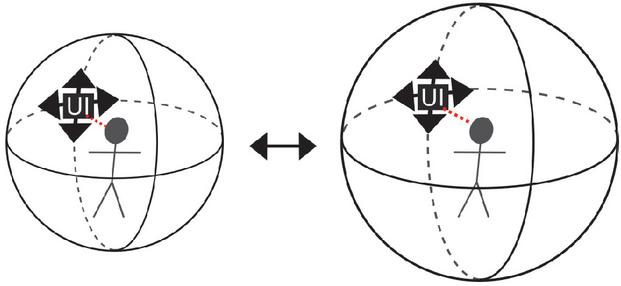
Figure 1 OrBI’s UI positioning, where the user interface is placed in the imaginary sphere where the user is looking, as well as how the sphere’s size can change.
5 Implementation
The OrBI framework was created with a web context in mind. JavaScript was used as the programming language and WebXR was used as the VR API. All the computer graphics elements were implemented in ThreeJS, a JavaScript 3D library. Using these technologies, it is possible to build VR content for virtually any smartphone with a gyroscope and a browser that supports WebXR.
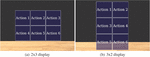
The approach for building the UI was to create 2D buttons that were presented as a matrix (Figure 2). The buttons are code-configurable as they can be changed in size, background picture, border, distance between them, how they are displayed and, of course, their functionality.
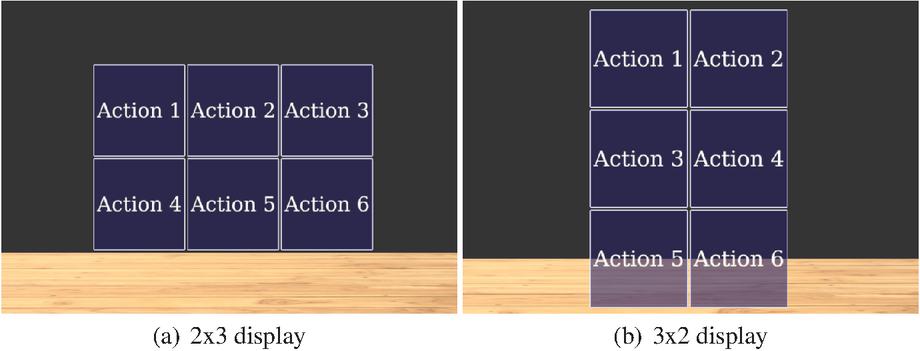
Figure 2 An example of the UI displayed in a couple matrix shapes.
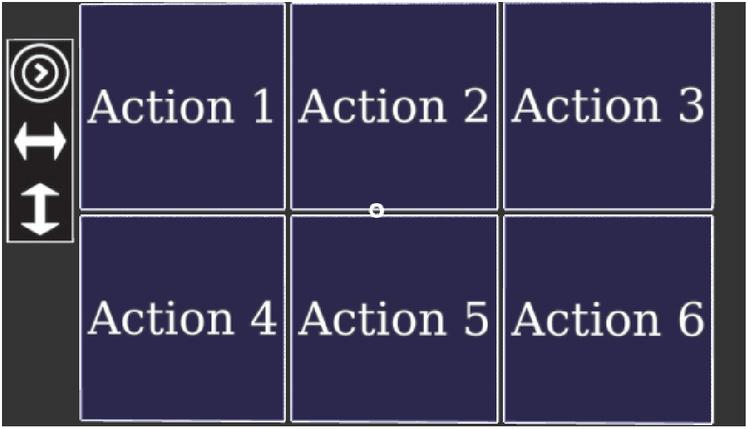
Figure 3 UI with the movement bar.
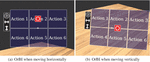
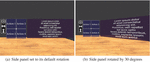
A side bar was added to help implement the movement commands. It has three buttons, as shown in Figure 3. The first button increases the radius of the imaginary sphere, the second activates horizontal movement, and the third activates vertical movement. The sphere’s possible radius are determined by code and can vary from application to application. When the user clicks the button, the radius increases, and if it reaches the limit, it returns to the first value. When the horizontal movement button is pressed, the UI will follow the user’s head motions to the right and left, and a stop button will appear in the middle top of the interface, allowing the user to stop horizontal movement by looking up (Figure 4.a). Similarly, when the vertical movement button is pressed, the UI will follow the user’s head motion up and down, and a stop button will appear in the middle of the interface, allowing the user to stop moving by looking right (Figure 4.b). In addition, a text-display panel was included and it is located on the right side of the interface. When the displayed text is difficult to see, the panel can be rotated to allow a clear view (Figure 5).
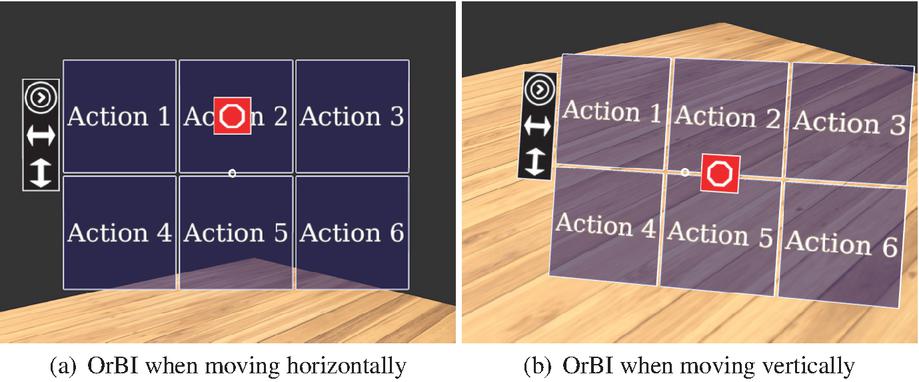
Figure 4 UI appearance while being moved.
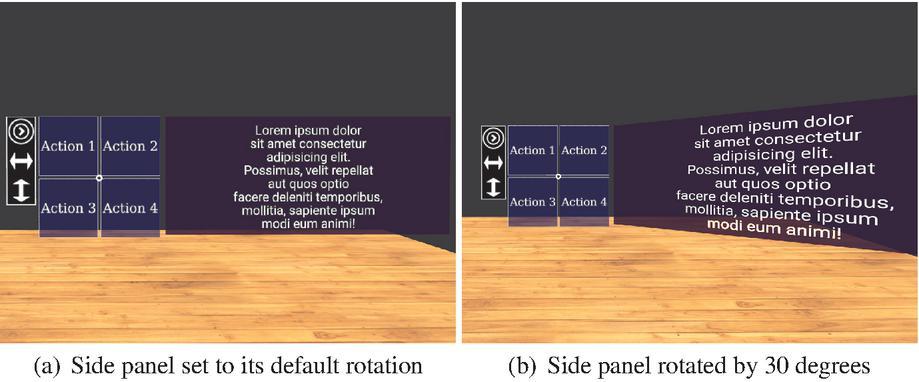
Figure 5 Side panel for text.
6 Experimental Results
OrBI was used to build the VR mode of some apps available in the VRTools platform [16]. These apps are discussed below.
6.1 Platonic Solids
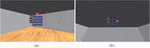
The Platonic Solids project was the first one to use OrBI. Users can visualize regular polyhedra (cube, dodecahedron, icosahedron, octahedron, and tetrahedron) one at a time using the Platonic Solids app. OrBI was used in this context to allow users to change the solid, adjust its size, toggle rotation, and view its wireframe version (Figure 6).
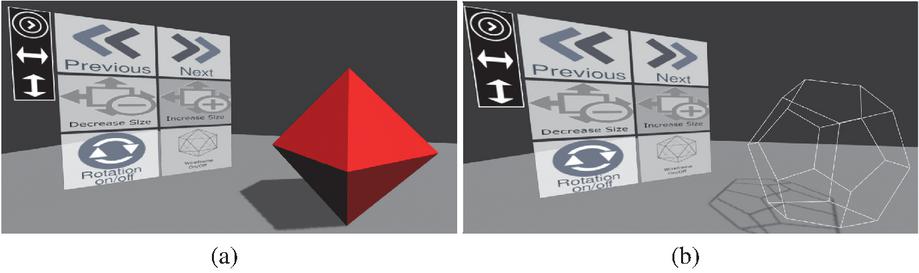
Figure 6 OrBI in Platonic Solids application showing an solid octahedron (a) and a wireframe dodecahedron (b).
6.2 Virtual Travel
The Virtual Travel project has a series of 360-degree photos of various locations around the world (Figure 7).
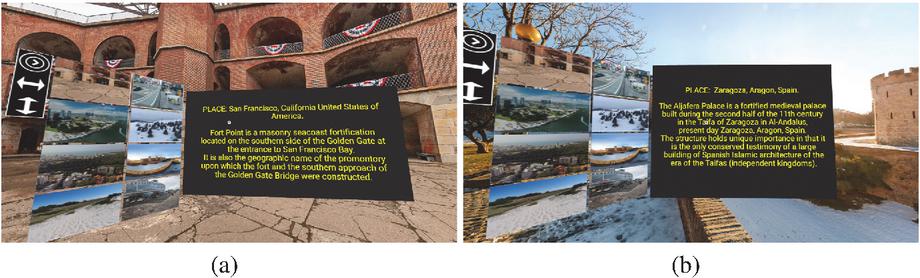
Figure 7 OrBI in Virtual Travel application showing two different locations.
As compared to other applications, Virtual Travel uses the OrBI in a slightly different way. Instead of using icons and texts for the buttons, it simply uses pictures of the locations. When the user clicks a button, he/she is transported to that location, and the right side panel displays information about the location.
6.3 Inclined Plane
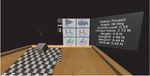
This application simulates a box sliding in an inclined plane. In this project, the functions of the OrBI were to start the simulation, adjust the location of the camera, increase or decrease friction, and increase or decrease the plane’s angle (Figure 8). The right side panel is also used by the app to show essential information.
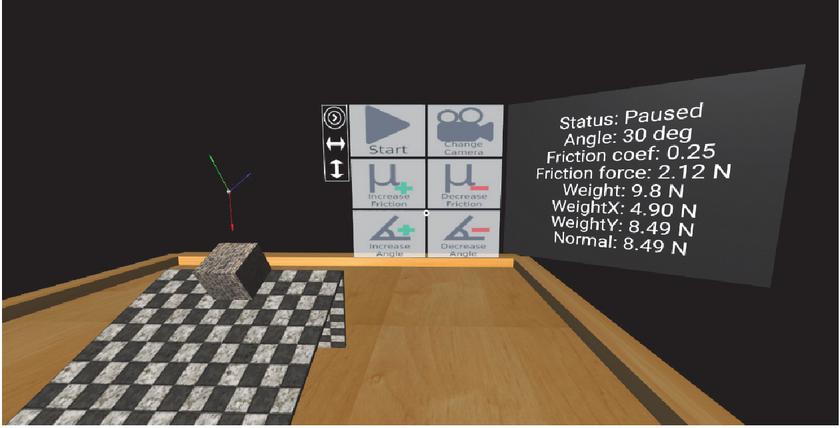
Figure 8 OrBI in Inclined Plane application.
6.4 Vascular Diseases
The Vascular Diseases app aims to raise awareness about a class of diseases that affects several people each year. The app depicts what could happen to someone’s organs if they have one of these health issues. The OrBI was used to switch between 3D models, zoom in and out, rotate the model, and toggle the highlight sphere, which shows where there are anomalies in the model (Figure 9).
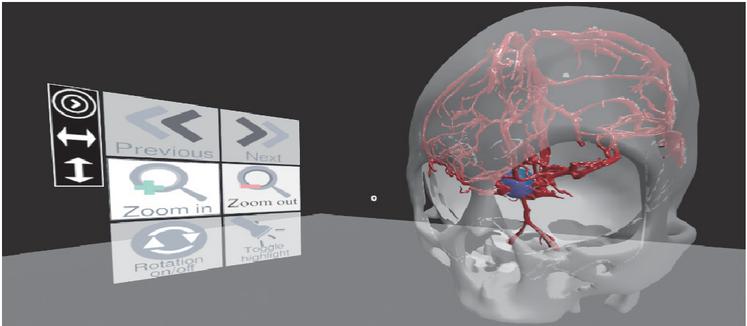
Figure 9 OrBI in Vascular Diseases application.
6.5 Electric Circuits
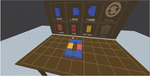
Electric Circuits’ aim is to provide a healthy environment for learning about electricity. Some colorful blocks represent real-world electric components and can be arranged to simulate real-world electric circuits (Figure 10). In the app, there are two instances of OrBI: the first is displayed vertically in front of a board from which the user can select blocks, and the second is displayed horizontally on a table on which the user can position the blocks and construct circuits.
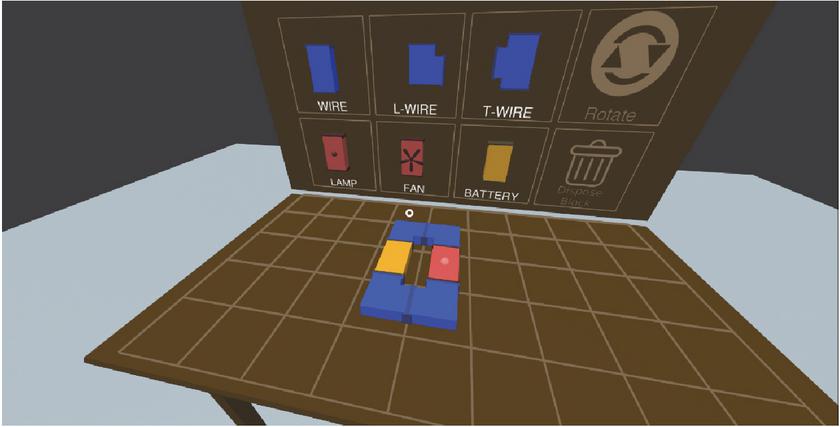
Figure 10 OrBI in Electric Circuits application.
7 Evaluation
To start our evaluation, volunteers were first introduced to Virtual Reality and the concepts of head tracking and dwell time for interaction before being introduced to OrBI and instructed to perform a small circuit in which they had to move and place the interface in 3 independent targets.
In the introduction to VR and to the other concepts, the participants used an application identical to the Virtual Travel mentioned in Section 6.2, except for the movement buttons and the side panel, which were hidden. The participants used the application for about a minute each, and they were instructed to gaze all around the virtual environment and use the interface to switch from one 360-degree image to another (Figure 11).

Figure 11 Virtual Travel app adapted for the evaluation intro.
Following the introduction to Virtual Reality, the participants watched a short video that introduced OrBI and explained the circuit they would do.
The evaluation circuit, the volunteers profile, and the quantitative and qualitative results are discussed below.
7.1 The Evaluation Circuit
The evaluation circuit app is a simple 3D room in which the OrBI is initially placed in front of the user. In this application, OrBI has four placeholder buttons in addition to the movement buttons.
A red square with the same size as the interface shows where the participant has to position the interface, and an outer square concentric to the first one indicates the allowable margin of error, changing to green when the interface was inside the allowed boundaries (Figure 12).
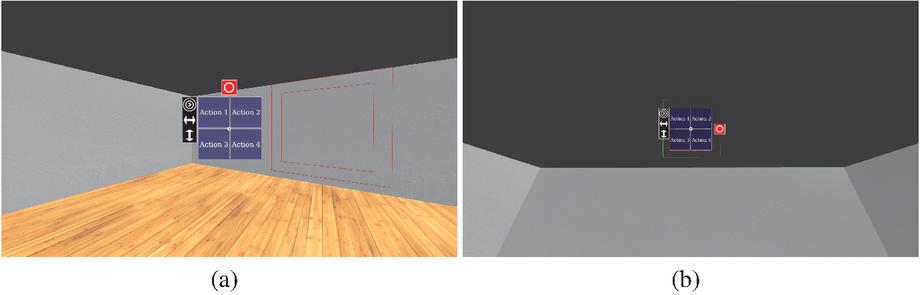
Figure 12 Images from the evaluation circuit showing the first 2 targets.
The first target is positioned to the user’s right and at the same height as the interface, so the user simply needs to slide OrBI horizontally to fit it in the first target. The second target differs from the first just in height and in distance, thus the user must increase the orbit radius and shift the interface upwards. The final target is positioned at the same coordinates as OrBI at the start, but at a greater distance, so the user needs to move the interface horizontally and vertically to fit it in.
7.2 The Volunteers
In total, 20 volunteers participated in this study, with 80% male and 20% female. The age range of the volunteers is from 17 to 63 years old, with the majority of them being young (50% aged from 17 to 20 years old). In terms of education level, 10% have a complete or incomplete middle school education, 40% have a complete or incomplete high school education, 25% have an incomplete higher education, and 25% have a complete higher education.
8 Analyses and Discussion
In this section we will present the qualitative and quantitative analysis of our work including the discussion of the results.
8.1 Quantitative Analysis
To perform our quantitative analysis we developed a protocol in which we evaluate the time a volunteer took to complete the circuit and the distance to the center of each target. The time unit is seconds, and the distance unit is virtual world unit, but the application was built so that one virtual world unit represents one meter. The measured time and the average between the three distances corresponding to the three targets used in the analysis.
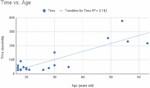
The average execution time was approximately 94.29s, but the standard deviation was s. An explanation for such high deviation may lie in the difference of the ages groups. Despite not being a strongly linear relationship, a high level of correlation () between age and time performance can be seen in Figure 13.
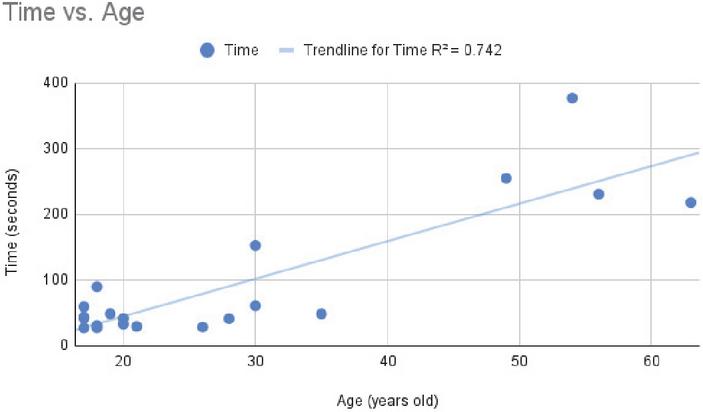
Figure 13 Time to complete the circuit vs. age.
Furthermore, if we split our data in groups by age (as in shown Table 1) we get lower means and standard deviations for the younger groups and higher means and standard deviation for the older groups.
Table 1 Mean time and standard deviation by age group
| Age Group | Mean Time(seconds) | Standard Deviation(seconds) |
| 41.80 | ||
| 75.89 | ||
| 270.17 |
It may be a plausible hypothesis that older people struggle more with OrBI because they are less experienced with technology in general, but this conclusion requires comparative data across different technologies to be more assertive. So far, we can only assume that it is harder for elderly people to use OrBI, but we lack the evidence to explain why.
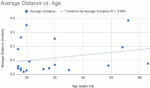
The average distance from the center of the target was 0.12 m and the standard deviation was 0.1 m. It is important mentioning that the final position of the interface has to be less than 0.4 m to the target to be accepted and the users had only one try for each target (the first valid position where OrBI was stopped was counted and the target was removed). This time there is no correlation between age and measurements (). Figure 14 shows the dispersion graphic of the result.
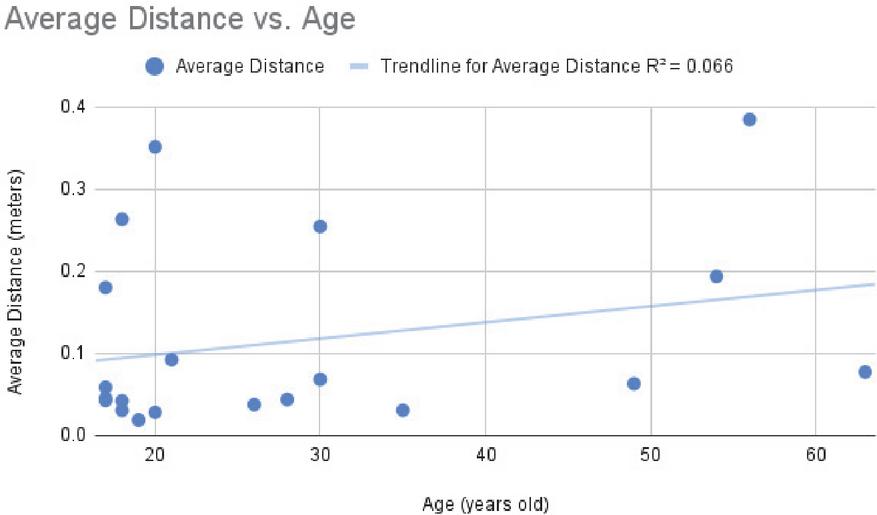
Figure 14 Mean distance from the target vs. age.
8.2 Qualitative Analysis
Following the completion of the evaluation circuit, the participants were requested to answer a survey with five questions about their perceptions of OrBI, with each question having five options: fully agree, agree, neutral, disagree, or totally disagree.
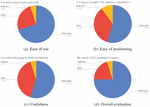
The findings were generally positive: 95% of the collaborators agree or totally agree that it is easy to learn how to use OrBI, 90% agree or totally agree that it is easy to position OrBI wherever they want, 95% agree or totally agree in the utility of moving interfaces, and 95% agree or totally agree that they had a overall good impression of OrBI. Those results are summarized in Figure 15.
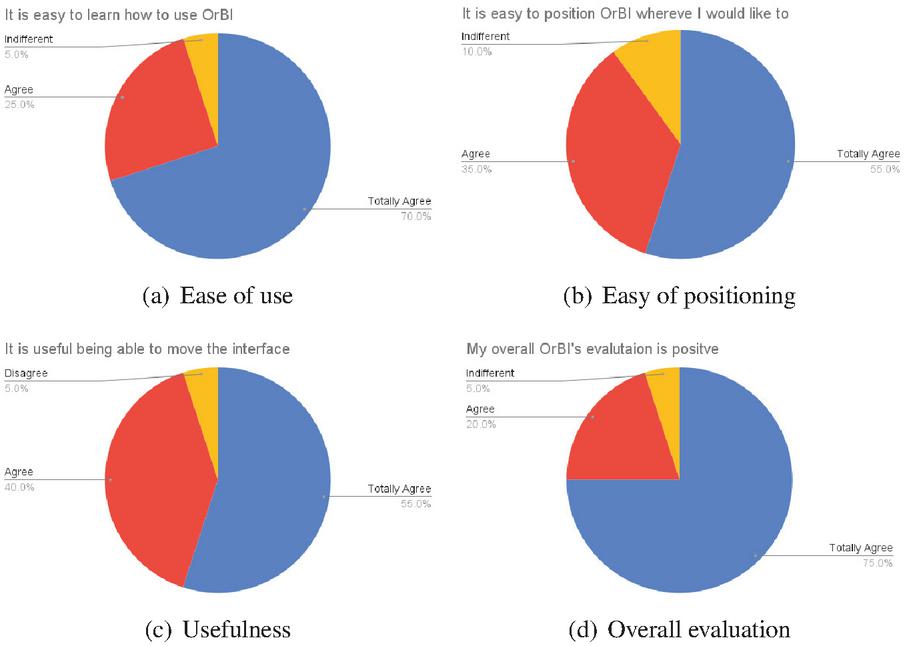
Figure 15 Results of the qualitative evaluation.
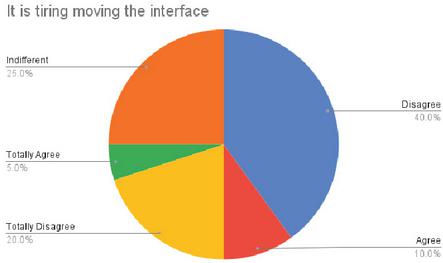
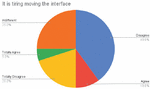
Figure 16 Tiredness assessment of using OrBI.
However, the results regarding how tiring it is to move the interface are not as largely positive as the others. Despite the fact that 60% of participants disagreed or fully disagreed that moving OrBI is taxing, the fact that 25% were indifferent and 15% agreed or totally agreed may cause concerns (Figure 16). Those statistics appear to support the assertions in the related work that the Dwelling technique may be exhausting to the user in some instances, and they raise the possibility that OrBI’s evaluation could produce a better result if our implementation did not rely on Dwelling.
9 Conclusion and Future Works
The goal of this paper was to present a framework for creating mobile-based user interfaces for low-cost Virtual Reality that do not require physical controllers to interact with a virtual world. Several VR apps for the Web were created using an OrBI framework implementation that employs the Dwelling approach for triggering interactions. Then, two specific apps were created to evaluate the ease of use and precision of OrBI.
The overall evaluation was positive, with 95% of participants finding it easy to learn how to use OrBI and 90% finding it simple to position the UI anywhere they wanted. However, quantitative statistics reveal that older people have a more difficult time utilizing OrBI, although age has no effect on precision. Furthermore, only 60% of participants believe that using the interface is not tiring, while 25% are indifferent and 15% agree that it is exhausting someway. Due to the existence of some related works claiming that Dwelling is exhausting for the user, the Dwelling approach was speculated to be the reason of the tiring issue.
In the future, it is planned to investigate alternatives to the Dwelling technique, primarily by employing light-weight approaches for hand-tracking and gesture detection using mobile devices’ cameras.
References
[1] Sampath Shanmugam, Vaishak R Vellore, and V Sarasvathi. Vrnav: A framework for navigation and object interaction in virtual reality. In 2017 2nd International Conference on Computational Systems and Information Technology for Sustainable Solution (CSITSS), pages 1–5. IEEE, 2017.
[2] Taizhou Chen, Lantian Xu, Xianshan Xu, and Kening Zhu. Gestonhmd: Enabling gesture-based interaction on low-cost vr head-mounted display. IEEE Transactions on Visualization and Computer Graphics, 27(5):2597–2607, 2021.
[3] Siqi Luo and Robert J Teather. Camera-based selection with cardboard hmds. In 2019 IEEE Conference on Virtual Reality and 3D User Interfaces (VR), pages 1066–1067. IEEE, 2019.
[4] Meghal Dani, Gaurav Garg, Ramakrishna Perla, and Ramya Hebbalaguppe. Mid-air fingertip-based user interaction in mixed reality. In 2018 IEEE International Symposium on Mixed and Augmented Reality Adjunct (ISMAR-Adjunct), pages 174–178. IEEE, 2018.
[5] Alon Grinshpoon, Shirin Sadri, Gabrielle J Loeb, Carmine Elvezio, and Steven K Feiner. Hands-free interaction for augmented reality in vascular interventions. In 2018 IEEE Conference on Virtual Reality and 3D User Interfaces (VR), pages 751–752. IEEE, 2018.
[6] Abraham Hashemian, Matin Lotfaliei, Ashu Adhikari, Ernst Kruijff, and Bernhard Riecke. Headjoystick: Improving flying in vr using a novel leaning-based interface. IEEE Transactions on Visualization and Computer Graphics, 2020.
[7] Xueshi Lu, Difeng Yu, Hai-Ning Liang, Wenge Xu, Yuzheng Chen, Xiang Li, and Khalad Hasan. Exploration of hands-free text entry techniques for virtual reality. In 2020 IEEE International Symposium on Mixed and Augmented Reality (ISMAR), pages 344–349. IEEE, 2020.
[8] Wenge Xu, Hai-Ning Liang, Yuxuan Zhao, Tianyu Zhang, Difeng Yu, and Diego Monteiro. Ringtext: Dwell-free and hands-free text entry for mobile head-mounted displays using head motions. IEEE transactions on visualization and computer graphics, 25(5):1991–2001, 2019.
[9] Arindam Dey, Amit Barde, Bowen Yuan, Ekansh Sareen, Chelsea Dobbins, Aaron Goh, Gaurav Gupta, Anubha Gupta, and Mark Billinghurst. Effects of interacting with facial expressions and controllers in different virtual environments on presence, usability, affect, and neurophysiological signals. International Journal of Human-Computer Studies, 160:102762, 2022.
[10] Lihang Wen, Jianlong Zhou, Weidong Huang, and Fang Chen. A survey of facial capture for virtual reality. IEEE Access, 10:6042–6052, 2022.
[11] Nazmi Sofian Suhaimi, James Mountstephens, and Jason Teo. A dataset for emotion recognition using virtual reality and eeg (der-vreeg): Emotional state classification using low-cost wearable vr-eeg headsets. Big Data and Cognitive Computing, 6(1), 2022.
[12] José Rouillard, Hakim Si-Mohammed, and François Cabestaing. A pilot study for a more Immersive Virtual Reality Brain-Computer Interface. In International Conference on Applied Human Factors and Ergonomics (AHFE), New-York, United States, July 2022.
[13] Erdhi Widyarto Nugroho and Bernardinus Harnadi. The method of integrating virtual reality with brainwave sensor for an interactive math’s game. In 2019 16th International Joint Conference on Computer Science and Software Engineering (JCSSE), pages 359–363, 2019.
[14] Pedro Monteiro, Guilherme Goncalves, Hugo Coelho, Miguel Melo, and Maximino Bessa. Hands-free interaction in immersive virtual reality: A systematic review. IEEE Trans. Vis. Comput. Graph., 27(5):2702–2713, 2021.
[15] Yannick Weiß, Daniel Hepperle, Andreas Sieß, and Matthias Wölfel. What user interface to use for virtual reality? 2d, 3d or speech–a user study. In 2018 International Conference on Cyberworlds (CW), pages 50–57. IEEE, 2018.
[16] Lucas Diniz da Costa, Paulo Victor de Magalhães Rozatto, André Luiz Cunha de Oliveira, and Rodrigo Luis de Souza da Silva. VR Tools – A free open-source platform for virtual and augmented reality applications on the web. Journal of Mobile Multimedia, pages 27–42, 2022.
Biographies

Paulo Victor de Magalhães Rozatto is an undergraduate student in Computer Science at the Federal University of Juiz de Fora. He has a IT Technician certificate from the Federal Institute of Rio de Janeiro (2018). His research interests are Computer Graphics, Augmented Reality, and Virtual Reality.

André Luiz Cunha de Oliveira is an undergraduate student in Computer Science at the Federal University of Juiz de Fora. His research interests are Computer Graphics, Augment Reality and Virtual Reality.

Rodrigo Luis de Souza da Silva is an Associate Professor in the Department of Computer Science at Federal University of Juiz de Fora. He has a B.S. in Computer Science from the Catholic University of Petropolis (1999), M.S. in Computer Science from Federal University of Rio de Janeiro (2002), Ph.D. in Civil Engineering from Federal University of Rio de Janeiro (2006) and a postdoc in Computer Science from the National Laboratory for Scientific Computing (2008). His main research interests are Augmented Reality, Virtual Reality, Scientific Visualization and Computer Graphics.
Journal of Mobile Multimedia, Vol. 18_6, 1599–1616.
doi: 10.13052/jmm1550-4646.1866
© 2022 River Publishers