Enhancing Gesture-Controlled Virtual Mouse and Virtual Keyboard Using AI Techniques
Jayasri Kotti1,*, B. Padmaja1 and D. Deepa2
1Department of Information Technology, GMR Institute of Technology, Rajam, Andhra Pradesh, India
2School of Computer Science and Engineering, Vellore Institute of Technology, Vellore, Tamilnadu, India
E-mail: jayasrikotti@gmail.com; padmaja0509@gmail.com; deepadresearch@gmail.com
*Corresponding Author
Received 20 August 2023; Accepted 18 February 2024; Publication 29 March 2024
Abstract
Artificial Intelligence has become an essential part of modern technology. Although computer technology is advanced, it can still be improved to make it more user-friendly. One way to do this is to replace touchscreen desktops with a virtual mouse and keyboard. This can reduce the need for gadgets and enhance human-computer interaction. During the COVID-19 pandemic, reducing human intervention and dependency on devices has been critical in controlling the spread of the virus. This is where a battery-powered or Bluetooth mouse, powered by virtual reality technology, can be helpful. The virtual mouse is created using OpenCV and virtual reality technology, with the proposed system utilizing advanced tools such as MediaPipe and Python. The MediaPipe library is particularly useful in artificial intelligence projects, as it enhances the efficiency of the model. The system is an AI-based mouse and keyboard that can be controlled using hand gestures. The user interacts with the system through the camera output displayed on the screen, while the webcam serves as an input device. Python and OpenCV tools are used for implementation, making it applicable in pandemic situations and smart teaching systems. The proposed system works on Enhancing gesture Controlled Virtual Mouse and Virtual Keyboard through Virtual Assistant using AI Techniques.
Keywords: Hand gestures, OpenCV, media pipe, virtual mouse, virtual keyboard, virtual assistant.
1 Introduction
Computers have become an integral part of our lives, but the ways we interact with them are outdated and have limitations. Traditional pointing devices like mice and touchpads can be cumbersome and limiting. To address these issues, a new field called Human-Computer Interaction (HCI) is emerging. One way to improve the way we interact with computers is to use hand movements. A hand movement recognition system replaces traditional pointing devices with hand movements, and a gesture-based AI virtual mouse system can be utilized in situations where we are unable to use a physical mouse, minimizing the space required for its use. This technology improves human-computer interaction and reduces the need for gadgets. Many models develop modules like a virtual mouse, virtual keyboard, etc. The Virtual Mouse and Virtual Keyboard are implemented using Open CV and Media Pipe. The virtual assistant is used for integrating the Virtual Mouse and Virtual Keyboard. Unlike previous approaches that required expensive data gloves, some systems do not rely on such specialized sensors, making them more accessible and applicable. They serve various purposes, such as enabling remote control of computers, facilitating touch-screen interactions, aiding individuals with physical disabilities, and assisting users when interacting with virtual machines. These applications provide alternative input methods, enhancing accessibility and usability across diverse computing environments.
In the rapidly evolving landscape of modern technology, the virtual keyboard has emerged as a pivotal innovation that has transformed the way we interact with digital devices. Physical keyboards were the only means of input for computers, smartphones, and tablets, but the virtual keyboard, a software-based interface, has revolutionized the way we input text and commands into these devices. It has not only made our interactions more versatile and adaptable but has also played a significant role in enabling the rise of touchscreens and portable, compact computing. In this exploration of the virtual keyboard, we will delve into its origins, functionalities, applications, and the profound impact it has had on modern computing and communication. Virtual assistants have emerged as indispensable tools that are transforming the way we interact with technology and manage our daily lives. These intelligent digital entities, powered by advanced artificial intelligence (AI) and natural language processing (NLP) technologies, are designed to perform a wide array of tasks and provide valuable assistance across various domains. Virtual assistants have their origins in the quest to create more seamless and human-like interactions with computers and devices. The advent of voice-activated virtual assistants like Siri, Google Assistant, Alexa, and Cortana marked a significant milestone in human-computer communication. These virtual entities are not only responsive to voice commands but also possess the ability to understand context, learn from user interactions, and adapt to individual preferences over time.
One of the primary functions of virtual assistants is information retrieval and dissemination. Users can ask questions, seek recommendations, or request information on a wide range of topics, from weather updates and news headlines to trivia and historical facts. This capability has made virtual assistants invaluable sources of real-time information and knowledge. Virtual assistants also excel at task management and productivity enhancement. They can set reminders, schedule appointments, send text messages, and even control smart home devices, streamlining daily routines and freeing up valuable time for users. In the workplace, virtual assistants are increasingly used for scheduling meetings, conducting research, and managing emails. Furthermore, virtual assistants have expanded their reach into the realm of entertainment and media consumption. They can play music, provide movie recommendations, and engage users in interactive storytelling experiences.
Virtual assistants have become multifaceted in their functionality, serving as personal entertainers and enriching leisure time. The integration of virtual assistants with smart home devices has brought about the era of home automation, allowing users to control lighting, thermostats, security systems, and more with voice commands, thereby enhancing convenience and energy efficiency. The convergence of virtual assistants and IoT technology is shaping the future of smart living. In fields such as healthcare, virtual assistants are being used to provide medical information, track medication schedules, and offer emotional support through conversation. In education, they are serving as virtual tutors and educational aids, helping students with research and homework. As virtual assistants continue to evolve, they are becoming increasingly personalized and context-aware, recognizing individual voices, adapting to accents, and remembering user preferences, creating a tailored user experience. With advancements in emotional AI, virtual assistants are also becoming more empathetic, and capable of understanding and responding to users’ emotional states.
2 Literature Survey
The implementation of a visual AI system for virtual control, using a hand-tracking system, eliminates the need for external devices. It tracks finger and hand movements through a webcam or built-in camera. The system has various applications, including reducing the transmission of COVID-19, controlling robots, and playing virtual reality games. The gesture recognition process is based on computer vision, where touch perception is the common diagnostic method. The text also explains the steps involved in touch detection, touch analysis, and touch recognition using machine learning methods and sensory networks. However, the system’s performance may be limited in different scenarios, lighting conditions, or with different individuals [1].
An amazing invention in computer technology is the virtual mouse. But it has a limited number of gestures for the cursor movements. The limitations of the Gesture Recognition-based AI Virtual Mouse paper include insufficient evaluation and scalability analysis, potential hardware constraints, and inadequate consideration of ethical and user adaptability aspects [2]. An AI virtual cursor system that uses computer vision to detect hand tips and capture hand motions using a webcam or built-in camera. Deep learning is the basis of the algorithm used to find the hands. The hand-tracking methods used are Media Pipe and OpenCV. The suggested AI virtual mouse has quite a few limitations, including some difficulty in dragging and clicking on the chosen text and a minor decline in precision in the right-click mouse function [3]. By using AI and ML techniques to control a virtual mouse through hand gestures, users can interact with a PC using hand movements captured by a webcam [4].
A virtual mouse that is controlled by hand gestures powered by AI can significantly increase user productivity and accessibility. This AI-powered virtual mouse system employs the MediaPipe framework for hand and finger tracking and the OpenCV library for image processing. However, the suggested model has a few limitations, such as the inability to select text by clicking and dragging it, and a slight loss of accuracy when using the right-click mouse function [5]. In response to these limitations, the author of the article, Kavitha R, proposed a dynamic hand gesture system for a virtual mouse. This system captures images of the user’s hand with a camera and employs an AI algorithm to detect the corresponding hand motions. The model was developed using CNN and the media pipe structure, and the author trained the algorithm using a set of data on hand movements. Moreover, the virtual mouse system has a voice assistant integrated into it, which allows users to manage the gadget using voice commands to perform a wide range of actions [6].
Instead of using a physical mouse, hand gestures can be used to control the mouse pointer. A webcam or built-in camera is used to detect hand movements, allowing the mouse functions to be performed. This system performs better than previous versions and has greater accuracy, thanks to the use of OpenCV and MediaPipe. However, it has some minor drawbacks, such as a slight loss of precision when right-clicking and difficulty selecting text while clicking and dragging. The AI virtual mouse, which utilizes computer vision techniques, involves four steps: Hand Tracking, Finger Counting, Gesture Volume Control, and AI Virtual Mouse. The process employs OpenCV, MediaPipe, and Python methods to detect the hand in the input, and it can work for any skin tone and under any lighting condition [8].
Deep learning and machine learning methods such as MediaPipe and OpenCV are widely used to distinguish user hand motions. However, there are still various drawbacks to these methods, such as difficulty moving the cursor to select multiple items and considerably fewer precise right-click features [9]. The vision-based control utilizing hand motion involves four steps: Hand region Extraction, Background Subtraction, Finger Segmentation, and Motion Recognition. It has limited applications and can only be used with a few hand gestures, such as those in the VLC Video player [10]. In a non-touch character writing system based on hand gestures, there are three steps: A hand recognition system, a virtual keyboard, and movement-flick input. The hand Gesture Recognition System can only recognize a few motions, including “newline,” “space,” “delete,” “backspace,” “open,” “close,” and “select language” [11].
Voice control is a major growing feature that changes the way people can live. A voice assistant using artificial Intelligence includes converting audio to text and then sending it to GTTS (Google text to speech). The approach was Automatic Speech Recognition which includes Acoustic Analysis. It is Limited to some operations like Google search and play a video/song on YouTube [12]. AI-enabled voice assistants, like Alexa and Siri, are progressively supplanting search engines as users actively utilize them to perform a multitude of their everyday activities. He analyzed the Users based on their Age group. The research has some limitations including sample bias, self-reporting bias, and the potential lack of long-term analysis, impacting the generalizability and depth of understanding regarding motivations for AI-enabled voice assistant usage [13].
Imagine a communication and visual assistant that uses voice and vision input instead of a keyboard. Its main goal is to make difficult tasks easier without ever having to use a keyboard or mouse. For instance, you can play music with voice commands, change the volume with computer vision, and search for specific content on Wikipedia. This system can be operated with a mouse or computer vision. It also includes applications like a virtual painter and a multi-dynamic search engine. However, the main issue is that it is not capable of acquiring awareness in the same way that humans do, which involves detecting and engaging with data from the environment. A voice assistant based on Python with the help of virtual assistants can make people’s lives easier. It works by taking voice commands from the user and carrying out everyday tasks as an application. The system can only use data from clients, and the author refers to artificial intelligence methods for this system. In a Python-programmed personal assistant with Static Voice support, input is captured as speech patterns through a microphone, audio data is identified, transformed into text, compared to established directions, and the desired output is given. The PyCharm community-supported project is created using open-source software parts.
Computer vision has advanced to the point where it is now able to identify an owner using a straightforward image processing program. Using convex hull detection, convex defect, and defect count in the convex hull, the author generated optical mice and keyboards. The implementation has a number of disadvantages. The Convex Hull algorithm could fail if another external noise or flaw is found in the webcam’s operating range. There are not many user controls on the keyboard. The click capabilities might have been emphasized more [17].
In gesture-controlled virtual mouse and keyboard systems hand gestures are recognized using a webcam and the coding is done in Python using Anaconda platform. The author implemented the system using a Haar Cascade Algorithm. The system is processed through Resizing, Binary conversion, Gray-scaling, and Segmentation [18].
In AI virtual mouse and keyboard using computer vision techniques involves three steps: Hand Tracking, Finger Counter, and Gesture Control Volume. OpenCV, Media-Pipe, and Python technologies are used to detect hand in the input. It has some system requirements like a bright room and hand as well as an HD webcam for better results [19]. A voice command system and a gesture-controlled virtual mouse efficiently and correctly identify hand movements and vocal instructions. The system uses a combination of Machine Learning and Computer Vision methods, such as CNN used by Media Pipe operating on top of PyBind11. Two modules have a role in this, one for direct hand detection and the other for categorizing gloves of any uniform color. These kinds of programs are employed in sectors such as gaming and healthcare [20]. The AI virtual mouse system uses an internal camera to capture hand motions, recognize hand tip detection, and a voice assistant to improve the system’s precision. The author implements the system using Palm Detection Mode, and Hand Landmark Model (Mediapipe) and for voice assistance, the author uses the Sapi 5 engine, which executes tasks using python modules [21]. Python 3.7 (64-bit) and OpenCV modules are used to detect hand in the input. The system has one limitation that is right-click accuracy is poor because it is the most challenging gesture for the computer to comprehend [23].
During COVID-19, Ing. Milan Trbo examined the teaching methods used in elementary and secondary Slovak schools. Focusing on its integration in online learning systems, intelligent tutoring systems, assessment, and input mechanisms, and increasing student engagement, AI in smart teaching during the COVID-19 epidemic While addressing difficulties and moral issues for responsible implementation, it emphasizes how AI has the ability to customize learning, improve assessments, and promote effective remote teaching [23]. The researchers explored the use of hand gestures as a means of controlling the cursor on a computer screen. The Authors have involved in designing and implementing a system that tracks and interprets hand gestures to control the cursor’s movement on the screen using Leap Motion Device. The Leap Motion device involves computer vision techniques, feature extraction, and classification algorithms to track hand movements and recognize gestures. It has limitation that it was not more efficient than physical mouse [24]. Jozsef Katona talks about the way virtual reality (VR) and Human-Computer Interaction (HCI)-based technologies are being used in a variety of industries, like robotics, education, and medical signal detection. It highlights the potential for improving human-computer interactions and improving the quality of life for people with disabilities via the use of brain-computer interfaces (BCIs), gesture control, and eye/gaze tracking. It also stresses the use of augmented and virtual reality settings for training, education, and simulation, and it foresees a transition towards immersive 3D VR experiences that may enhance learning, creativity, and innovation. The downside is that users frequently adapt to innovation significantly more slowly, and the creation, maintenance, and operation of advanced technologies will bring novel obstacles [25].
3 Proposed Methodology
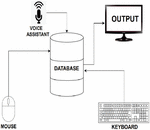
The proposed model is a multifaceted system designed to enhance the user experience by seamlessly integrating three key modules: a virtual mouse, a virtual keyboard, and a virtual assistant, as illustrated in Figure 1. This comprehensive integration transforms the way users interact with their devices, offering a more intuitive and efficient means of controlling their computers, inputting text and commands, and seeking assistance. The first module, the virtual mouse, addresses the need for a more natural and hands-free method of cursor control. By leveraging advanced image processing and gesture recognition techniques, users can manipulate cursor movement with hand gestures alone, eliminating the need for physical mouse peripherals. This innovation not only reduces clutter in the workspace but also opens up new possibilities for gesture-based interactions in various applications, such as gaming, design, and virtual environments.
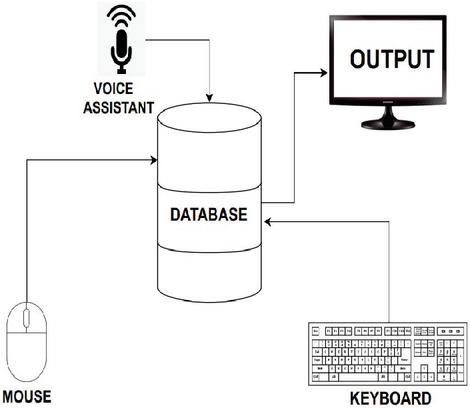
Figure 1 Proposed method.
The second module, the virtual keyboard, empowers users to input text and commands using finger movements and gestures. This module’s capability to recognize and interpret gestures provides users with a virtual typing interface, making text entry more dynamic and responsive. Users can type, swipe, and gesture their way through tasks, enhancing both convenience and adaptability, particularly in scenarios where traditional physical keyboards may not be readily available or practical. The third module, the virtual assistant, leverages voice recognition techniques to understand user queries and provide intelligent responses and assistance.
This module enhances user productivity and convenience by enabling natural language interactions. Users can issue voice commands, ask questions, and request information, and the virtual assistant responds with relevant actions or information. It can assist with tasks ranging from scheduling appointments and setting reminders to providing answers to general inquiries. The seamless integration of these three modules creates a powerful synergy, offering users a holistic and cohesive interaction experience with their devices. Users can smoothly transition from manipulating the cursor to typing text and then to seeking assistance, all within the same interface. This integration streamlines workflows, reduces the cognitive load on users, and fasters a more efficient and enjoyable computing experience.
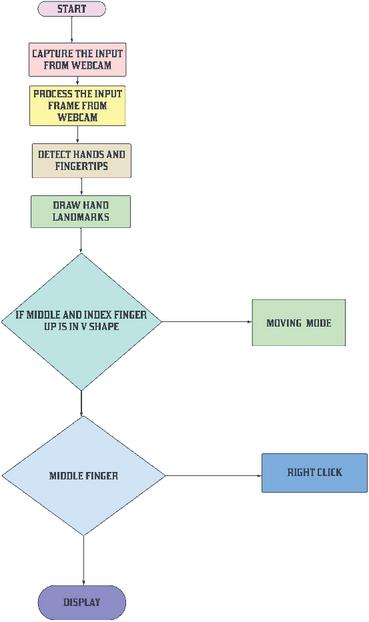
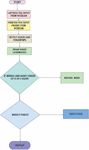
Figure 2 Flowchart of virtual mouse.
Figure 2 showcases the virtual mouse and keyboard system created by utilizing Media Pipe and OpenCV. Media Pipe’s hand tracking module enables precise real-time detection of hand movements, which is used to develop a virtual mouse that allows users to control the cursor on a screen using their hand. Additionally, OpenCV recognizes hand gestures like pinch or swipe, and translates them into mouse actions such as clicking or dragging items across various environments and user interfaces.
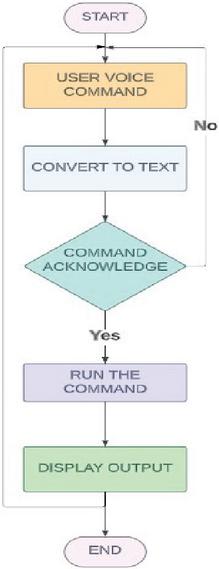
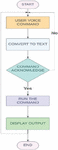
Figure 3 Flowchart of virtual assistant.
Figure 3 shows A virtual assistant using speech recognition is an advanced AI system that comprehends and responds to user commands and queries spoken in natural language. By utilizing automatic speech recognition (ASR) to transform spoken commands into text and harnessing natural language processing (NLP) to comprehend user intention, the virtual assistant can interactively provide information, execute tasks, and control connected devices (Virtual Mouse and Virtual Keyboard). This integrated approach not only offers an innovative and accessible human-computer interaction experience but also extends the convenience and usability of the system in various environments and user interfaces. The virtual mouse and keyboard system is built by leveraging the capabilities of both Media Pipe and OpenCV. With Media Pipe’s hand tracking module, real-time hand movements are accurately detected, enabling the creation of a virtual mouse where the user’s hand controls the cursor on the screen. Additionally, OpenCV comes into play for recognizing hand gestures, such as pinch or swipe, and translating them into mouse actions like clicking or dragging items applications across various environments and user interfaces. The operations of Virtual Mouse are shown in Figure 2. The Virtual Assistant Commands are shown in below Table 1.
Table 1 Virtual assistant commands
| S. No | Commands | Output |
| 1 | Launch Gesture Recognition | Activates the webcam to recognize hand gestures. |
| 2 | Stop Gesture Recognition | Disables the webcam and halts gesture recognition. |
| 3 | search (text_you_want_to_search) | If Chrome Browser is running, it will open a new tab; otherwise, it will open a new window. It then proceeds to search the provided text on Google. |
| 4 | STEP-1: Find a Location STEP-2: (Location_you_wish_to_find) | The user will be prompted to provide the location to search for. The required location will be located on Google Maps within a new tab in Chrome. |
| 5 | what is today’s date/ date | Display the current date |
| 6 | what is the time / time | Provides the present time. |
| 7 | Copy Paste | Duplicates the chosen text into the clipboard. Inserts the duplicated text. |
| 8 | Bye Wake up | Suspends the execution of voice commands until the assistant is awakened. Resumes voice command execution. |
| 9 | Exit | Terminates the voice assistant. |
4 Results
The testing results have demonstrated that the virtual keyboard, mouse, and helper have all been effectively implemented. OpenCV and media pipelines are used for a variety of actions on the virtual mouse. Right, left, double, drag-and-drop, and volume control are some of its features. Characters on the virtual keyboard can be used for searching and typing. User requests such as Display date, Display time, open Google, Search location, and start Virtual Mouse will all be carried out by the virtual assistant. Figure 4 shows the hand recognition using OpenCV and media pipe, where media pipe is used for hand tracking and Figure 5 shows the middle finger downwards to operate the right-click function.
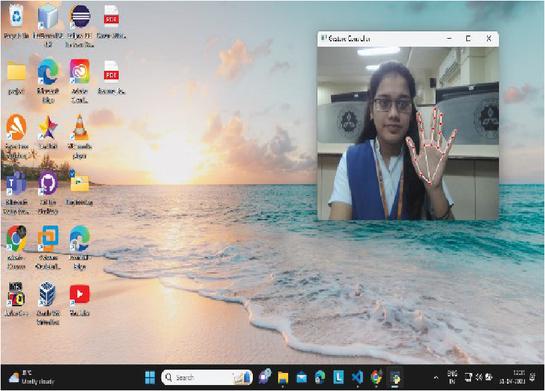
Figure 4 Recognizing hand.
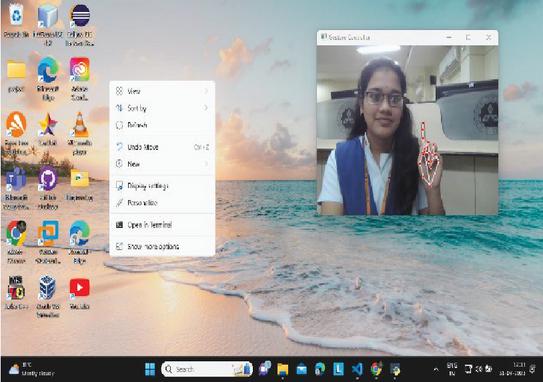
Figure 5 Right click.
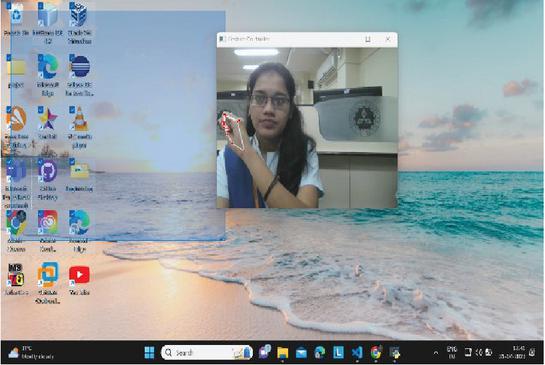
Figure 6 Drag.
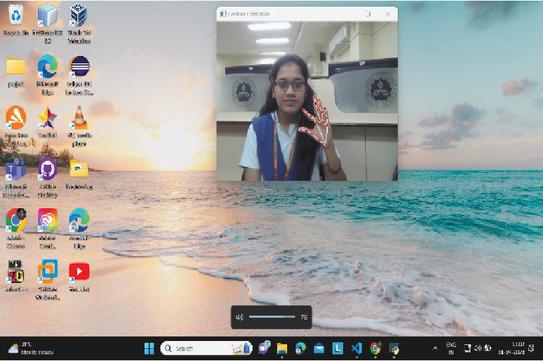
Figure 7 Volume control.
Figure 6 shows the drag operation using hand gestures with the wrist, and Figures 7 and 8 display the volume control using the thumb and index finger. Figure 9 shows a virtual keyboard with characters for typing, and the typed characters are shown in Notepad.
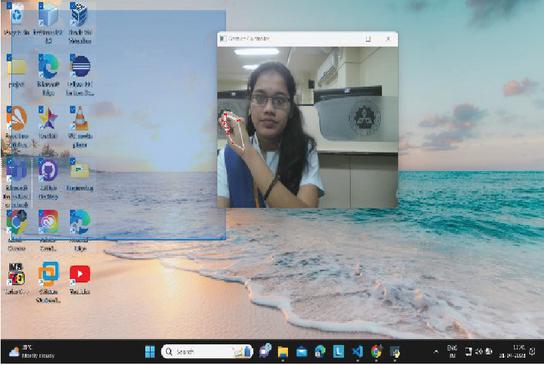
Figure 8 Volume decrease.
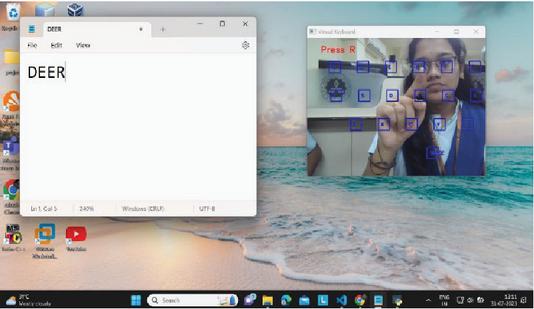
Figure 9 Virtual keyboard.

Figure 10 Virtual assistant.
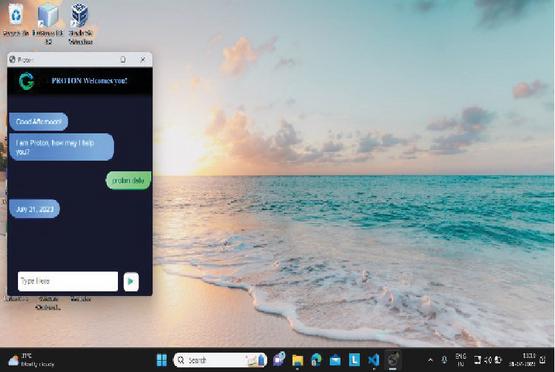
Figure 11 Display date.
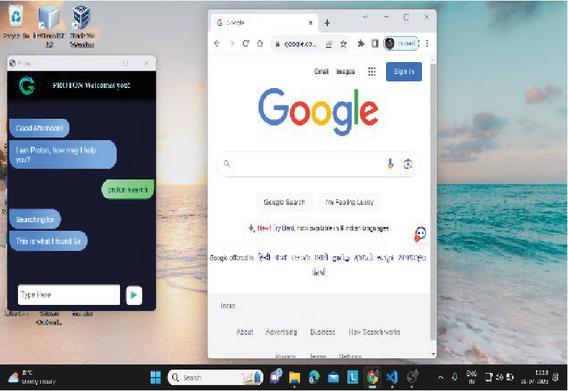
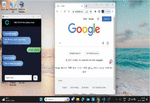
Figure 12 Open Google.
A virtual assistant that will respond to voice instructions from the user is shown in Figures 10 and 11. Both of these virtual assistants will respond to voice commands to deliver results.

Figure 13 Display time.
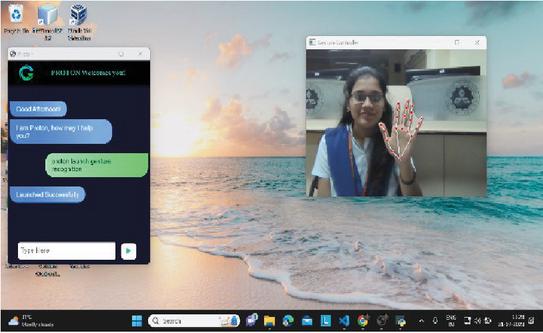
Figure 14 Launched gesture recognition.
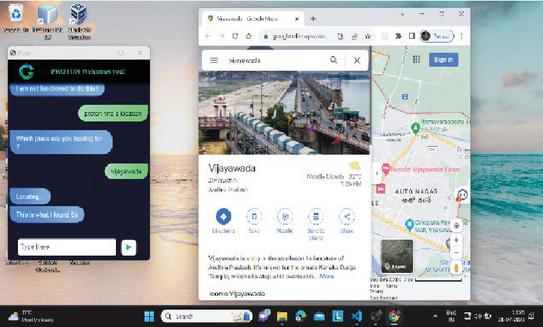
Figure 15 Find location.
Figure 12 is showing open google command and Figure 13 is displaying the time and the launch gesture detection, which looks like a virtual mouse, is shown in Figure 14, and the user-provided position is shown in Figure 15.
5 Conclusion
This innovative system leverages cutting-edge AI techniques, including OpenCV, Media Pipe, and Python, to revolutionize human-computer interaction. Media Pipe’s hand tracking module plays a pivotal role by enabling real-time and precise detection of hand movements. This capability allows users to seamlessly control a virtual mouse with their hand movements, eliminating the need for physical mouse devices. OpenCV’s gesture recognition functionalities are seamlessly integrated, allowing users to perform mouse actions like clicking and dragging through specific hand gestures, such as pinching or swiping. This not only enhances precision but also provides an intuitive and natural way to interact with the computer. In addition to the gesture-controlled mouse, the system includes a virtual keyboard. This virtual keyboard, powered by both Media Pipe’s hand tracking and OpenCV’s gesture recognition, allows users to input characters by gesturing over virtual keys. Users can type and input text without the need for a physical keyboard, which enhances portability and simplifies the user interface. This feature caters to diverse user needs, making it particularly useful for scenarios where traditional input devices may be impractical.
The system’s added feature of a virtual assistant using speech recognition technology takes user interaction to the next level. Users can control both the virtual mouse and keyboard through voice commands. This feature greatly enhances accessibility and productivity. It’s especially beneficial for individuals with physical disabilities who may struggle with traditional input methods. Users can execute a wide range of tasks, from launching applications to composing emails, all through natural language voice commands. The system’s AI-driven speech recognition capabilities ensure accurate understanding and execution of user requests. The integration of virtual keyboards and mice, combined with enhanced accessibility features like voice commands and gesture recognition, positions this system as a game-changer in human-computer interaction. This system’s versatility has the potential to revolutionize computing experiences across various domains and environments, making it a powerful tool for enhancing accessibility, productivity, and user satisfaction.
6 Future Scope
The combination of virtual keyboards and virtual mice in software solutions has great potential for the future of human-computer interaction. As technology advances, this integrated system can provide a seamless and intuitive experience to meet diverse needs. It offers enhanced accessibility features such as voice commands and gesture recognition, making it accessible to people with physical disabilities. Additionally, it can extend compatibility across multiple platforms and integrate with virtual reality environments for immersive interactions. Customizable options, collaboration tools, and AI-powered predictive input keep users productive. Robust security measures and cloud-based integrations allow users to control their IoT devices while enjoying a seamless experience across devices, revolutionizing the computing experience across domains and environments. The proposed system, such as HCI, can be used to control robots and other machinery in robotics. The suggested technology can be used for virtual prototyping and design in general in design and architecture.
References
[1] Rustagi, Dhruv and Maindola et al., ‘Virtual Control Using Hand-Tracking’, International Journal for Modern Trends in Science and Technology. 8. 26–31. doi: 10.46501/IJMTST0801005, 2022.
[2] Shukla, A., Katiyar, D. D., and Goel, M. G, ‘Gesture Recognition-based AI Virtual Mouse’. International Journal for Research in Applied Science and Engineering Technology, 10(3), 1583–1588, 2022, March 31, https://doi.org/10.22214/ijraset.2022.40937.
[3] Shriram, S., Nagaraj, Bowthiya, Jaya, J., Shankar, S. and Ajay, P, ‘Deep Learning-Based Real-Time AI Virtual Mouse System Using Computer Vision to Avoid COVID-19 Spread’, Journal of Healthcare Engineering, 2021, doi: 10.1155/2021/8133076.
[4] Shivanand, Nirmala. “AI And Ml Based Gesture Controlled Virtual Mouse Actions System-A Novel Approach.”
[5] V. S. Sangtani, A. Porwal, A. Kumar, A. Sharma, and A. Kaushik, ‘Artificial Intelligence Virtual Mouse using Hand Gesture’, IJMDES, vol. 2, no. 5, pp. 26–30, May 2023.
[6] Kavitha R, Janasruthi S U et al., ‘Hand gesture controlled virtual mouse using artifical intelligence’, ijariie, vol-9, issue-2, ISSN(O)-2395-4396, 2023.
[7] D. Saritha P. Venkata Siva Prasad et al., ‘Gesture Controlled AI Virtual Mouse System Using Computer Vision’, International Journal of Research in Engineering, IT and Social Sciences, ISSN 2250-058812(7), 134–138, July 2022.
[8] Kathar, Shashank, Shubham Jagtap et al., ‘AI Virtual Mouse’, IJAEM.net.
[9] Kharbanda, K., and Sachdeva, U, ‘Gesture Controlled Virtual Mouse Using Artificial Intelligence’, International Research Journal of Modernization in Engineering Technology and Science, Volume:05/Issue:01/January-2023.
[10] C. D. Sai Nikhil, C. U. Someswara Rao, E. Brumancia, K. Indira, T. Anandhi and P. Ajitha, ‘Finger Recognition and Gesture based Virtual Keyboard’, 2020 5th International Conference on Communication and Electronics Systems (ICCES), Coimbatore, India, 2020, pp. 1321–1324, doi: 10.1109/ICCES48766.2020.9137889.
[11] Rahim, Md Abdur, Jungpil Shin, and Md Rashedul Islam, ‘Hand gesture recognition-based non-touch character writing system on a virtual keyboard’, Multimedia Tools and Applications 79, no. 17–18 (2020): 11813–11836.
[12] S. Subhash, P. N. Srivatsa, S. Siddesh, A. Ullas and B. Santhosh, ‘Artificial Intelligence-based Voice Assistant’, 2020 Fourth World Conference on Smart Trends in Systems, Security and Sustainability (WorldS4), London, UK, 2020, pp. 593–596, doi: 10.1109/WorldS450073.2020.9210344.
[13] S. Malodia, N. Islam, P. Kaur and A. Dhir, ‘Why Do People Use Artificial Intelligence (AI)-Enabled Voice Assistants’, IEEE Transactions on Engineering Management, doi: 10.1109/TEM.2021.3117884.
[14] R. S. Sai Dinesh, R. Surendran, D. Kathirvelan and V. Logesh, “Artificial Intelligence based Vision and Voice Assistant,” 2022 International Conference on Electronics and Renewable Systems (ICEARS), Tuticorin, India, 2022, pp. 1478–1483, doi: 10.1109/ICEARS53579.2022.9751819.
[15] Manojkumar, M. P. K., Patil, A., Shinde, S., Patra, S., and Patil, S, ‘AI-Based Virtual Assistant Using Python: A Systematic Review’, IJRASET, ISSN : 2321-9653, 2023
[16] G. Preethi, Abishek. K, Thiruppugal S, Vishwaa D A, 2022, ‘Voice Assistant using Artificial Intelligence’, International Journal of Engineering Research & Technology (Ijert) Volume 11, Issue 05 (May 2022).
[17] S. R. Chowdhury, S. Pathak and M. D. A. Praveena, ‘Gesture Recognition Based Virtual Mouse and Keyboard’, 2020 4th International Conference on Trends in Electronics and Informatics (ICOEI) (48184), Tirunelveli, India, 2020, pp. 585–589, doi: 10.1109/ICOEI48184.2020. 9143016.
[18] Bhakare, M. A., Rathod, M. A., Kolhe, M. A., Shardul, M. K., and Kumar, N, ‘Implementation of Gesture Recognition Stystem With Virtual Mouse And Keyboard Using Haar Cascade Algorithm’, International Research Journal of Modernization in Engineering Technology and Science’, Volume:05/Issue:06/June-2023.
[19] Pardeshi, S., Jagtap, S., Kathar, S., Giri, S., and Kapare, S, ‘AI Virtual Mouse and Keyboard’, IJAEM.net.
[20] J, Prithvi, et al. ‘Gesture Controlled Virtual Mouse with Voice Automation’, www.ijert.org/research/gesture-controlled-virtual-mouse-with-voice-automation-IJERTV12IS040131.pdf. Accessed 7 July 2023.
[21] R, Likitha, et al. ‘AI Virtual Mouse System Using Hand Gestures and Voice Assistant’, IJERAL, www.ijera.com/papers/vol12no12/S1212132138.pdf. Accessed 7 July 2023.
[22] Khushi Patel, Snehal Solaunde, Shivani Bhong, Prof. Sairabanu Pansare, ‘Virtual Mouse Using Hand Gesture and Voice Assistant’, International Journal of Innovative Research in Technology (IJIRT), Volume 9, Issue 2, July 2022, ISSN: 2349-6002.
[23] M. Strbo, ‘AI based Smart Teaching Process During The Covid-19 Pandemic’, 2020 3rd International Conference on Intelligent Sustainable Systems (ICISS), Thoothukudi, India, 2020, pp. 402–406, doi: 10.1109/ICISS49785.2020.9315963.
[24] G. Sziladi, T. Ujbanyi, J. Katona and A. Kovari, ‘The analysis of hand gesture-based cursor position control during solve an IT related task’, 2017 8th IEEE International Conference on Cognitive Info communications (CogInfoCom), Debrecen, Hungary, 2017, pp. 000413–000418, doi: 10.1109/CogInfoCom.2017.8268281.
[25] Katona, J. A, ‘Review of Human–Computer Interaction and Virtual Reality Research Fields in Cognitive Info Communications’, Appl. Sci. 2021, 11, 2646. https://doi.org/10.3390/app11062646.
Biography

Jayasri Kotti, received her doctorate from Andhra University, Visakhapatnam, M.Tech (Information Technology) from Andhra University, Visakhapatnam, AP, India. She received a Gold Medal for Best Thesis from Andhra University. She worked as Dean R & D and Professor in the Department of Computer Science and Engineering, Vignan’s Institute of Engineering for Women, Visakhapatnam, Andhra Pradesh, India. She has 15 years of Teaching experience. She has more than 30 publications in reputed journals and guided UG, PG, and PhD thesis. She also published 5 patents, 2 books, and 6 book chapters. She got the best faculty award and best researcher award at the college level. Her research areas are Software Engineering, Machine Learning, Artificial Intelligence and Internet of Things. At present, she is working at GMR Institute of Technology, Rajam, Andhra Pradesh, and doing active research work.

B. Padmaja is an Assistant Professor in the Department of Information Technology at GMR Institute of Technology (GMRIT). She is currently pursuing a part-time Ph.D. at Andhra University alongside her teaching responsibilities. With her academic background and ongoing research, Ms. B. Padmaja is dedicated to contributing to the field of Information Technology through her teaching, research, and academic pursuits. Her research interests primarily revolve around Artificial Intelligence (AI) and Machine Learning (ML), showcasing her dedication to advancing these fields through academic and research contributions. With a robust background in these areas, Ms. B. Padmaja is committed to making significant strides in AI and ML through her academic and research endeavors.

D. Deepa is currently working as an Assistant professor in Vellore Institute of Technology, Vellore, Tamilnadu, India. She completed her master degree in Computer Science and Engineering at Kongu Engineering College, Anna University, in 2011 and completed her PhD in Information and Communication and Engineering in Anna university, Chennai in 2024. Her major research interests are Natural Language Processing and Deep Learning Models.
Journal of Mobile Multimedia, Vol. 20_2, 437–494.
doi: 10.13052/jmm1550-4646.2029
© 2024 River Publishers