Information Technology Augmentative and Alternative Communication Using Smart Mobile Devices
Iurii Krak1, Olexander Barmak2 and Ruslan Bahrii2,*
1Taras Shevchenko National University of Kyiv, Kyiv, Ukraine
2Khmelnytskyi National University, Khmelnytskyi, Ukraine
E-mail: krak@univ.kiev.ua; alexander.barmak@gmail.com; gcardinal2009@gmail.com
*Corresponding Author
Received 26 October 2020; Accepted 19 March 2021; Publication 18 June 2021
Abstract
The article describes the information technology of alternative communication implemented by non-contact text entry using a limited number of simple dynamic gestures. Non-contact text entry technologies and motion tracking devices are analysed. A model of the human hand is proposed, which provides information on the position of the hand at each moment in time. Parameters sufficient for recognizing static and dynamic gestures are identified. The process of calculating the features of the various components of the movement that occur when showing dynamic hand gestures is considered. Common methods for selecting letters with non-contact text entry are analysed. To implement the user interaction interface, it is proposed to use a radial virtual keyboard with keys containing alphabetical letters grouped. A functional model and a model of human-computer interaction of non-contact text entry have been developed. It enabled to develop an easy-to-use software system for alternative communication, which is implemented by non-contact text entry using hand gestures. The developed software system provides a communication mechanism for people with disabilities.
Keywords: Communication technology, sign language, leap motion, hand model, dynamic gestures, non-contact text entry.
1 Introduction
Communication is a vital necessity for a person and one of his basic needs. A large number of people with speech disorders need additional communication tools to communicate. The concept of augmentative and alternative communication is to provide means to people with disabilities for communication with the outside world [1].
The authors proposed information technology for the implementation of human communication for people who temporarily lost the ability for verbal communication [2]. It is proposed to organize the communication by entry and then voicing the text using standard mobile and auxiliary devices. Part of the technology is the developed method of entering text information, which is adapted to different numbers of input control signals. This allows to fully utilize the residual human capabilities for communication and improve the efficiency of typing. In addition, it expands the list means of alternative communications that can be used to generate control signals [2].
One of the options for alternative communication is to enter text messages using non-verbal communication tools, where a limited number of controls are modelled using human finger configurations. Similar configurations are used when communicating with the use of sign language dactyl (fingerspelling alphabet) by people with hearing impairments [3].
The use of dynamic gestures expands the possibilities for entering text. This allows us to increase the number of input control signals, which in turn can significantly speed up text entry. At the same time, the use of gestures requires more advanced systems for tracking hand movements, the development of methods for determining static and dynamic gestures, complicates human-computer interaction.
So, the purpose of the research is to create information technology of alternative communication for non-contact text entry using a limited number of simple dynamic gestures.
2 Overview of Non-Contact Text Entry Technologies
Many scientific papers are devoted to the methods of text entry on personal computers and smart mobile devices. However, works related to non-contact text entry are not widespread. Non-contact text entry always causes problems when designing and implementing a virtual keyboard, tracking and perceiving user actions, and displaying the interaction between these actions and the input surface.
Text entry in a virtual environment can be done using speech recognition and gestures or a virtual keyboard. Text input devices can be classified as discrete (such as buttons), continuous (for example, eye, hand tracking device), and hybrid input devices (for example, interactive displays with a stylus).
In [4], the main focus is on entering text using the virtual keyboard. A virtual keyboard prototype is developed that allows the user to enter text in a virtual environment. This prototype senses the movements of the user’s fingers above the keyboard surface using the Leap Motion device [5].
The developers also suggested using gestures for enter text – so a gesture (thumb up) was implemented to separate different actions in a virtual environment, such as to mark the end of a sentence.
Studies have shown that the use of sign language has several limitations. For example, a user using a virtual reality device on his head – can move his head to make a gesture, or, if a hand-tracking device is used – he can reproduce the gesture using his fingers. However, this kind of head or finger interaction requires that users move their head or hands frequently, which can lead to fatigue and pain.
In [6, 7], the possibility of text entry using a virtual reality helmet was investigated. Head movements were used to control the pointer on the keys of the virtual keyboard. Three methods were explored: TapType, DwellType, and GestureType. The TapType method is similar to typing on a smartphone where users move the pointer by turning their head and selecting a button by pressing it. In the DwellType method, users paused on the key for a while to select it. In the GestureType method, users typed at the word level using word-related gestures. This method achieves text input speeds of 24.73 words per minute by improving the gesture recognition algorithm and inclusion the head motions pattern. However, this method has a limited set of words related to gestures.
Many works use gestures of “pointing” and “touch” to simulate a button click in a virtual environment to enter text [8–10].
Another approach is to show movements in the air, where the user reproduces a template that matches the letters of the word [11]. In this work, a large high-resolution display was used and users wore gloves with markers.
In [12, 13], a text input technique using stroke motions in air is also used. Such a technique is similar to writing text with a stylus, where the user writes a characteristic gesture, similar to writing a letter.
Recently, it has become possible to use smart glasses as a device for text entry [14]. The text entry technique is based on eight combinations of fingers in contact or released with using touch enabled textile.
Analysing the above works, it should be noted that the text entry by using the human hand movements suggests the absence of a physical keyboard or touch screen during user interaction with the computer. Therefore, there is a need to develop a virtual keyboard, the visual elements of which must be associated with an input signal that is transmitted from an external device.
3 Hand Tracking Systems
One way for obtaining controls is the recognition of configurations and movements of the hand, which consists in identifying human gestures using certain technologies. To date, research in this area has been conducted on the most promising technologies: glove technology, hands sensors, 2D and stereo cameras [15–17].
The technology that use gloves or hand sensors has a high accuracy of motion recognition, but the prolonged use of additional technological means is not comfortable. Using 2D space provides that hand moves in only one plane, which limits the use of natural hand movements to interact with the computer.
Three-dimensional input devices enable the implementation of the Natural User Interface (NUI), where the process of Human-Computer Interaction (HCI) using hand movements is similar to that in the real world. The combination of real and virtual content is called Mixed Reality (MR) which includes Augmented Reality (AR) and Augmented Virtuality (AV). Augmented Reality mostly consists of real objects complemented by several virtual objects. Augmented Virtuality consists of mostly virtual objects that are augmented with few real objects. Finally, Virtual Reality replaces the real world and only displays virtual objects in the observed environment [18, 19]. Examples for user interaction in context with AR on mobile phones are gesture interaction based on finger tracking in front of a phone’s camera [20].
Given that all devices, in one form or another, have cameras that capture images, the urgent issue is the study of the capabilities of persistent recognition of configurations and hand movements.
Consider the three most technologically advanced devices that have built-in stereo cameras and the actual Application Programming Interface (API) for recognizing human hand movements.
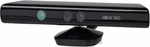
Microsoft Kinect (Figure 1) was the first device that realized the interaction with human [21].
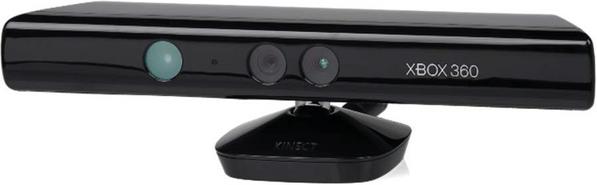
Figure 1 Microsoft Kinect device [18].
Researchers from Microsoft Research Asia have introduced a system that can recognize and translate sign language using a Kinect motion sensor and special software [22]. It is designed to provide interaction with a computer to people with disabilities who are not able to use traditional voice control. In this project, tracking the hand leads to a process of three-dimensional alignment of the trajectory of movement and matching of individual words in sign language. Words are generated using Kinect for Windows software hand tracking and then normalized, and matching results are computed to determine the most suitable candidates when analysing a signed word.
The three-dimensional path matching algorithm has enabled to construct a recognition and translation system in sign language, consisting of two modes. In the first Communications Mode, the system perceives visual information and turns it into text in English or Chinese. In the second Translation Mode, it performs the reverse interpretation into gestures displayed on the screen using a three-dimensional avatar. Guided by text input from a keyboard, the avatar can display the corresponding sign-language sentence. The deaf person responds using sign language, and the system converts that answer into text [22].
Several research projects have considered the use of Kinect for sign language recognition and concluded that the system can recognize gestures with large amplitudes but is not able to recognize small gestures [23].
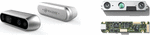
Intel’s RealSense technology allows to interact with computer using body movements, gestures, and facial expressions [24]. On Figure 2 is shown the appearance of Intel RealSense device.
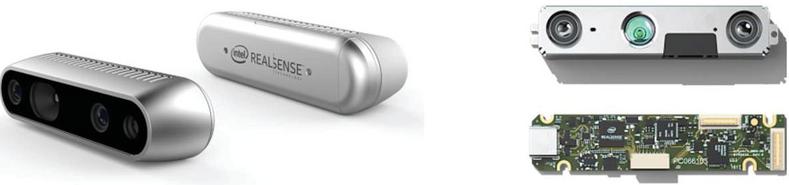
Figure 2 Appearance of Intel RealSense device [25].
In the Intel RealSense Software Development Kit (SDK), the developer has available tools for tracking the position of fingers, hands, analysing facial expressions, using elements of Augmented Reality, and speech recognition. The camera enables to identify and track the position of the hands and fingers, and to recognize gestures. The device enables to determine static positions and some simple hand movements such as grabbing/releasing, moving, zooming in/out, and more. Recent versions have also increased the accuracy of gesture recognition, including clapping, rotation (both sides), palm openings and compression.
The SDK Hand Module and the Cursor Module provide real-time 3D hand motion tracking, using a single depth sensor [26].
The Hand Module consist of two separate tracking modes (Full-hand & Extremities), each designed to solve a different use-case, while the Cursor Module has a single tracking mode [26]. These modes differ in the information they provide and the computation resources that they require:
• Cursor Module – returns a single point on the hand, allowing very accurate and responsive tracking and a limited set of gestures. The Cursor Module was designed to solve the hand-based UI control use-case. Cursor mode includes hand tracking movement and a click gesture.
• Extremities mode (Hand Module) – returns the general location of the hand, its silhouette, and the extremities of the hand: the hand’s top-most, bottom-most, right-most, left-most, center and closest (to the sensor) points. This mode was de-signed to provide a light-weight method of the user’s hand tracking.
• Full-hand mode (Hand Module) – returns the full 3D skeleton of the hand, including all 22 joints, fingers information, gestures, and more. This mode was designed to provide a full set of features for each tracked hand.
Leap Motion Controller is a device developed by Leap Motion for human-machine interaction with a game purpose [5]. The device detects and tracks the movement of the hand, the position of fingers and tools similar to fingers (pen, pencil), as well as gestures and movements [27]. The Leap Motion field of view is an inverted pyramid up to 600 millimeters high, centered on the device. The scanning speed of objects is about 200 frames per second [28]. The device uses two high-precision infrared cameras and three infrared LEDs to collect information within its operating range. On Figure 3 is shown the appearance and principle of operation of Leap Motion [5].
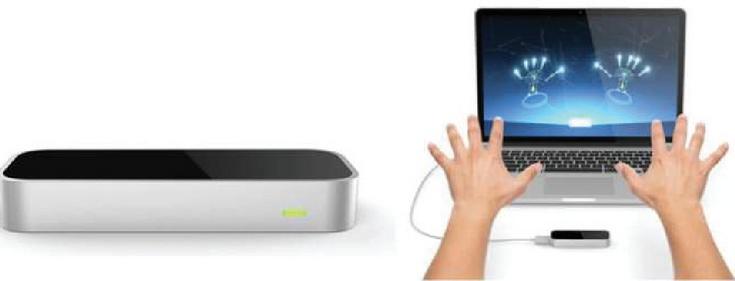
Figure 3 Appearance and principle of operation of the Leap Motion controller [29].
Leap Motion software processes input data and obtains information about the location of objects using built-in mathematical calculations.
The advantages of the Leap Motion controller include the precise level of detail of the API, which provides access to data that specify the position of the hands and fingers. The data received from the API is deterministic and does not require interpretation by client applications. The software recognizes five-finger hands, which contrasts with other available 3D input devices, such as Microsoft Kinect, where the level of sensory data needs to be cleaned and interpreted.
Using the Leap Motion device allows to fully explore the proposed hand model, with which can simulate the dactyl alphabet of sign language of the deaf and other simple gestures.
For research, Leap Motion software was used, which receives data from sensors and analyses them considering the anatomy of the hand, fingers and wrist. The software contains a human hand model, compares it with the data obtained and determines the best match between them. Data received from sensors is analysed frame by frame and sent by the driver to applications supported by Leap Motion. For each frame is obtained a list of geometric parameters of the detected objects in its field of view, such as hands, fingers, and elemental gestures.
The Leap Motion software provides information on five finger positions. For intelligent tracking of the most probable positions of those parts of the hand that are currently not visible, the visible parts of the hand, its internal model and recent observations are used.
In order to determine the parameters of the human hand model that are persistent to recognition, a corresponding application has been developed to retrieve data from the device and write it to the database for the further analysis.
Therefore, there are several major modules of the developed system:
• user hand interactive display module;
• hand model parameter reading module;
• module for recording received parameters to the database.
The interactive display module of the user’s hand allows to see what the Leap Motion device is currently seeing and adjust the position of the hand.
The hand parameter reading module accesses the hand model, which provides the Leap Motion device software and stores in the temporary list all the parameters that are necessary for the further data mining.
The module for recording of received parameters is responsible for storing data received from the module for reading hand parameters in the corresponding database tables. The image of the model of the hand is also saved while showing gestures.
4 General Description of Information Technology for Text Entry using Hand Gestures
Information technology for entering text using hand movements implies non-contact user interaction with the computer and others smart mobile device. To ensure interaction using movements, it is proposed to use the three-dimensional Leap Motion device. However, modern smart mobile devices are also able to recognize hand movements without the use of additional devices [30].
Gestures are naturally divided into static and dynamic. If the user shows a specific configuration of the fingers, this is called a static gesture. Dynamic gestures involve moving for some time. Thus, gesture recognition primarily requires type separation algorithms, followed by the identification of specific gestures.
The text input process requires research into methods for selecting controls that contain the letters of the alphabet. There are three methods that can be used to control using human hand movements: selecting a letter by “pressing”, highlighting the letter for a while, and using simple gesture recognition.
Non-contact interaction also implies the absence of a physical keyboard or touch screen; therefore, there is a need to develop a virtual keyboard, the visual elements of which must be connected to the input signal, given from an external Leap Motion device.
The speed and ease of entering text using human hand movements is also significantly influenced by the virtual keyboard design. The interaction with the device should be simple and reliable and not require a lot of knowledge from the user. When designing the interface, it is necessary to consider that hand movements are not accurate enough, so such elements must be placed at a sufficient distance from each other.
The proposed information technology, using modern external devices of three-dimensional interaction, allows realizing the text entry using hand movements.
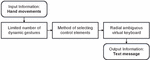
Information technology consists of the following steps (Figure 4):
(1) Input information: Human hand movements tracked using a Leap Motion device.
(2) Recognition of a limited set of dynamic gestures.
(3) Method of selecting letters of the alphabet when entering text.
(4) Virtual keyboard design development.
(5) Output information: Text message.
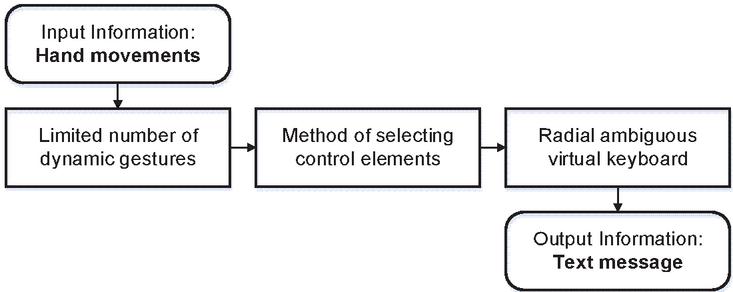
Figure 4 Diagram for non-contact text entry using hand dynamic gestures.
In Figure 4 is shown the main steps for determining a limited number of dynamic gestures that are comfortable for a person to reproduce over time and at the same time do not require complex recognition algorithms. After that, the letters are selected using the radial virtual keyboard, which has several zones with grouped letters of the alphabet. At the final stage of the system’s work, the most probable word is determined, which corresponds to the user’s actions and a text message is generated.
5 Hand Model for Sign Language
Here are studies on the development of mathematical models and the implementation of relevant information technologies for visual display and gesture recognition on the example of modeling of Ukrainian sign language, non-verbal communication of people with hearing impairments, identification of stable imaging features to identify hand configuration in Ukrainian Sign Language [31, 32].
Note that modern Ukrainian dactyl alphabet numbers 33 dactyl signs, which are transmitted in three ways: the finger configuration, the finger and the wrist movement. The need for movement when determining the dactyl is due to the similarity of configurations for the 6th dactyl. Therefore, 27 unique finger configurations are taken to build the model without any movement.
By analyzing all the features of a hand configuration on the example of the dactyl signs of the sign language of the deaf, it possible to identify the hand features that are involved in most configurations:
• palm tilt in the wrist;
• angles between fingers;
• bent or not bent finger (completely or only fingertip);
• touch the tip of the thumb to others.
For frontal stereo cameras, a hand model is used that is similar to the anatomical skeleton of the human hand and contains the bones of the wrist and the phalanges of the fingers. The thumb model does not quite match the standard anatomical shape. The human thumb has one bone less than the bones of the other fingers. However, for simplicity, the thumb model includes a zero-length metacarpal bone and thus the thumb has the same number of bones as the other fingers [28].
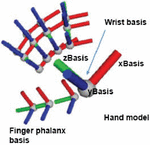
Considering the above features, was proposed a hand model (Figure 5), by which it is possible to simulate the dactyl alphabet of sign language of the deaf:
| (1) |
where is the set of basic parameters that specifies
the direction of the palm and fingertips, – number of parameters;
is the set of parameters that specifies the
configuration of the fingers, – number of parameters;
is the set of parameters that specifies
additional information about the gesture, – number of parameters.
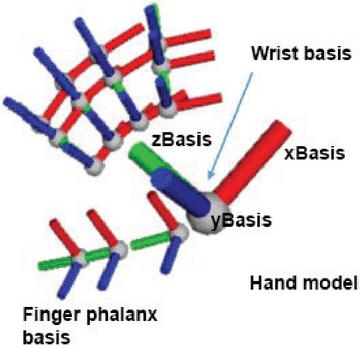
Figure 5 Hand model for the sign language.
Consider in more detail the components of the human hand model, which are represented by vectors for local bases in the joints.
Set of basic parameters includes vectors that specify the direction of the palm and fingertips:
• is the vector direction palm;
• is the normal vector of palm;
• is the direction vectors fingertips;
• is the palm tilt angles relative to the horizontal and vertical axes;
• is the parameter that determines a finger pointing to something.
The calculated parameters determine the configuration of the fingers and are obtained by converting the direction vectors of the bones of the wrist and phalanx of the fingers:
• is the angles between fingers;
• is the fingers tilt angles relative to palm;
• is the finger phalanx tilt angles (distal) relative to first phalanx (proximal);
• is the distance between the tips of the thumb and all other fingers;
Parameters provide additional information about the gesture:
• is the identifier, gesture name and position of the index and middle fingers.
Thus, the following studies will be conducted on the model of the above parameters for the dactyl alphabet of sign language deaf and other simple common gestures.
6 Define a Limited Number of Simple Static and Dynamic Gestures
The widespread use of automated information processing technologies and the accumulation of large amounts of data in computer systems have made it very important to find hidden relationships in datasets. To solve it, methods of mathematical statistics, database theory, artificial intelligence theory and several other areas are used that together form the technology of data mining.
Cluster analysis consists in finding clusters with similar parameters from many objects. The purpose of the analysis is to obtain a set of configurations of the dactyl alphabet of sign language for the deaf that have high quality clustering.
In [33], a cluster analysis of set configurations of the dactyl alphabet of the sign language of the deaf was performed using model (1). Clusters were identified containing only one configuration of the dactyl sign (the most separate configurations). Studies have also shown that more separated are the configurations of the hand, when the palm is fully visible to the device’s camera. In this case, the fingers can be bending. Thus, the task of recognizing gestures can be reduced to the task of identifying them from a limited set of sufficiently separate configurations of the hand.
Based on the analysis of dactyls of sign language of the deaf, it is possible to determine the criterion of formation of a limited set of simple configurations of the hand (gestures). Thus, the criterion for the selection of gestures is corresponding with such requirements as convenient showing and ease of remembering by a person and high quality clustering for each specific device.
A limited number of 12 simple static gestures have been formed for the experiment that correspond the requirements above. Most of them are common gestures, which mean numbers from one to ten, shown with one hand. It is also assumed that the finger can be in two positions i.e. the straight or completely bent, and the palm of the hand is turned to the camera.
According to preliminary raw data collected by the Leap Motion API, a limited set of hand configurations have been determined (Table 1), which are reliably recognized by means with front stereo cameras [33].
Table 1 Appearance simple gestures
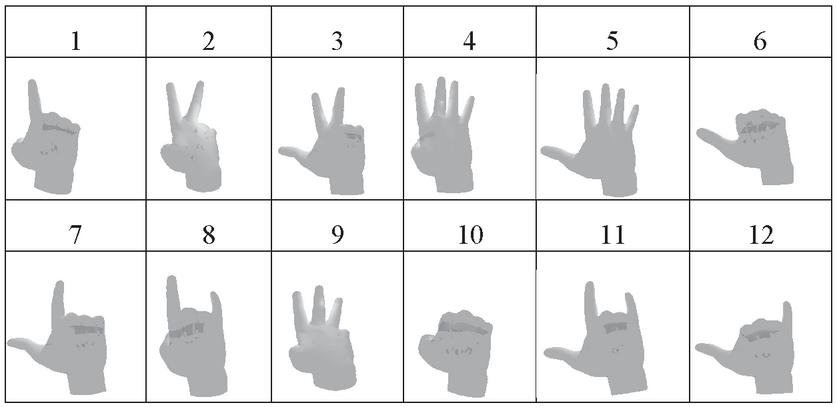 |
To recognize the specified list of static gestures, there is used the sufficient model parameters (1), which are responsible for the vectors of the direction of the fingertips:
• is the direction vector for thumb;
• is the direction vector for index finger;
• is the direction vector for middle finger;
• is the direction vector for ring finger;
• is the direction vector for pinky finger;
Dynamic gestures are easy to distinguish from static gestures. Their main feature is the value of the velocity of the fingers and palm . Assume that the hand moves if the total movement value is greater than a certain predetermined value. Otherwise, static hand gestures must be recognized.
Dynamic gestures can be divided into two groups: the static gesture with general movement of the hand position and the static gesture with the movement of only the tips of the fingers. Therefore, to determine the model of movement of dynamic gestures, the velocity of the fingertips and palms is mainly used.
General hand movement provides information about translational arm movement, arm rotation and circular motion of the arm. The next step is the movement of the fingertips, and since there can be quite a lot of such movements, considered only the movement of the index finger. The movement of this finger is used the most often by a person when interacting. In some gestures, the other fingers of the hand also often repeat the movements of the index finger.
Consider the process of calculating the features of the various components of the movement that occur when dynamic hand gestures are shown.
Consider the features of translational movement of the hand, when the fingers and palm are moved together without rotation. To determine the features, it is necessary to compare the velocity vectors of fingers and palms . If the obtained values are close to one, assumed that the hand moves forward.
The calculation of the feature of the hand rotation consists of two steps. The first step is to calculate the difference between the current and the previous normal vector . The second step requires the determination of the angle between this difference and the direction of the hand .
Determination of features of a hand moving in a circle when the palm makes a large circle. This calculation is similar to the definition of hand rotation, where the difference between the current and the previous values of the palm normal is first calculated. It is also necessary to determine that the hand does not rotate.
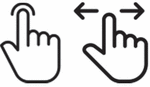
Determination of features during of a keystroke movement and a swipe with the index finger is shown (Figure 6).
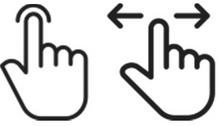
Figure 6 Gesture of keystroke and index finger swipe.
These movements are based on a static gesture with a direct pointing finger. They differ only in that with a gesture of pressing a key, the finger moves vertically, with a swipe the finger moves horizontally. To determine the features, a value is calculated between the direction of index finger velocity and the normal vector of the palm . If this value approaches to one, assume that a dynamic gesture is a keystroke with the index finger. If the value approaches to zero, assume that the dynamic gesture is a horizontal swipe of the index finger. This indicates that the movement of the finger is perpendicular to the normal vector of the palm.
Therefore, it can be concluded that there is a rather limited number of movements that can be used in information technologies for text entry.
7 Method for Selecting Letters when Entering Text
The main difficulty of any non-contact input method is that a large set of language symbols must be associated with a very limited set of controls. Considering only lowercase letters and space characters, there are 33 characters that must be selected by a limited number of hand movements.
The method of entering textual information with fewer controls includes selection methods that allow to associate controls with the output control signal received from Leap Motion. The analysis showed that each of them has a number of limitations and disadvantages [2].
So, direct selection, obviously, cannot be used to choose characters without additional selection refinement algorithms.
Scanning methods are generally used if there is only a binary control signal that can be implemented for a limited period of time. The scanning process must either accept or reject the proposed selection. All options for selection will be repeated until one of them is selected by the user. Since scanning is a process that requires a certain time to work, combining it with a control signal, which also takes time, can result to a low communication speed. Moreover, for the scanning paradigm, it is impossible to take advantage of a control signal that has more than two states.
The encoding selection method is achieved by grouping characters, where each character is encoded by the sequence of actions that must be performed to select it.
In mid-air interaction, based on tracking of users’ hands, used selection-based text entry methods [34]. The selection of “pressing” is similar to pressing keys in touch devices, where the user moves the cursor (finger) to the desired letter and confirms the selection by the action of “pressing”. Selecting a letter with the help of “highlighting” provides that the user must select a letter and stay on it for a certain time.
Selection using simple movements implements text input at the level of word selection from a limited dictionary. This requires the development of both recognition algorithms for a large number of gestures, and the creation such dictionary sufficient for composing text messages.
After analysing the selection methods and considering the relatively small number of available movements, within the framework of information technology, it is proposed to use the method of entering text using a virtual keyboard with keys containing grouped letters of the alphabet [2, 35]. This method assumes that with the help of hand movements will be selected not a specific letter, and a set of letters. That is, controls for entering text information are blocks (buttons) consisting of grouped letters of the alphabet. The number of such blocks is much less than the number of single letters and can vary depending on the number of movements that are involved in the text input.
Today, a common and convenient way to enter text on smart mobile devices is the typing using the virtual keyboard. Ambiguous virtual keyboard will significantly reduce the number of control signals required for communication, but it requires a solution to the ambiguous choice problem [2]. The fastest and most technological is the method of entering textual information based on the T9 Input Method, which allows to enter the letters of words in one touch for each letter of the word [36].
The methods disambiguate selection will allow to get a list of words that correspond to the sequence of user actions, and the prediction algorithm will determine the most probable word [2].
Virtual keyboard layouts have a large impact on the error rate of the prediction algorithm. There are many virtual keyboard layouts [37]. The most famous are alphabetical, Dvorak and Qwerty layouts. Studies [2] has shown that a qwerty-like layout is low error rate of the prediction algorithm for six control elements. In addition, qwerty-like layout is convenient for people with experience of working with digital devices.
8 User Interface Design
The speed and ease of entering text using human hand movements is also significantly affected by the design of the virtual keyboard. Interaction with the device should be simple and reliable and not require a lot of knowledge from the user. However, while some existing the best practices can easily be applied to non-contact control applications, there is no reason to believe that what works the best on regular desktop or mobile menus will also work for three-dimensional interaction [28, 38, 39].
Analysing solutions of the non-contact application developer community, some recommendations have been formulated to consider when developing a user interface [27]:
1. Arrangement of elements of controls.
When selecting interface elements, one must to consider that hand movements are not accurate enough; therefore, such elements must be placed at a sufficient distance from each other.
1. Proximity-based highlighting scheme.
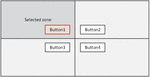
Another important approach that also makes it easier to selection is to build an interface according to the scheme of highlighting objects based on the proximity of the user pointer to it. This allows selecting the element closest to the user’s cursor without having to be above it. In Figure 7, there are four possible actions, and the user cursor is in the upper left quadrant, so Button 1 is highlighted.
1. Radial arrangement of controls.
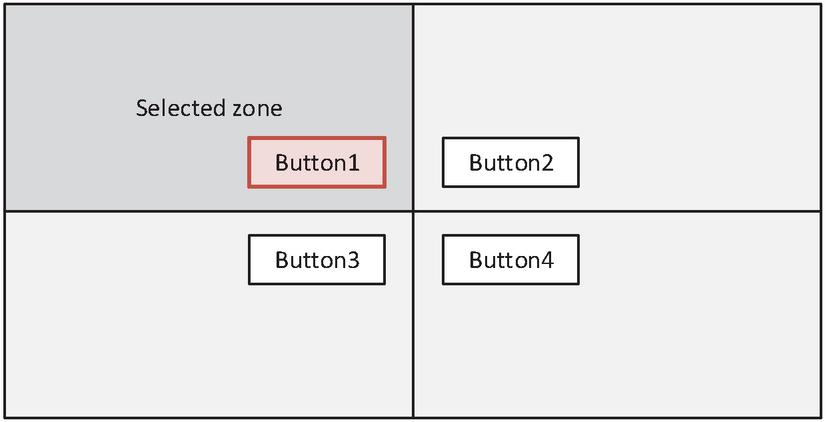
Figure 7 Example of proximity-based highlighting scheme.
The radial arrangement of the controls allows quickly and accurately navigating through several elements. The movement that needs to be done to select one cell is very slight, which reduces the amount of time and physical activity.
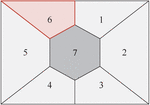
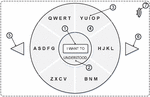
In Figure 8 is shown an example interface scheme with a division into one central zone and six radial zones. It is highlighted if the user pointer is located in it.
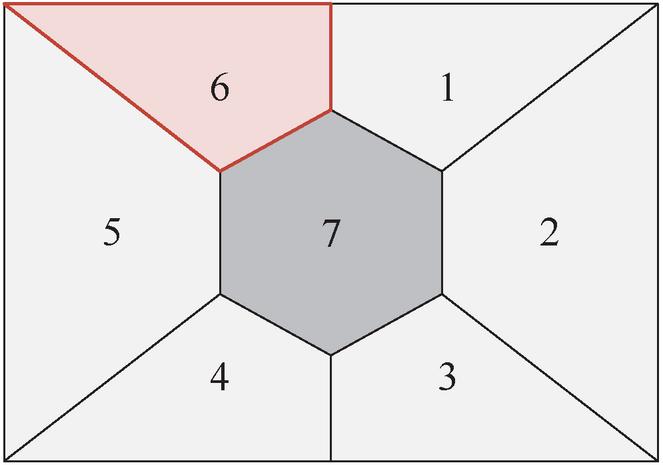
Figure 8 Radial arrangement of controls.
The central zone can be used as one of the main controls or as a neutral element.
In addition, the application should include clear visual feedback when highlighting and selecting each control, as well as audible feedback when navigating between and selecting elements. Also, when moving the arm along the axis in the direction of the screen, the cursor state should reflect the user’s proximity to “tap”.
The combination of the considered mark-up and highlighting rules is easy to use and provides the opportunity to develop a user-friendly design for non-contact text input using a limited number of simple dynamic gestures.
9 Functional Model of Information Technology
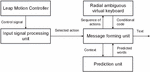
The functional model is important in the implementation of information technology of alternative communication for non-contact text entry. When designing the information system, a functional model (Figure 9) was created. It provides for receiving and processing of input control signals from external devices.
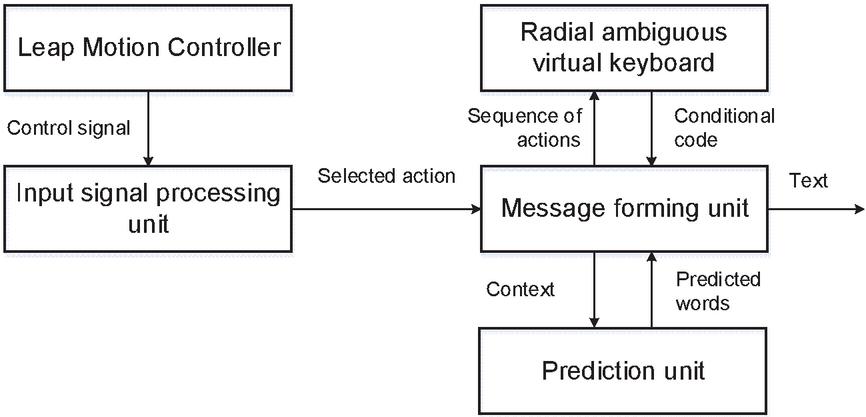
Figure 9 Functional model of information system.
The function model processes the continuous type of signal received from the device. It performs the function of linking a dynamic gesture to control elements assigned to it.
Input signal processing unit receives a control signal from the Leap Motion device and recognizes a limited set of gestures to select controls.
The radial virtual keyboard block is responsible for user interaction with the device and consists of areas for displaying the entered text, word variants, a virtual keyboard and auxiliary controls. Thus, this unit performs the function of text entry using a reduced number of control signals. At the output of this function block is a set of letters to form a text message. This block also provides a feedback signal that is displayed to the user.
The prediction unit calculates the probability of candidate words using a statistical language model. The list of words is constantly updated depending on the context and already entered letters of the word.
The proposed functional model describes the process of information processing, the input and output parameters of each block, which will allow to implement as a whole information technology non-contact text entry.
10 Implementation of Information Technology of Alternative Communication
Human-computer interaction explores the design and use of computer-based interfaces between humans (users) and computers. The user interface combines all the elements and components that are able to influence the interaction of the user with the software and implement its functionality. For alternative communication, it is extremely important to design a user-oriented interface that must to consider its individual limitations.
In Figure 10 is shown a model of human-computer interaction for entering text messages using a limited number of simple gestures [40].
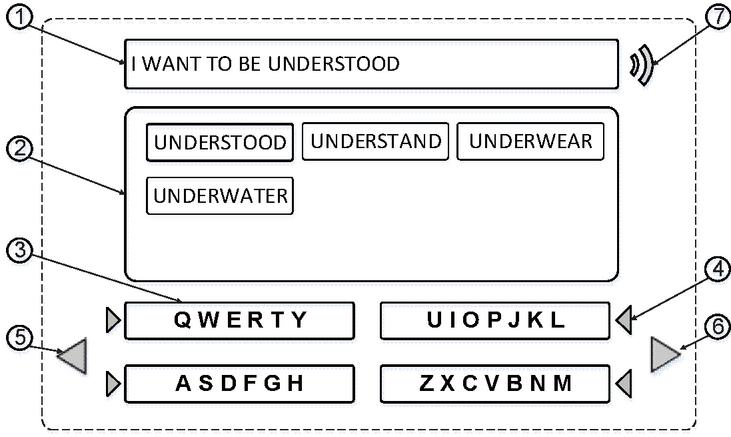
Figure 10 User interaction model.
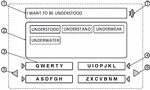
Each simple gesture is represented as a state of a discrete signal associated with separate functional controls. The function model processes up to 12 different input signal states associated with controls. They include the direct text input function and auxiliary functions, such as cancelling a selection error, skipping to the next word, voicing the text, etc.
In Figure 11 is shown an adapted model of human-computer interaction that corresponds to a functional model of information technology for non-contact input of text messages using a limited number of simple gestures. This model is focused at mobile devices that have a limited screen area, such as smart watches.
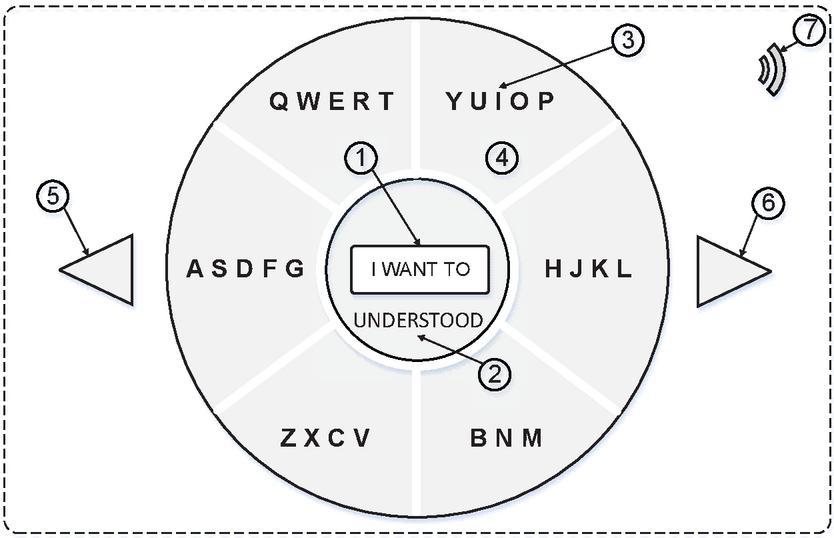
Figure 11 User interaction model (radial arrangement of controls).
The operating area of the model consists of the following controls: 1 is zone for displaying the entered text; 2 is a zone for displaying suggested words that correspond to the current code of the word entered; 3 is a zone that displays a virtual keyboard with the selected order of letters followed; 4 is control that allows to select the key containing the required letter; 5 is control that allows to undo the false choice; 6 is control element that moves to the next word; 7 is a control that activates the function of voice playback of text.
The controls proposed in the model are enough to implement the communication of information technology is considered.
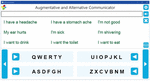
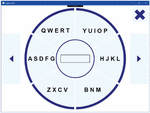
In Figures 12, 13 are shown software implementation versions for information technology for non-contacts text entry using a limited number of simple static and dynamic gestures.
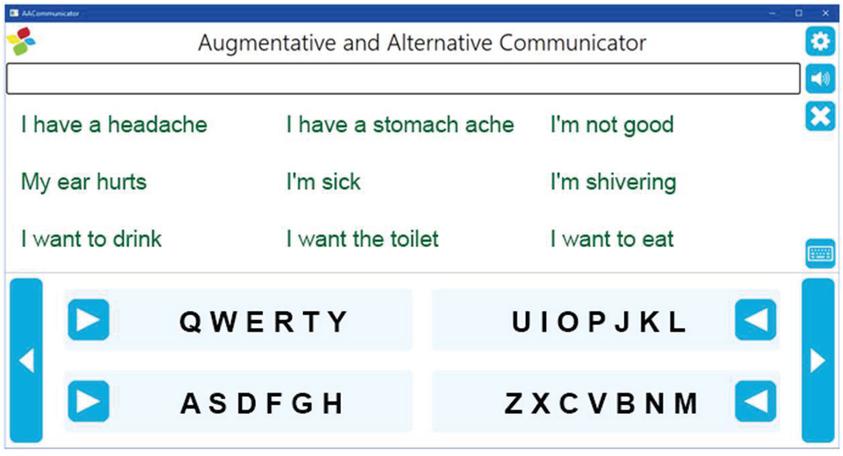
Figure 12 Alternative communication using simple sign language gestures.
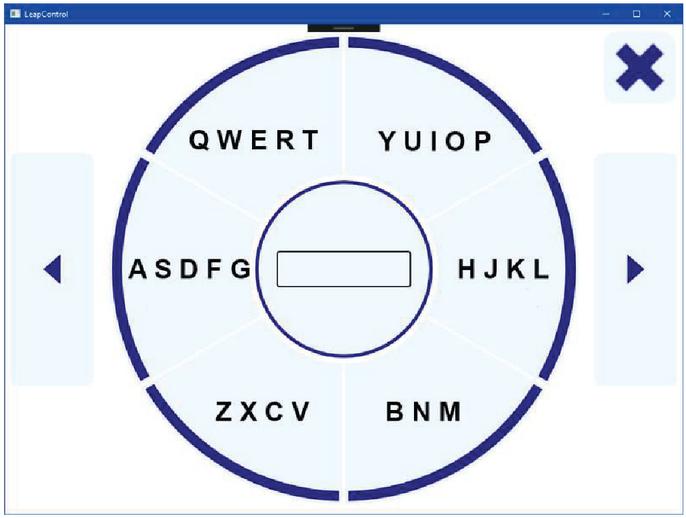
Figure 13 Alternative communication using simple dynamic gestures.
This approach allows us to create human communication for people who have temporarily lost the ability for verbal communication using cross platform realization.
11 Conclusion
The paper proposes an information technology of alternative communication for non-contact text entry using a limited number of simple dynamic gestures. Using the Leap Motion device allows the transfer of a limited number of hand movements to the software environment without developing complex recognition algorithms. However, modern smart mobile devices are also able to recognize hand movements without the use of additional devices.
The basic parameters of the model that provide information about the position of the hand at each moment of time are determined. Parameters sufficient for recognizing static and dynamic gestures are identified. The process of calculating the features of the different components of the movement that occur when showing dynamic hand gestures is considered. It is shown that there are a rather limited number of movements that can be used in information technology for entering text message.
Studies have shown that existing letter input methods are not fast enough, so it is suggested to use a radial virtual keyboard in combination with the well-known ambiguous letter selection approach.
The user interaction interfaces are considered, which take into consideration the features of working with the support of the Leap Motion device. An interface design has been created that combines the layout rules and highlighting of the controls. This makes it possible to develop an easy-to-use software system for both a computer and a smart mobile device.
According to the developed model of human-computer interaction, software was created for text entry using hand gestures to provide communication for people with disabilities.
References
[1] Augmentative and Alternative Communication (AAC). http://www.asha.org/public/speech/disorders/AAC/. Accessed Sept. 06, 2019
[2] O. Barmak. R. Bagriy, I. Krak, V. Kasianiuk Information technology for entering text based on tools of the special virtual keyboard mobile and auxiliary devices. In: Proceedings of the Second International Workshop on Computer Modeling and Intelligent Systems (CMIS-2019), Zaporizhzhia, Ukraine, 2019. pp. 413–427
[3] Sign Language Alphabets From Around The World https://blog.ai-media.tv/blog/sign-language-alphabets-from-around-the-world. Accessed Nov. 01, 2019
[4] Adhikary J Text Entry in VR and Introducing Speech and Gestures in VR Text Entry. In: Proceedings of the MobileHCI 2018 Workshop on Socio-Technical Aspects of Text Entry, Barcelona, Spain, September 3 2018. pp. 15–17
[5] Leap Motion https://www.leapmotion.com/. Accessed April 09, 2020
[6] Yu Chun, Yizheng Gu, Zhican Yang, Xin Yi, Hengliang Luo, Yuanchun Shi Tap, dwell or gesture: Exploring head-based text entry techniques for hmds. In: Proceedings of the 2017 CHI Conference on Human Factors in Computing Systems, 2017. ACM, pp. 4479–4488
[7] Dobosz K., Popanda D., Sawko A. (2020) Head-Based Text Entry Methods for Motor-Impaired People. In: Gruca A., Czachórski T., Deorowicz S., Harȩżlak K., Piotrowska A. (eds) Man-Machine Interactions 6. ICMMI 2019. Advances in Intelligent Systems and Computing, vol 1061. Springer, Cham
[8] Vogel, Daniel, Ravin Balakrishnan Distant freehand pointing and clicking on very large, high resolution displays. In: Proceedings of the 18th annual ACM symposium on User interface software and technology, 2005. ACM, pp. 33–42
[9] Wilson, Andrew D Robust computer vision-based detection of pinching for one and two-handed gesture input. In, Proceedings of the 19th annual ACM symposium on User interface software and technology, 2006. ACM, pp. 255–258
[10] Bowman, Doug A, Chadwick A, Wingrave JM, Campbell V, Q. Ly, Rhoton C. J (2002) Novel uses of Pinch Gloves for virtual environment interaction techniques. Virtual Reality 6 (3):122–129
[11] Markussen A, Jakobsen MR, Hornbæk K Vulture: a mid-air word-gesture keyboard. In: Proceedings of the SIGCHI Conference on Human Factors in Computing Systems, Toronto, Ontario, Canada, 2014. Association for Computing Machinery, pp. 1073–1082. doi:10.1145/2556288.2556964
[12] Ni T, Bowman D, North C AirStroke: bringing unistroke text entry to freehand gesture interfaces. In: Proceedings of the SIGCHI Conference on Human Factors in Computing Systems, Vancouver, BC, Canada, 2011. Association for Computing Machinery, pp. 2473–2476. doi:10.1145/1978942.1979303
[13] Castellucci SJ, MacKenzie IS Graffiti vs. unistrokes: an empirical comparison. In: Proceedings of the SIGCHI Conference on Human Factors in Computing Systems, Florence, Italy, 2008. Association for Computing Machinery, pp. 305–308. doi:10.1145/1357054.1357106
[14] Belkacem I., Pecci I., Martin B., Faiola A. (2019) TEXTile: Eyes-Free Text Input on Smart Glasses Using Touch Enabled Textile on the Forearm. Human-Computer Interaction – INTERACT 2019 pp. 351–371
[15] Wang RY, Popović J (2009) Real-time hand-tracking with a color glove. ACM Trans Graph 28 (3):Article 63. doi:10.1145/1531326.1531369
[16] Anant Agarwal, Manish K Thakur Sign Language Recognition using Microsoft Kinect. In: 6th International Conference on Contemporary Computing, IC3, 2013. pp. 181–185
[17] Hansaem Lee, Junseok Park (2015) Hand Gesture Recognition in Multi-space of 2D/3D. IJCSNS International Journal of Computer Science and Network Security 15 (6):12–16
[18] Mossel A (2014) Robust Wide-Area Tracking and Intuitive 3D Interaction for Mixed Reality Environments. Thesis for: PhD
[19] Boletsis, Costas & Kongsvik, Stian (2019). Text Input in Virtual Reality: A Preliminary Evaluation of the Drum-Like VR Keyboard. Technologies 7, 31
[20] Hürst, W, van Wezel C (2013) Gesture-based interaction via finger tracking for mobile augmented reality. Multimed Tools Appl 62: 233–258
[21] Microsoft Kinect https://en.wikipedia.org/wiki/Kinect. Accessed April 06, 2019
[22] Digital Assistance for Sign-Language Users. https://www.microsoft.com/en-us/research/blog/digital-assistance-for-sign-language-users/. Accessed Sept. 16, 2019
[23] Yang HD (2014) Sign language recognition with the Kinect sensor based on conditional random fields. Sensors (Basel) 15 (1):135–147. doi:10.3390/s150100135
[24] B. Liao, J. Li, Z. Ju, G. Ouyang Hand Gesture Recognition with Generalized Hough Transform and DC-CNN Using Realsense. In: 2018 Eighth International Conference on Information Science and Technology (ICIST), Cordoba, 2018. pp. 84–90
[25] Stereo depth modules and processors by Intel® RealSense https://www.intelrealsense.com/stereo-depth-modules-and-processors/ Accessed January 26, 2021
[26] Intel® RealSense SDK 2016 R3 Documentation https://software.intel.com/sites/landingpage/realsense/camera-sdk/v1.1/documentation/html/doc\_hand\_hand\_tracking\_modes.html. Accessed April 16, 2020
[27] Naidu C, Ghotkar A (2016) Hand Gesture Recognition Using Leap Motion Controller. International Journal of Science and Research (IJSR) 5 (10):436–441
[28] Leap Motion Developers https://developer.leapmotion.com/documentation/ index.html Accessed April 09, 2020
[29] Tracking/Leap Motion Controller https://www.ultraleap.com/product/leap-motion-controller/ Accessed January 26, 2021
[30] Elleuch H, Wali A, Samet A. and Alimi AM (2015) A static hand gesture recognition system for real time mobile device monitoring, 15th International Conference on Intelligent Systems Design and Applications (ISDA), Marrakech 2015, pp. 195–200
[31] Kryvonos IG, Krak IV, Barmak OV, Kulias AI (2017) Methods to Create Systems for the Analysis and Synthesis of Communicative Information. Cybernetics and Systems Analysis 53 (6):847–856
[32] Krak I.V, Kryvonos IG, Barmak OV, Ternov AS (2016) An Approach to the Determination of Efficient Features and Synthesis of an Optimal Band-Separating Classifier of Dactyl Elements of Sign Language. Cybernetics and Systems Analysis 52 (2):173–180
[33] Kryvonos IG, Krak IV, Barmak OV, Bagriy RO (2016) New tools of alternative communication for persons with verbal communication disorders. Cybernetics and Systems Analysis 52 (5):665–673
[34] Markussen A., Jakobsen M.R., Hornbæk K. (2013) Selection-Based Mid-Air Text Entry on Large Displays. In: Kotzé P., Marsden G., Lindgaard G., Wesson J., Winckler M. (eds) Human-Computer Interaction – INTERACT 2013. INTERACT 2013. Lecture Notes in Computer Science, vol 8117. Springer, Berlin, Heidelberg
[35] Gomide, Renato & Loja, Luiz & Lemos, Rodrigo & Flôres, Edna & Melo, Francisco & Teixeira, Ricardo (2016) A new concept of assistive virtual keyboards based on a systematic review of text entry optimization techniques. Research on Biomedical Engineering 32 (2):176–198
[36] Grover D, King M, Kuschler C (1998) Reduced keyboard disambiguating computer. Tegic Communications, Inc., Seattle
[37] Sarcar, Sayan & Ghosh, Soumalya & Saha, Pradipta & Samanta, Debasis (2010) Virtual keyboard design: State of the arts and research issues. TechSym 2010 – Proceedings of the 2010 IEEE Students’ Technology Symposium. 289–299
[38] Bachmann D, Weichert F, Rinkenauer G (2018) Review of Three-Dimensional Human-Computer Interaction with Focus on the Leap Motion Controller. Sensors (Basel) 18 (7). doi:10.3390/s18072194
[39] He, Zhenyi & Yang, Xubo (2014). Hand-based interaction for object manipulation with augmented reality glasses. 227–230. 10.1145/2670473.2670505.
[40] Bahrii R, Krak I, Barmak O, Kasianiuk V Implementing Alternative Communication using a Limited Number of Simple Sign Language Gestures. In: 2019 IEEE International Conference on Advanced Trends in Information Theory (ATIT), Kyiv, Ukraine, 2019. pp. 435–438
Biographies

Iurii Krak, Full Doctor (1999), Full Professor (2000), Corresponding Member of the National Academy of Science of Ukraine (NASU). He is currently working Head of the Theoretical Cybernetics Department at Taras Shevchenko National University of Kyiv (Ukraine) and Principal researcher at V.M.Glushkov Cybernetics Institute NASU. His scientific interest in the fields of data and image processing, information classification and recognition, robotics, artificial intelligent, sign language modeling and recognition, face emotions recognition, NLP, HCI etc.

Olexander Barmak, Full Doctor (2013), Full Professor (2015). He is currently working Head of Computer Science and Information Technologies Department Khmelnytskyi National University (Ukraine). His research interests include: (1) Development and improvement of methods of classification and clustering of information, theoretical and applied bases of human-oriented information technologies on the principles of ethics and trust in artificial intelligence; (2) Information technology for modelling virtual reality problems, including the development of new types of human-computer interfaces for Augmentative and Alternative Communication.

Ruslan Bahrii obtained the bachelor’s and master’s degree specialization of mechanical engineering technology from Technological University of Podillya (Khmelnytskyi) in 2000 and 2001, and the Candidate of Technical Science degree (PhD) in Ternopil National Economic University in 2018, respectively. He is currently working as an Associate Professor at the Department of Computer Science and Information Technologies, Faculty of Programming, Computer and Telecommunication Systems, Khmelnytskyi National University. His research areas include information technology of alternative communication, nonverbal communication, mobile multimedia, text prediction methods and statistical language model and beyond.
Journal of Mobile Multimedia, Vol. 17_4, 527–554.
doi: 10.13052/jmm1550-4646.1743
© 2021 River Publishers