Augmenting Websites with Voice Commands: An Approach Focused on Accessibility
César González-Mora1,*, Irene Garrigós1, Sven Casteleyn2 and Sergio Firmenich3
1Department of Software and Computing Systems, University of Alicante, Alicante, Spain
2GEOTEC, INIT, University of Jaime I, Castellón de la Plana, Spain
3Universidad Loyola, Andalucía, Spain
E-mail: cgmora@ua.es; igarrigos@ua.es; sven.casteleyn@uji.es; sergio.firmenich@lifia.info.unlp.edu.ar
*Corresponding Author
Received 27 November 2024; Accepted 04 February 2025
Even now, users with disabilities encounter serious barriers when accessing the Web. In particular, blind and visually impaired users encounter difficulties browsing and reading the contents of a website. Screen readers provide some assistance, yet, as they are unable to interpret the Web structure, they summarise information and read specific labelled fragments. Therefore, the overall comprehension of the text remains challenging. In this sense, in order to improve the accessibility of websites on the fly, we propose a Web augmentation framework for accessibility (WAFRA). Our framework uses Web augmentation techniques that extend the website with voice interaction and new actions: label text fragments, read aloud these fragments, facilitate navigation, increase font size and show videos. In order to perform this accessibility improvement, we automatically provide annotations from DBPedia regarding important information for end users. Moreover, we also provide the option that intermediary users add new annotations for labelling or including more specific information, which can be shared with other users by crowdsourcing. The evaluation of the framework shows its usefulness to ease website access for users with visual disabilities compared to using screen readers.
Keywords: Information websites, voice interaction, web accessibility, web augmentation.
Due to the globalisation of information, the amount of data available on the Web has grown dramatically over the years, but its access is limited by serious barriers for users with disabilities [16, 4, 25, 20, 39]. Considering that around 15% of the world’s population live with disabilities (as stated by the World Health Organisation1), universal Web accessibility should be a mandatory requirement [17]. However, despite the great progress in Web technologies, the Web is still not equally accessible to all people, especially blind and visually impaired users [25, 15].
In order to improve the accessibility of websites, screen readers facilitate users with disabilities to access websites by reading their contents. However, visually impaired users are at a disadvantage because Web technologies are designed for visual interaction [4]. Moreover, screen readers are limited to reading out loud website content in a straightforward way without interpreting the Web structure. Therefore, blind and visually impaired users experience several problems finding the information they need, as existing research indicates [28, 25, 7, 21]. The improvement of screen readers has been addressed [2, 36, 38, 18] through the annotation of Web contents. Although these related works may help in specific situations, user needs are not completely considered as users cannot interact with the website using their voice. In this sense, the manual – not through voice – interaction with websites is still complex for visually impaired users. Furthermore, the difficulty of browsing by using screen readers is important to be considered by users who have recently acquired a visual disability condition [7]. Even though there is related work that tries to address this [5, 34, 27, 30, 29], it focuses on accessibility as a whole but does not help users to obtain specific content. Moreover, the idea of augmenting the Web was stated several years ago [8], and it is reinforced by newer literature which shows that this technique is widely used to improve the user experience [11]. However, from the accessibility point of view, existing Web augmentation approaches [22, 26, 24, 12] do not focus on the information that users are interested in, which could improve the browsing experience, especially in websites that contain large amounts of information. In addition, they do not offer users the possibility to interact with the Web through voice, which is crucial for blind users.
To tackle the aforementioned problems, we propose a Web augmentation framework for accessibility (WAFRA), which combines collaborative accessibility improvement by crowdsourcing [35] and emerging interaction modes such as conversational user interfaces [5]. To the best of our knowledge, Web augmentation has not been used in this context. Considering how crucial voice is for web interaction [9], the main idea of our research is to augment websites with voice-based interaction that is specified according to the needs of users for a particular informational website. WAFRA is deployed and works at the client side, allowing its behaviour to be easily personalised. This underlying modus operandi also makes it possible to augment websites with traditional manual commands (such as an icon to zoom), woven in the original website user interface, allowing to support users with visual impairment or blindness. Therefore, our approach is based on access to information on the Web by visually impaired users, so websites are made accessible by the use of WAFRA in Web browsers and the annotation process, which may be improved by intermediary users, as shown in Figure 1. The differences include the installation of WAFRA in a Web browser, the annotation of the website (automatically from the semantic web and/or manually intermediary users), the saving and/or loading of annotations from an online repository, the performing of accessibility operations to transform the annotated website in an accessible website, and finally, access to the website information by visually impaired users. These steps are detailed in Section 3.1.
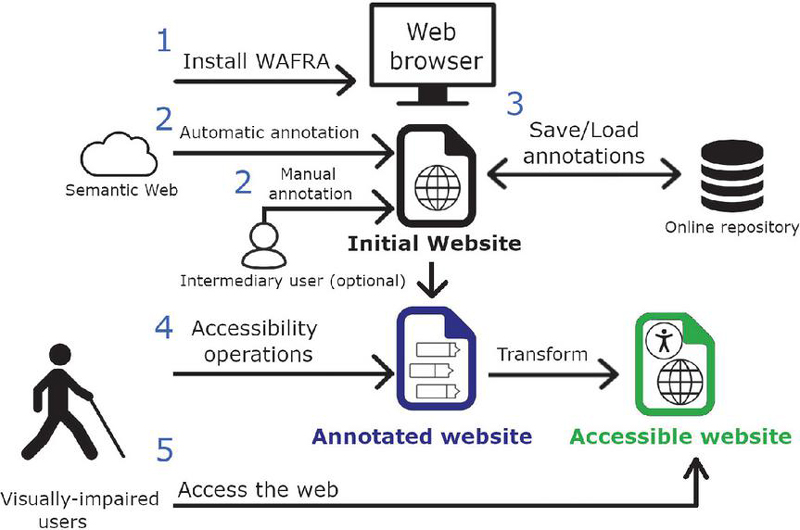
Figure 1 How to use WAFRA to provide end users with accessible websites.
In this research study, end users with visual disabilities are the main focus, ranging from visual impairment to blindness. It can also be useful for blind users who do not know how to use screen readers such as people who have recently acquired this condition, and also for visually impaired users that do not know about these screen readers. WAFRA offers a fine granularity level, because it allows managing the different sections of the website with specific annotations automatically obtained from the Semantic Web, allowing relevant information to be reached in the most suitable way. Moreover, a summarisation of the information is provided to users from DBPedia, which has proved to be a key improvement to provide a more effective and enjoyable experience for visually impaired web users [1].
As other existing approaches for collaborative accessibility improvement of existing websites, our approach also provides the possibility of intermediary users or volunteers to participate in the process of improving the accessibility by including manually more annotations [15, 35]. They can configure the augmentation for a specific website, such as the assistant visually impaired people rely on, and in many countries have a right to under the social security system. These extra annotations are made by the intermediary users directly by selecting items using a graphical interface. Then, our approach includes these annotations in the content of the website by using the Schema.org standard vocabulary. In order to reduce the intervention of an intermediary user, we provide automatic annotations for every website extracted from the Semantic Web using the resource description framework (RDF) format from the DBPedia SPARQL protocol and RDF query language (SPARQL) endpoint, which helps us to get information regarding any topic. Among these annotations from DBPedia, the main annotation consists of a summary regarding the topic of the website, which contributes to improve the understanding of the information. In addition, the annotations created by intermediary users in a specific website can be shared so that other users can reuse them. Therefore, the participation of intermediary users is not necessary, but it can be helpful to offer more annotations, as intermediary users may be unavailable or to reduce the annotation effort.
WAFRA proposes – but it is not limited to – predefined accessibility operations. We have defined these operations considering the the World Wide Web Consortium accessibility initiative, and particularly, the Web Content Accessibility Guidelines.2 Among the selected operations are: read aloud specific content fragments, focus on the main parts of the website by hiding unnecessary elements, increase and decrease the text size, facilitate the navigation to different content, manage the Web history of navigation and show videos about the topic of the website. These operations can be performed using both voice and manual interaction, that is, by voice commands and also by using the mouse. Moreover, considering that WAFRA is a framework, volunteers and intermediary users with programming skills can add new accessibility operations to WAFRA.
In this sense, with WAFRA this paper makes the following contributions:
1. Improve website accessibility on the fly by providing not only voice interaction through a browser extension, but also accessibility operations to show videos, help in navigation and increase font size to better see the information.
2. Contribute to the existing accessibility improvement of screen readers by providing semantic annotations that allow to read aloud important information by WAFRA.
3. Provide a collaborative system of labelling website’s content to facilitate other visualy impaired users to reuse these annotations to access relevant data.
4. Evaluate the current use of screen readers comparing with WAFRA to assess the helpfulness of those systems and draw the corresponding conclusions; WAFRA is perceived as a better solution, especially when intermediary users include extra annotations of websites.
This article is structured as follows. In Section 2, the related work is described in detail. Then, in Section 3, a tool to improve Web accessibility is presented with a running example in Section 4 and an evaluation of the approach is explained in Section 5. Finally, in Section 6 conclusions are presented.
On the one hand, screen readers such as JAWS,3 BrowseAloud4 and WebAnywhere [6] can be used to improve the interaction between users with disabilities and computer systems, including the Web browser. However, these screen readers perform a straightforward reading of the website’s content, including metadata, less important content and content repeated on every page (e.g. company information, taglines, contact information). Therefore, users may find it difficult and time-consuming to find the information they are looking for [4]. Different related works aim to solve screen readers’ problems. For example, InteractSE [1] provides a user interface to facilitate the search over the Web. In this case, they provide a machine learning summary of the search results so that users can easily access a more suitable website. From this research we highlight the summarisation of results as a key aspect, so that we also provide this summary of information by an annotation obtained from DBPedia. Moreover, a recent study [28] has proved the need to improve the accessibility of websites by providing a rule for the logical structuring of a document linked to its content, guided by an ontology and by its internal representation in the form of a tree, taking into account the cognitive mechanisms for reading and retrieving information. In this sense, our approach considers information from the Semantic Web and also an ontology for annotating the content of websites.
On the other hand, voice interaction to improve Web accessibility has also been addressed. In this sense, a conversational Web interaction system [5] provides users with a chatbot to offer easy access to Web content in natural language. However, it is only focused on usability so that the accessibility of existing websites is not improved. Indeed, the automatic generation of these chatbots to access open data is also addressed [13]. However, they do not consider improving the accessibility for visually impaired users, and only access to API-based sources is provided, which only addresses a fragment of published Web data. Other authors [27] use voice assistants to facilitate access to Web content, so Web accessibility and computer–human interaction are not addressed. Another approach [9] proposes the use of voice as assistants like Amazon Alexa to access the Web. Although this tool is really helpful for navigating through the Internet, it only provides a simple reading aloud operation for accessing website information. Indeed, this application is not designed as a tool for accessibility on the Web (as stated by the authors), but it may help in accessing and operating in different websites.
Furthermore, in order to improve Web accessibility, other existing works perform Web augmentation [22, 26, 24, 12], a chatbot and other conversational agents [37, 3]. In this sense, in general, predefined operations through manual operations are offered to remove barriers for visually impaired users when accessing the Web [11]. For example, Farfalla [22] aims to improve Web accessibility through Web augmentation operations to transform the presentation of the content, such as changing the size of the text. Besides, other solutions aim to improve Web accessibility through strategies related to Web augmentation such as Web adaptation [33], personalisation [23] or refactoring [15]. On the other hand, conversational agents such as [3] propose the use of artificial intelligence agents to help users navigate through the Web just by conversing in natural language. Also, in [37] they propose chatbots to easily access data from knowledge databases. However, Web accessibility by voice interaction to really help blind and visually impaired users is not yet proposed, so these users still experience problems while accessing Web content. Moreover, these approaches do not facilitate users to obtain the specific information they demand.
In conclusion, although there are several interesting and useful approaches to improve Web accessibility in the literature, a complete solution that considers both voice and manual accessibility operations to really help visually impaired users to easily access Web content is still needed. Therefore, to help close this gap, we propose WAFRA to further assist visually impaired users in their Web journeys.
In this section, a Web augmentation framework to enhance accessibility is presented. This approach is specifically designed for websites with a large amount of information and targets visually impaired users. Using WAFRA, users are able to interact with the Web by voice or manually, and for this interaction between users and WAFRA, the system supports both English and Spanish languages.
The main beneficiaries of this approach are users with visual disabilities, including blindness and other visual problems. For example, in well-known sites such as Wikipedia,5 the information usually overwhelms end users, making it difficult for them to easily find concrete information.
This section is organised by including the following subsections: steps of the accessibility improvement process, accessibility operations offered to users and implementation details of the approach.
The WAFRA process prescribes the different steps to improve the accessibility of a website (see Figure 1):
1. Installing the framework. In order to use our framework, intermediary users must install WAFRA for visually impaired users by using a browser extension. The supported and tested browser is Google Chrome, which can be used in any operating system such as MacOS, Linux and Windows. We have tested the different operating systems so that most of the users can take advantage of our tool. Once installed the extension and the script added to this extension, the WAFRA framework is ready to be used to annotate a website and facilitate access to its content. Note that the installation of WAFRA can also be done by end users if their abilities allow it, yet most often, an intermediary user will perform the installation on behalf of the end user.
2. Annotating a website. Once WAFRA is ready, the website to be accessed must be annotated. This annotation is performed automatically when accessing a website. These annotations are extracted from the Semantic Web, specifically from the DBpedia live SPARQL endpoint,6 which is one of the largest knowledge bases on the Web [19]. The Linked Data obtained from DBpedia consist of machine-readable semantic descriptions regarding the website’s topic and related concepts (name, birth date, and date of death in the case that it is a person). Other semantic data sources can be incorporated into WAFRA in addition to DBpedia. After this automatic annotation, intermediary users can also annotate other sections and parts that are important to be read aloud, but it is not mandatory as automatic annotation has already been performed, reducing the involvement of intermediary users. In order to add more annotations, intermediary users can interact with our framework by selecting first the suitable option from WAFRA (Figure 2), and then clicking on the desired elements of the webpage to annotate them. Using these selected elements, the WAFRA framework enriches the website’s document object mode (DOM) to include semantic data. An example of paragraph and text annotations performed in a Wikipedia article (see Section 4) consists of:
Other annotations are shown in Figure 10.
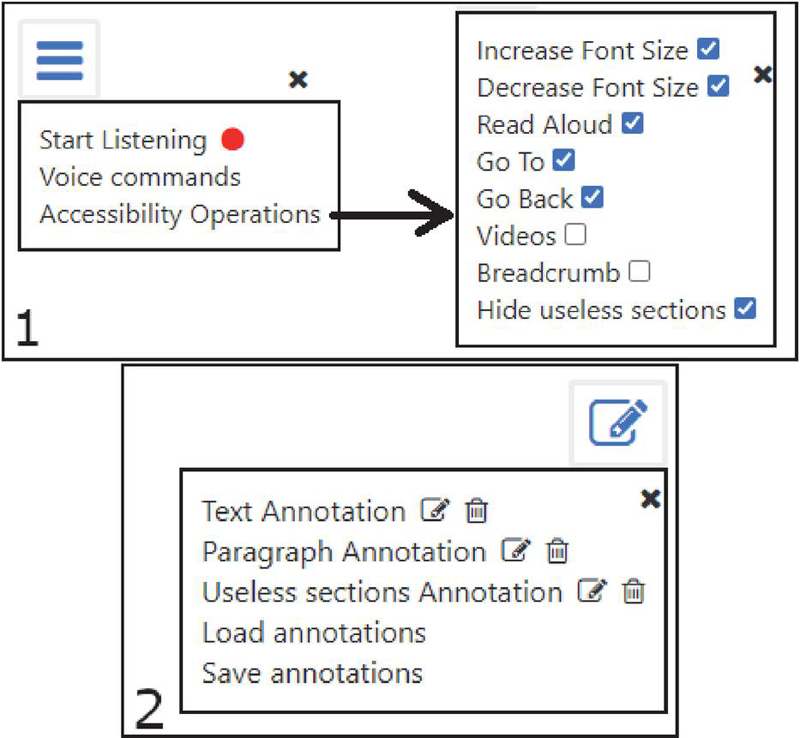
Figure 2 Main menus of WAFRA: accessibility operations (1) and annotations (2).
3. Save and/or load annotations. The annotated elements, which are specific for each webpage, are stored on the client side. However, we also provide mechanisms to facilitate the annotation process by reusing annotations shared by other users through an online repository of annotations. The operations that this centralised server of annotations allows are: save for keeping our annotations for a specific website, and load for downloading the annotations made by other users. In order to correctly save these annotations, a unique name, description, category, and target users must be specified (Figure 3). This unique identifier should be something easily recognisable by users and WAFRA speech recognition. For the category, users can specify between “general overview” or “detailed information”; while for target users the options are “all users”, “users with some visual impairment” and “blind people”. All these annotations’ properties are then presented to users when looking for available annotations for the website (Figure 4). Then, users have the possibility of rating the annotations made by other users according to their opinion.
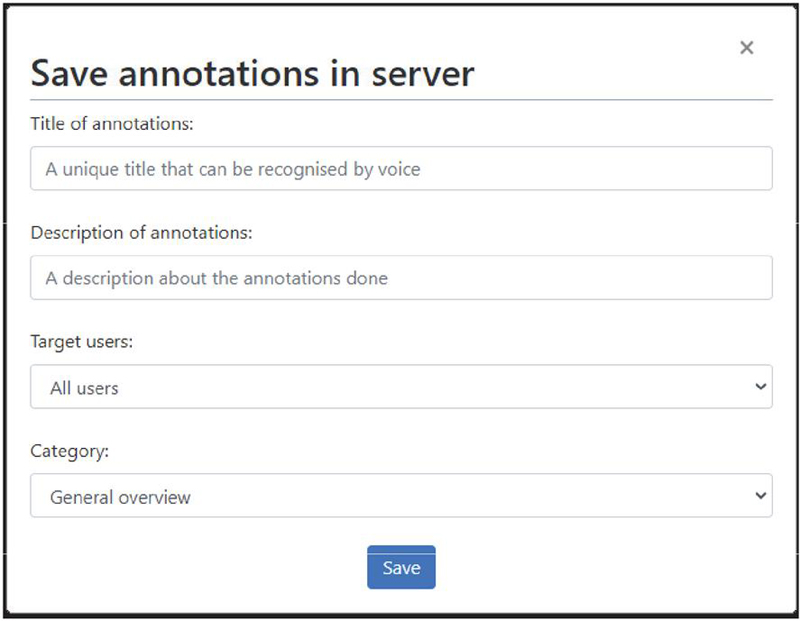
Figure 3 WAFRA menu for saving annotations in the server.
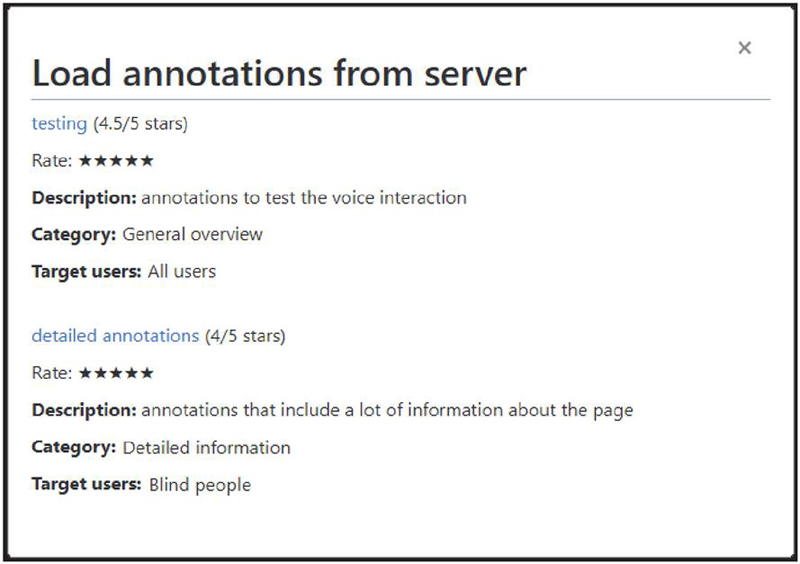
Figure 4 WAFRA menu for loading annotations from the server.
Therefore, end users can then take advantage of existing annotations, thus alleviating the annotation process and possibly avoiding the involvement of intermediary users.
4. Performing accessibility operations. Following the annotation process, WAFRA is ready to provide end users with accessibility operations that manipulate the website’s content. The operations provided by WAFRA include: reading specific text aloud, improving navigation, showing videos to avoid textual representation of the information, hiding unnecessary data and options to focus on important information, increasing and decreasing the font size, and guiding users to different sections or to go back and forward according to the user’s Web history. These operations are detailed in Section 3.2.
5. Accessing the web content. Finally, with the improvement of Web accessibility, end users can easily access the website’s contents. The website to be accessed must be previously annotated so that it can be augmented with the accessibility operations. All the available operations and annotated sections of the Web are conveniently presented so that users with visual disabilities can easily get the desired information using operations such as reading aloud website fragments.
As explained in the previous section, once a website is annotated, accessibility is improved through different operations by using voice or manual commands. All these commands can be personalised, activated, and deactivated according to users’ needs. The provided operations are not a closed list, they are those that are currently natively supported by WAFRA, but they can be extended by intermediary users or any interested party with programming skills.
As can be seen in Figure 5, the WAFRA framework consists of a set of classes, including “WAFRA”, “Operation”, “Annotation”, and subclasses corresponding to each of the offered operations. First of all, the “WAFRA” class includes the default functionality to manage the interaction with the website’s DOM, storage of annotations, and speech recognition and synthesis. The framework provides two extension points: one for operations and another one for annotations. In order to add new operations, developers must create a new JavaScript class that inherits from the “Operation” abstract class, initialising its properties and implementing its methods (initialise, start and stop). Moreover, to add new annotation types, users must create another class inheriting from the “Annotation” abstract class, assigning values to the properties and implementing its methods (initialise, start, save, stop, reset and undo). In this way, the framework allows and facilitates the task of modifying or creating new operations and types of annotations.
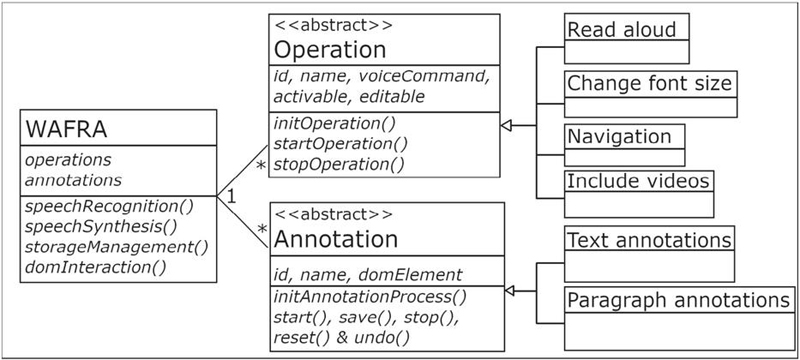
Figure 5 Framework structure overview.
WAFRA provides the following default operations:
• Read the text aloud. In order to increase the readability of websites, WAFRA offers the possibility to read aloud this text, as visually impaired users may find it difficult to read the text. To listen to the website instead of reading it, WAFRA offers a set of voice commands that consist of the word “read” followed by the section’s name (as previously annotated). The website is also augmented by adding a button after each paragraph that can read its text. In order to facilitate the read-aloud operation, in case users do not know which sections are available, there is also the possibility to list all section names (see later on), and to use the “read sections” operation to read aloud all sections one after another. Additionally, commands “read next” and “read previous” can be used to read one section without specifying the name and then be able to read the next or previous one. In order to stop the reading-aloud operation, there is the keyboard shortcut control + space.
• Stop/start listening. By default, WAFRA is listening for users’ voice commands. In case we want WAFRA to stop listening, there is an option in the main menu and also a “stop listening” voice command. To start listening again, there is the keyboard shortcut control + space; no equivalent voice command can be used as WAFRA is not listening. The keyboard shortcut control + space can also be used to stop listening and to stop reading as mentioned before.
• List operations and sections. All the operations offered by WAFRA and all the sections annotated can be discovered by users in the main menu and also by asking by voice: the voice command “list operations” can be used to know which operations are available, the voice command “list sections” can be used to know which sections are available to read aloud or navigate to. Finally, WAFRA reads aloud all the operations and sections available when using the voice command “welcome”. The keyboard shortcut control + shift + space is equivalent to the “welcome” command.
• Activate/deactivate operation. The operations offered by WAFRA can be activated or deactivated by end users using the WAFRA main menu or the voice command “activate” or “deactivate” followed by the operation name. The operations that are deactivated cannot be launched manually nor by voice commands until they are activated again.
• Change operation command. In order that users can personalise the voice command of each operation, WAFRA offers this option in its main menu, but also using the voice command “change”. To change a voice command, WAFRA asks for the name of the voice command to be changed and the new name for this voice command.
• Load/save annotations. The annotations made on the website can be shared with other users. The operation to save annotations can be done by intermediary users in the WAFRA main menu, whereby user specifies the mandatory properties name, description, category (general overview, detailed information) and target users (all, visually impaired, or blind users). Moreover, both end and intermediary users can reuse the annotations of other users by using the voice command “load annotations”. With this command, a list of existing annotations is presented to users by reading aloud their descriptions and related properties. Once the desired annotation set is identified, the user loads it by the voice command “load annotations” followed by the name of the annotation set.
• Rate annotations. The annotations available in the WAFRA annotations’ server can be rated in order to know which are more suitable for end users and their purpose. End users can rate and see the score of the annotations in the corresponding menu of WAFRA, but there is also the option to do it by voice commands. When all the annotations are presented using the “load annotations” command, their score is also indicated. Moreover, if you want to rate the annotations you are currently using, the voice command to use is “score” followed by a number from 1 to 5. Rating of the annotations, along with well-chosen property values, is important so that end users can correctly identify an annotation set that is relevant for their particular purpose (e.g., get a general overview versus detailed content).
• Focus on important information. In websites where the content is of utmost importance or where certain information is more important than other information, focusing on that relevant data while hiding many options and/or less relevant information for the end users is crucial. Our framework addresses this issue by offering an operation to hide less important parts of the website, which must be annotated as such by intermediary users beforehand. This operation is performed automatically for each website if it is not deactivated by end users. The annotation performed consists of adding the CSS class named “hideUselessSections” that incorporates the HTML attribute “display” with value “none” to hide the useless part of the website:
Increase and decrease text size operation. In general, visually impaired users consider it problematic to read websites because the default font size usually does not suit their needs. Even though modern browsers usually offer zooming options, this enlarges all the content, modifying the whole user interface and causing readability problems. Therefore, WAFRA offers an operation that increases or decreases the font size depending on user needs. This operation is available for every user by saying aloud “Increase/decrease font size”, or by manually using the corresponding option in the WAFRA’s main menu.
• Show videos related to the topic. In order to improve the content of each webpage, WAFRA includes a set of YouTube7 videos related with the website’s main topic. Hereby, WAFRA presents an extra layer of audiovisual content, which provides an alternative way of facilitating information. Providing non-textual equivalents such as videos is beneficial for users who have difficulties with reading [10], especially in the Wikipedia website due to the amount of information shown (Figure 10). The title of the website is used by WAFRA to search for related videos and include them at the end of the webpage using the YouTube Data API.8 There is an option to hide and show this video section, and also the option to go directly to this section from the menu included by WAFRA or using the voice command “videos”.
• Navigate through the Web. With the intention of keeping a browsing history and quickly navigating to recent webpages from the same domain, WAFRA supports users to easily navigate through them (e.g., go back and forward), avoiding the hassle of hitting the navigation buttons on the browser. To this aim, WAFRA offers a breadcrumb menu which includes the last visited pages in the user Web history. These actions can also be launched by a voice command “Go back”, and “Go forward”, improving the Web accessibility and facilitating the interaction with the website. Moreover, in order to improve the navigation within the same website, there is a “Go to” operation that allows to redirect users to specific sections annotated by intermediary users. This operation can be triggered by a voice command (“Go to 'Section name'”) or by the menu included by WAFRA as shown in Figure 6. As explained before, users can also use the “list sections” command to list all sections, and the “read next” and “read previous” to jump to the next/previous section. The annotation performed by WAFRA for this operation is shown at the top of Figure 7.
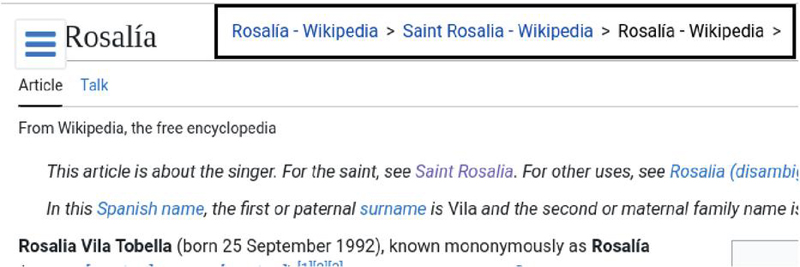
Figure 6 Example of breadcrumbs made by WAFRA in Wikipedia.
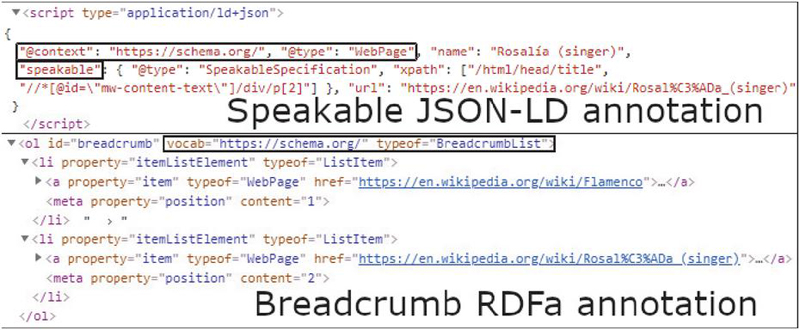
Figure 7 Example of “speakable” and “breadcrumb” annotations made with WAFRA.
The process of providing accessible websites to visually impaired users starts by installing WAFRA into the Web browser (step 1 in Figure 1). Before installing WAFRA, users must install a browser extension named Tampermonkey.9 This extension allows scripts to be added to perform the Web augmentation technique. Therefore, after installing Tampermonkey, users may add WAFRA to this extension as WAFRA consists of a script written in Javascript for Web augmentation. This script allows website content to be labelled with annotations, and after that, perform accessibility operations to modify website code to make information easily accessible by users with visual disabilities. In order to do so, the main algorithm of the script consist of being always ready to interpret a user’s voice by a list of available commands. Once a command is received, the script performs the corresponding accessibility operation by modifying the website’s DOM or reading aloud the information asked by the user. The script is freely and openly available online,10 and it has also been uploaded to Greasy Fork11 to facilitate its installation.
After that, the website is annotated automatically from the Semantic Web and/or manually by intermediary users (step 2 in Figure 1). All these annotations, made automatically and manually by intermediary users, are based on the Schema.org vocabulary of type WebPage12 with Resource Description Framework in Attributes (RDFa) and JavaScript Object Notation for Linked Data (JSON-LD) encodings. Our framework uses elements from the vocabulary, such as “speakable” and “breadcrumb” to mark up human-readable data with machine-readable indicators, improving the reusability of annotated data. For example, Figure 7 shows a snippet of a website annotated using our framework with the Schema.org vocabulary of type WebPage, including the property “speakable” with JSON-LD encoding and the property “breadcrumb” of type BreadCrumbList with RDFa encoding (which consists of HTML attributes). Over 10 million websites, including giants such as Google, use Schema.org’s vocabulary to markup web contents [32]. For example, websites with speakable13 structured data can be accessed by the Google Assistant to read content aloud to users. Additionally, users can extend the framework to annotate it using other vocabularies.
The annotations from a website are collaborative, which means that can be shared with other users (step 3 in Figure 1). In order to do so, an annotations server14 is publicly available to store the annotations online. This server consists of a RESTful API implemented using NodeJS, allowing GET operations to download the annotations and POST operations to store them persistently in the server.
Once the website is collaboratively annotated, users are able to perform accessibility operations that manipulate the website’s DOM, so that the structure of the website is modified to address accessibility improvement. This modifications rely on the operation made by users as explained before in Section 3.2. The most important operation consist of listening users’ voice and reading aloud the textual content. Regarding its implementation, the Web Speech API15 of JavaScript is used for speech synthesis and recognition operations. Finally, the output of this process is a website with modified DOM to be easily accessible by visually impaired users (step 5 in Figure 1).
As a running example, we illustrate the use of WAFRA in Wikipedia articles, as these typically include a lot of information. Specifically, we used our framework in a Wikipedia article of a Spanish singer.16 This webpage, shown in Figure 8 contains an overload of information, and it also includes a set of non-essential options with respect to finding specific information by visually impaired users (such as the possibility to edit the Wikipedia article or view the page’s history).
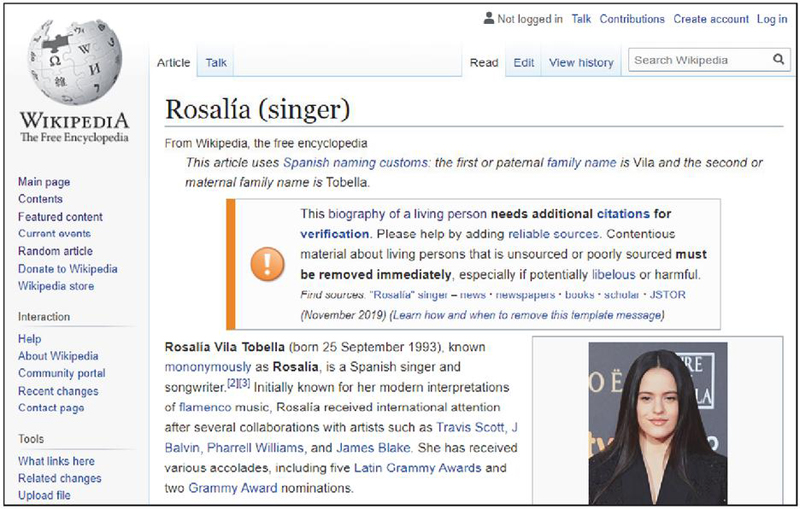
Figure 8 Example of a Wikipedia article.
Next, we illustrate the five-step process (see Figure 1) to improve this Wikipedia page’s accessibility using WAFRA.
1. Installing the framework. First, users install the Tampermonkey extension in the Google Chrome browser, and then add WAFRA by including our script in the extension.
2. Annotating the website. The next step consists of the automatic annotation of a website, which is performed when entering the website by accessing the DBPedia endpoint and performing the corresponding SPARQL query. In this case, an intermediary user adds more annotations regarding important text sections and paragraphs to allow end users to read them aloud and navigate to them, and also indicate superfluous sections and information, such as Wikipedia alerts for authors. These annotations are applied in the example website16 by an intermediary user that activates the corresponding operations from the framework and then selects the desired sections of the website, as shown in Figure 9. These annotations can be edited or deleted individually and independently (Figure 9).
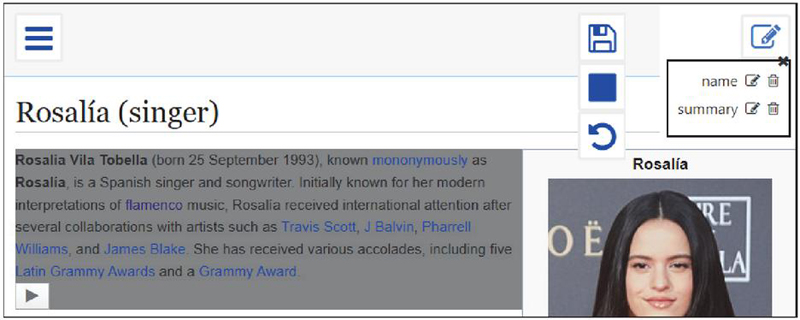
Figure 9 Paragraph annotation example.
Moreover, a set of basic annotations are automatically added by WAFRA using the information extracted from DBPedia Live endpoint17: a summary of the webpage, and the name and birth date of Rosalía. An example of the SPARQL query used by WAFRA to obtain the summary property from this Rosalía Wikipedia page is:
Saving and/or loading annotations. After annotating the website, the intermediary users have the option to save their annotations online as shown in Figure 3. In addition, annotations made by other users can be loaded by the intermediary user, but also end users can download existing annotations from the server by using voice interaction and manually through the annotations menu (Figure 4).
4. Performing accessibility operations. Once the Wikipedia webpage is annotated, the end user can perform operations to improve the accessibility of the website. The list of available operations is automatically read aloud by WAFRA when accessing the website. The operations included in this example are: change the text size, read text aloud by audio from the different sections of the website, hide unnecessary information and options, show videos and include a breadcrumb menu.
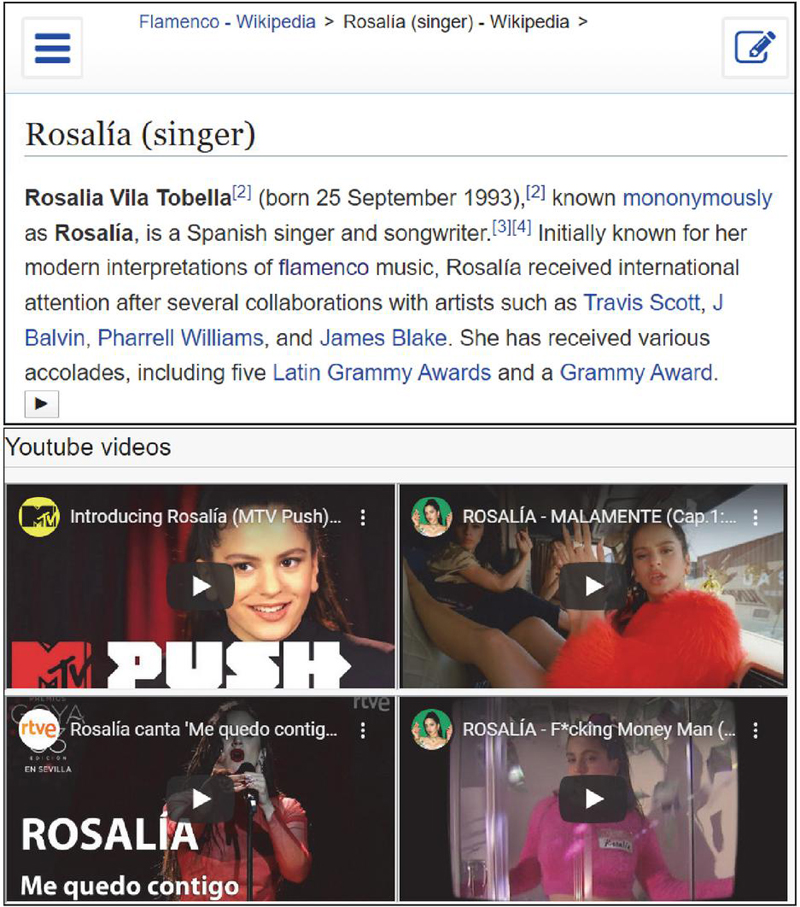
Figure 10 Example of a Wikipedia article after using our approach.
5. Accessing the web. Finally, the resulting augmented website with improved accessibility is depicted in Figure 10. As can be observed, the original Wikipedia article (previously shown in Figure 8) has changed to a large extent: at the top left, the WAFRA main menu has been added; at the top centre, we have the navigation menu; at the top right, we now have the annotations menu; and finally, the web content is in the foreground with a play button after each paragraph to be read aloud. Moreover, a set of YouTube videos (shown in Figure 10) has been included at the end of the website to facilitate the comprehension of the information and to reduce the navigation effort.
An example of interacting with WAFRA by voice to access Web contents such as relevant information about the singer Rosalía is illustrated in Figure 11.
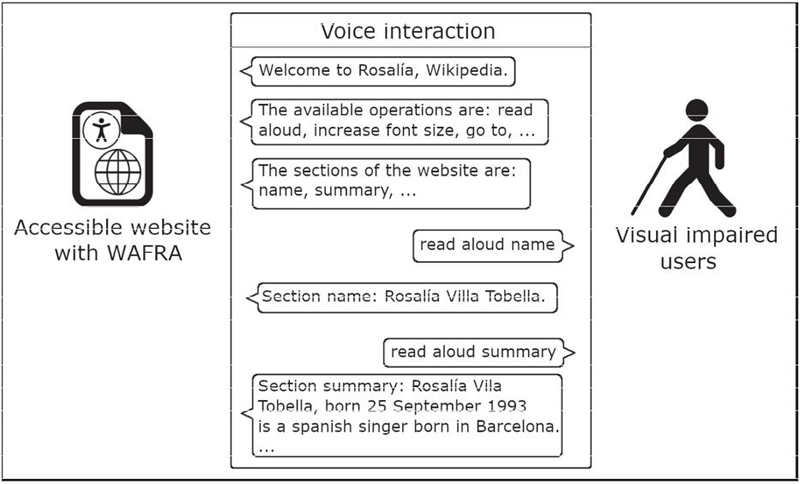
Figure 11 Example of interacting by voice with WAFRA.
Therefore, after using WAFRA to improve Web accessibility, users with visual disabilities are able to access information from this specific website using the different operations and voice commands available. A detailed evaluation of the approach to validate that the accessibility of websites is really improved for visually impaired users is presented in next section.
The WAFRA framework targets visually impaired users and aims to ease their access to information-intensive websites. To evaluate our approach, we performed a user study with 30 participants (10 intermediary users and 20 visually impaired users; a setup similar as found in literature [31, 14]) in order to validate three hypotheses: (i) are the automatic annotations obtained from DBPedia really helpful for visually impaired users, requiring few effort and time – compared with using screen readers – for visually impaired end users to search for relevant and correct information? (ii) Are the WAFRA operations helpful, and is the resulting WAFRA augmented website easy to use, really improving the website’s accessibility? (iii) Is the WAFRA annotation process for intermediary users easy to perform, and does it require less time and effort? The participants were users interested in improving the accessibility of websites, with different skills regarding computer interaction and informatics in general. The visually impaired users belong to the Spanish National Organisation for the Blind, participating in a Tiflotechnology group, and the intermediary users were selected from the University of Alicante, as partners of the Digital Accessibility Unit.18
The experiment is presented firstly with its setup (Section 5.1), then by the obtained results (Section 5.2) followed by a discussion of these results (Section 5.3), and finally, the threats to validity to consider (Section 5.4).
Before the evaluation, consent from the individuals was obtained (but no IRB approval was involved). Then, WAFRA was briefly introduced to each user individually because participants didn’t have any previous experience using our framework. This introduction, which took approximately 2 minutes, consisted of an explanation of the features that WAFRA provides for both end-users and intermediaries. After this explanation, we proceeded with the experiment: first, end-users took advantage of automatically included annotations to get website information. After that, intermediary users had the objective of improving the accessibility of a specific website with more annotations, so that visually impaired users could take advantage of these improvements and easily get some specific information. Moreover, a group of visually impaired users were introduced to JAWS,19 a popular screen reader, in order to compare their experience with using WAFRA.
First of all, in the experiment with 20 visually impaired users, a group of 5 users were asked to use WAFRA to obtain certain information in a WAFRA automatically annotated website. After that, a group of 10 users were asked to use WAFRA with the same website but including more annotations from the intermediary users. Finally, a group of 5 users were asked to use JAWS to obtain the same information from the website without annotations. The task that users needed to perform consisted of getting the following information from a Wikipedia article about a football player20: birth date, birthplace, the records he achieved during his career and donations made. The Wikipedia article was in Spanish because this is the native language of the participants. The website was exemplary annotated by the researchers (acting as intermediary users), in order to avoid bias due to potentially different and/or incorrect annotations by the intermediary users. For the evaluation of visually impaired users, we recorded the following variables: number and type of operations performed, time to reach specific information, and correctness of the information obtained. A 5 star Likert scale questionnaire was also performed asking about their satisfaction regarding ease of use, effort, time needed, helpfulness of the operations, and also suggestions and other comments.
In the experiment with 10 intermediary users, they were asked to perform the following tasks: (i) install the Tampermonkey browser extension and the WAFRA script; (ii) access a Wikipedia article about software21; and finally, (iii) annotate the important sections of this website. In the evaluation of intermediary users, we recorded the following variables: installation time of WAFRA, time to annotate the website and the number and type of annotations made. After the annotation process, a 5 star Likert scale questionnaire was performed asking about their satisfaction regarding ease of use, effort, time needed to perform the task and optional suggestions.
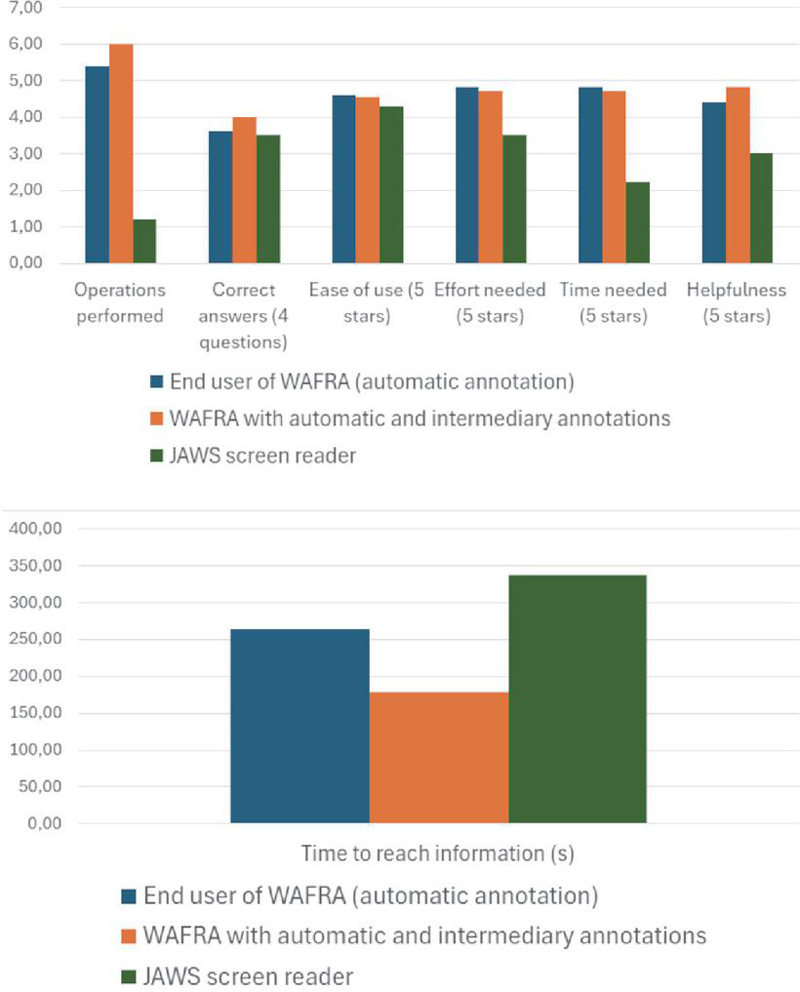
Figure 12 Summary of the experiment with mean values of users’ results, including users of WAFRA with automatic annotations only, users of WAFRA with both automatic and manual annotations and users of a screen reader (JAWS).
A summary of the results is shown in Figure 12, comparing the results obtained by users that performed the experiment using WAFRA only with automatic annotations, then using WAFRA with automatic and manual annotations (by intermediary users), and finally, using a screen reader (JAWS). The charts shown in this Figure 12 are based on the summary table (Table 1) with the mean results shown in order to easily compare the usefulness and helpfulness of WAFRA and screen readers. The complete results of the evaluation are shown in Tables 2, 3, 4 and 5, presenting the basic descriptive statistics of the results (mean, median and standard deviation) in the last row of each table.
Table 1 Summary of mean results to compare the use of WAFRA with automatic annotation, intermediary annotation and the use of a screen reader (JAWS)
|
|
|
|
|
|
|
|
| WAFRA |
| automatic |
| annotations |
|
|
|
|
|
|
|
|
| WAFRA |
| auto and |
| intermediary |
| annotations |
|
|
|
|
|
|
|
|
|
|
|
|
|
|
|
|
|
Table 2 Results of visually impaired users using WAFRA without intermediary user intervention (automatic annotation only)
Table 3 Results of intermediary users annotation process
|
|
|
| # and type |
| of |
| annotations |
|
|
|
|
|
|
|
|
|
|
|
|
|
|
|
|
|
|
|
|
|
| 5 paragraph |
| & 14 text |
| selection |
|
|
|
|
|
|
|
|
|
|
|
|
|
|
|
|
|
|
|
|
|
|
|
|
|
|
|
|
|
|
|
|
|
|
|
|
|
|
|
|
|
|
|
|
|
|
|
|
|
|
|
|
|
|
|
|
| 3.8 paragraph |
| & 7.1 text |
| selection |
|
|
|
|
|
|
|
| 0 paragraph |
| & 7.5 text |
| selection |
|
|
|
|
|
|
|
|
| 5.22 in paragraph |
| & 5.92 in text |
| selection |
|
|
|
|
Table 4 Results of visually impaired users using WAFRA in a website with extra annotations by intermediary users
Table 5 Results of visually impaired users using JAWS screen reader
On the one hand, visually impaired users using WAFRA retrieved the requested information from an automatically annotated website (see Section 5.1). They needed 5.4 accessibility operations of WAFRA on average. Moreover, the time to get all the asked information was less than 5 minutes in all the cases (4.4 minutes on average). It is important to mention that almost all the information retrieved was correct (3.6/4), and users considered the system generally helpful, easy to use, and requiring low effort and time (4.6, 4.8, 4.8 and 4.4 out of 5 respectively). Compared with using WAFRA in a website that includes extra annotations performed by intermediary users, end users needed more operations (6 on average) but less time to reach the information (less than 3 minutes on average). All the answers were correct and the satisfaction was higher regarding helpfulness, ease of use, effort needed and time (all with almost maximum satisfaction score; 4.8, 4.55, 4.7 and 4.7 out of 5 respectively). However, when using the JAWS screen reader, they needed on average almost twice the time to get the information (more than 5 minutes). In this case, the information obtained was not always correct, and the users needed around 1 operation on average to get the information, which was the operation that reads aloud all the text from the website. It is important to note that users on average considered the screen reader less helpful (3 stars out of 5), easy to use (4.3 stars out of 5) and their satisfaction regarding the effort and time was significantly lower (3.5 and 2.2 stars out of 5 respectively), compared to both the automatic annotations and the annotations made by intermediary users.
On the other hand, the 10 different intermediary users were able to install WAFRA in less than a minute (an average of half a minute approximately) and annotate the website in an average time of 3.5 minutes, depending on the annotations made: type (text and paragraph annotations) and number. However, the installation time is only for the first time, and the annotation effort made for a website can be lowered by re-using annotations made by other users, which is one of the most important features of WAFRA for improving scalability. In this experiment, we realise that most intermediary users annotated the contents by using more text selections than paragraph selections, with an annotation average of seven text selections and more than three paragraphs. After a process of revising their annotations, in general, the information annotated was correct and relevant. Regarding their satisfaction, the intermediary users considered the annotation process using WAFRA easy to use (4.4 stars out of 5), and with low effort and time needed (with satisfaction of 4.8 and 4 out of 5, respectively).
This experiment provided initial evidence that WAFRA successfully achieves the objective to ease access to information-intensive websites for visually impaired users, as shown in the comparison of Figure 12. In Figure 12 the results of the experiment show that comparing WAFRA with a screen reader, users obtained more correct answers, considered the approach easier to use, with less effort and time needed, and finally, users considered WAFRA more helpful than the screen reader, especially when using with automatic and intermediary annotations but with a non-significant difference (between only automatic annotations and both automatic and manual). Therefore, we can state that our application WAFRA achieves the objective of successfully providing accessible websites to visually impaired users, even with only automatic annotations and without the intervention of intermediary users.
On the one hand, visually impaired users correctly found the information they were looking for with both automatic annotations and those made by intermediary users, considered the system helpful, easy to use in less time and with little effort compared to using a screen reader. The intermediary figure is not necessary as WAFRA provides a set of automatically generated annotations, but the intervention of intermediary users may be useful to facilitate access to more specific information.
On the other hand, intermediary users correctly annotated relevant information and found the system easy to use, requiring less time and effort. Moreover, all the participants (both the visually impaired users and intermediary users) recommended WAFRA for other users with visual disabilities and considered it useful for them.
As previous studies conclude [4], conversational paradigms cannot consist in a simple transposition of text into voice as screen readers. Also, from this evaluation we can state that, in comparison with screen readers, the inclusion of voice interactivity in websites for visually impaired users improves their accessibility, allowing these users to easily find the information they are looking for. As pointed out by the participants of the experiment in an open discussion, users with a voice interface such as WAFRA take less time to get the desired information to answer the survey compared to using a screen reader, which generally reads indiscriminately all the information on the screen.
Therefore, our contribution to the literature consists of providing an easy-to-use voice interface with accessibility operations that ease access to relevant information for visually impaired users. Furthermore, once the annotations are available, they can be virtually effortlessly reused for other visually impaired users.
The following threats to validity in the experiment need to be taken into account. The experiment with visually impaired users using WAFRA in a website with extra annotations by intermediary users requires time and effort from these users, which is not always available. In order to consider this situation, the automatic annotation made from DBpedia actually provides basic annotations which have been also evaluated in the experiment. Screen readers such as JAWS do not require this effort made by intermediary users, but considering our automatic annotation process, our approach also does not require these intermediary users. The help of intermediary users can be considered as an extra, as their annotation may provide more information to final users. Moreover, these annotations made by intermediary users can be shared with other users, thus alleviating the effort to other users.
A Web augmentation framework for accessibility (WAFRA) is presented in this paper to provide visually impaired users with accessible websites. The WAFRA approach addresses problems related to accessing information websites by allowing end users to more readily obtain content by voice and manual interaction. First, an intermediary user installs the WAFRA framework to annotate the relevant content of a website. After that, end users with visual disabilities are able to perform different accessibility operations to easily access Web content. The set of operations that WAFRA provides consists of reading content aloud, focusing on the main parts of the website by hiding unnecessary information, increasing/decreasing the font size, facilitating navigation, and showing videos about the topic. In addition, new operations are likely to be added to WAFRA by users with programming knowledge, as it is a framework.
Even though the accessibility operations have been specifically designed for websites that include a lot of textual information, such as Wikipedia, the process of improving Web accessibility based on Web augmentation can be applied to any website. With our tool, information overload and readability problems can be addressed not only through voice interaction but also by manual operations woven into the user interface. Although our approach is based on the need for a user to identify and annotate the sections of the website, this process is alleviated by providing basic annotations using Semantic Web data obtained from DBPedia, and by allowing annotations to be saved and re-used among intermediary and end users.
Finally, the evaluation of the approach in an experiment with 30 users demonstrates that the framework performs efficiently; it is able to successfully generate a more accessible website, with little effort from intermediary users, to the satisfaction of visually impaired users, allowing them to find relevant information faster and more easily compared with screen readers.
This research work is funded by the following projects: PROMETEU/2018/089 and TIN2016-78103-C2-2-R. The evaluation part was made thanks to the Tiflotechnology and Braille group of the ONCE of Alicante.
[1] Aboubakr Aqle, Dena Al-Thani, and Ali Jaoua. Can search result summaries enhance the web search efficiency and experiences of the visually impaired users? Universal Access in the Information Society, 21(1):171–192, 2022.
[2] Vikas Ashok, Syed Masum Billah, Yevgen Borodin, and IV Ramakrishnan. Auto-Suggesting Browsing Actions for Personalized Web Screen Reading. In Proceedings of the 27th ACM Conference on User Modeling, Adaptation and Personalization, UMAP ’19, page 252–260, 2019.
[3] Marcos Baez, Cinzia Cappiello, Claudia M. Cutrupi, Maristella Matera, Isabella Possaghi, Emanuele Pucci, Gianluca Spadone, and Antonella Pasquale. Supporting natural language interaction with the web. In Web Engineering, page 383–390, Cham, 2022. Springer International Publishing.
[4] Marcos Baez, Claudia Maria Cutrupi, Maristella Matera, Isabella Possaghi, Emanuele Pucci, Gianluca Spadone, Cinzia Cappiello, and Antonella Pasquale. Exploring challenges for conversational web browsing with blind and visually impaired users. In Extended Abstracts of the 2022 CHI Conference on Human Factors in Computing Systems, CHI EA ’22. Association for Computing Machinery, 2022.
[5] Marcos Baez, Florian Daniel, and Fabio Casati. Conversational Web Interaction: Proposal of a Dialog-Based Natural Language Interaction Paradigm for the Web. In Proceedings of the Third International Workshop on Chatbot Research and Design, 2019.
[6] Jeffrey P. Bigham, Craig M. Prince, and Richard E. Ladner. WebAnywhere: A Screen Reader on-the-Go. In Proceedings of the 2008 International Cross-Disciplinary Conference on Web Accessibility (W4A), page 73–82, 2008.
[7] Yevgen Borodin, Jeffrey P. Bigham, Glenn Dausch, and I. V. Ramakrishnan. More than Meets the Eye: A Survey of Screen-Reader Browsing Strategies. In Proceedings of the International Cross Disciplinary Conference on Web Accessibility (W4A), W4A ’10, 2010.
[8] Niels Olof Bouvin. Unifying Strategies for Web Augmentation. In Proceedings of the Tenth ACM Conference on Hypertext and Hypermedia : Returning to Our Diverse Roots: Returning to Our Diverse Roots, pages 91–100, 1999.
[9] Julia Cambre, Alex C Williams, Afsaneh Razi, Ian Bicking, Abraham Wallin, Janice Tsai, Chinmay Kulkarni, and Jofish Kaye. Firefox voice: An open and extensible voice assistant built upon the web. In Proceedings of the 2021 CHI Conference on Human Factors in Computing Systems, CHI ’21. Association for Computing Machinery, 2021.
[10] Wendy Chisholm, Gregg Vanderheiden, and Ian Jacobs. Web Content Accessibility Guidelines 1.0. Interactions, 8(4):35–54, 2001.
[11] Oscar Díaz and Cristóbal Arellano. The Augmented Web: Rationales, Opportunities, and Challenges on Browser-Side Transcoding. ACM Trans. Web, 9(2):8:1–8:30, 2015.
[12] Oscar Díaz, Cristóbal Arellano, Iñigo Aldalur, Haritz Medina, and Sergio Firmenich. End-User Browser-Side Modification of Web Pages. In Web Information Systems Engineering – WISE 2014, pages 293–307, 2014.
[13] Hamza Ed-Douibi, Javier Luis Cánovas Izquierdo, Gwendal Daniel, and Jordi Cabot. A model-based chatbot generation approach to converse with open data sources. In ICWE, 2021.
[14] Leo Ferres, Gitte Lindgaard, Livia Sumegi, and Bruce Tsuji. Evaluating a tool for improving accessibility to charts and graphs. ACM Trans. Comput.-Hum. Interact., 20(5), 2013.
[15] A. Garrido, S. Firmenich, G. Rossi, J. Grigera, N. Medina-Medina, and I. Harari. Personalized Web Accessibility using Client-Side Refactoring. IEEE Internet Computing, 17(4):58–66, 2013.
[16] Marcos Gomez-Vazquez, Jordi Cabot, and Robert Clarisó. Automatic generation of conversational interfaces for tabular data analysis. In Proceedings of the 6th ACM Conference on Conversational User Interfaces, CUI ’24. Association for Computing Machinery, 2024.
[17] Vicki L. Hanson and John T. Richards. Progress on Website Accessibility? ACM Trans. Web, 7(1):2:1–2:30, 2013.
[18] Simon Harper and Yeliz Yesilada. Web Authoring for Accessibility (WAfA). Journal of Web Semantics, 5(3):175–179, 2007.
[19] Sebastian Hellmann, Claus Stadler, Jens Lehmann, and Sören Auer. Dbpedia live extraction. In On the Move to Meaningful Internet Systems: OTM 2009, pages 1209–1223. Springer Berlin Heidelberg, 2009.
[20] Royce Kimmons. Open to all?: Nationwide evaluation of high-priority web accessibility considerations among higher education websites. Journal of Computing in Higher Education, 29(3):434–450, 2017.
[21] Jonathan Lazar, Aaron Allen, Jason Kleinman, and Chris Malarkey. What Frustrates Screen Reader Users on the Web: A Study of 100 Blind Users. International Journal of Human–Computer Interaction, 22(3):247–269, 2007.
[22] Andrea Mangiatordi and Harpreet Singh Sareen. Farfalla project: browser-based accessibility solutions. In Proceedings of the International Cross-Disciplinary Conference on Web Accessibility, page 21, 2011.
[23] Jesús López Miján, Irene Garrigós, and Sergio Firmenich. Supporting Personalization in Legacy Web Sites Through Client-Side Adaptation. In Alessandro Bozzon, Philippe Cudre-Maroux, and Cesare Pautasso, editors, Web Engineering, pages 588–592, 2016.
[24] Ignacio Peinado and Manuel Ortega-Moral. Making Web Pages and Applications Accessible Automatically Using Browser Extensions and Apps. In Universal Access in Human-Computer Interaction. Design for All and Accessibility Practice, pages 58–69, 2014.
[25] Christopher Power, André Freire, Helen Petrie, and David Swallow. Guidelines Are Only Half of the Story: Accessibility Problems Encountered by Blind Users on the Web. In Proceedings of the SIGCHI Conference on Human Factors in Computing Systems, pages 433–442, 2012.
[26] G. V. R. J. S. Prasad, M. S. Soumya, and V. Choppella. Renarrating web pages for improving information accessibility. In 2017 12th International Conference on Intelligent Systems and Knowledge Engineering (ISKE), pages 1–8, 2017.
[27] Gonzalo Ripa, Manuel Torre, Sergio Firmenich, and Gustavo Rossi. End-User Development of Voice User Interfaces Based on Web Content. In End-User Development, pages 34–50, 2019.
[28] Katerine Romeo, Edwige Pissaloux, and Frédéric Serin. Accessibility to textual and visual information on websites for visually impaired persons. 2019.
[29] Daisuke Sato, Masatomo Kobayashi, Hironobu Takagi, Chieko Asakawa, and Jiro Tanaka. How Voice Augmentation Supports Elderly Web Users. In The Proceedings of the 13th International ACM SIGACCESS Conference on Computers and Accessibility, pages 155–162, 2011.
[30] Daisuke Sato, Shaojian Zhu, Masatomo Kobayashi, Hironobu Takagi, and Chieko Asakawa. Sasayaki: Augmented Voice Web Browsing Experience. In Proceedings of the SIGCHI Conference on Human Factors in Computing Systems, pages 2769–2778, 2011.
[31] Anastasia Schaadhardt, Alexis Hiniker, and Jacob O. Wobbrock. Understanding blind screen-reader users’ experiences of digital artboards. In Proceedings of the 2021 CHI Conference on Human Factors in Computing Systems, 2021.
[32] Schema. Schema.org, 2022.
[33] Constantine Stephanidis and Anthony Savidis. Universal Access in the Information Society: Methods, Tools, and Interaction Technologies. Universal Access in the Information Society, 1(1):40–55, 2001.
[34] Zan Sun, Amanda Stent, and I. V. Ramakrishnan. Dialog Generation for Voice Browsing. In Proceedings of the 2006 International Cross-Disciplinary Workshop on Web Accessibility: Building the Mobile Web: Rediscovering Accessibility?, page 49–56, 2006.
[35] Hironobu Takagi, Shinya Kawanaka, Masatomo Kobayashi, Daisuke Sato, and Chieko Asakawa. Collaborative web accessibility improvement: challenges and possibilities. In Proceedings of the 11th International Conference on Computers and Accessibility, pages 195–202, 2009.
[36] P. Verma, R. Singh, and A. Kumar Singh. A Framework for the Next Generation Screen Readers for Visually Impaired. International Journal of Computer Applications, 47:31–38, 2012.
[37] Annemarie Wittig, Aleksandr Perevalov, and Andreas Both. Towards bridging the gap between knowledge graphs and chatbots. In Web Engineering, page 315–322, Cham, 2022. Springer International Publishing.
[38] Yeliz Yesilada, Robert Stevens, Simon Harper, and Carole Goble. Evaluating DANTE: Semantic Transcoding for Visually Disabled Users. ACM Trans. Comput.-Hum. Interact., 14(3):14–es, 2007.
[39] Kyunghye Yoon, Rachel Dols, Laura Hulscher, and Tara Newberry. An exploratory study of library website accessibility for visually impaired users. Library & Information Science Research, 38(3):250–258, 2016.

César González-Mora is an Associate Professor in the Web and Knowledge research group in the Department of Software at University of Alicante, Spain. His research interests include open data, web augmentation, the semantic web and application programming interfaces.

Irene Garrigós is a Professor in the Department of Software and Computing Systems (University of Alicante, Spain) and is Head of the Web and Knowledge research group. Her research interests include open data, web augmentation and modelling, personalisation and application programming interfaces.

Sven Casteleyn is an Associate Professor at Jaime I University (Castellón, Spain). His research interests include Web science and engineering, Semantic Web, WoT and mobile computing. His publications are two books and chapters, and more than 100 articles in international journals and conferences.

Sergio Firmenich obtained his PhD in LIFIA with a grant from CONICET in 2013. It mainly consisted in an approach to support user tasks on the Web through client-side adaptation. He is currently researching crowdsourcing-based mechanisms for the adaptation and customisation of Web applications.
Journal of Web Engineering, Vol. 24_2, 163–198.
doi: 10.13052/jwe1540-9589.2421
© 2025 River Publishers