Modern Web Frameworks: A Comparison of Rendering Performance
Risto Ollila1,*, Niko Mäkitalo2 and Tommi Mikkonen2
1Intruder Systems Ltd, London, UK
2University of Helsinki, Department of Computer Science, Helsinki, Finland
E-mail: risto@giantmoo.se; niko.makitalo@helsinki.fi; tommi.mikkonen@helsinki.fi
Corresponding Author
Received 30 May 2021; Accepted 25 November 2021; Publication 08 March 2022
Abstract
Recent years have seen the rise of a new generation of UI frameworks for web application development. These frameworks differ from previous generations of JavaScript frameworks in that they define a declarative application development model, where transitions in the state of the UI are managed by the framework. This potentially greatly simplifies application development, but requires the framework to implement a rendering strategy which translates changes in application state into changes in the state of the UI. The performance characteristics of these rendering strategies have thus far been poorly studied.
In this article, we describe the rendering strategies used in the frameworks Angular, React, Vue, Svelte and Blazor, which represent some of the most influential and widely used modern web frameworks. We find significant differences in the scaling of costs in their rendering strategies with potentially equally significant practical performance implications. To verify these differences, we implement a number of benchmarks that measure the scaling of rendering costs as an application grows in complexity.
The results of our benchmarks confirm that under certain circumstances, performance differences between frameworks can range up to several orders of magnitude when performing the same tasks. Furthermore, we find that the relative performance of a rendering strategy can be effectively estimated based on factors affecting the input sizes of render loops. The best performing rendering strategies are found to be ones which minimize input sizes using techniques such as compile-time optimization and reactive programming models.
Keywords: Web framework performance, declarative rendering, virtual DOM, frontend frameworks, single-page application frameworks, angular, react, vue, svelte, blazor.
1 Introduction
The use of JavaScript on the web has become ubiquitous, with up to 97% of websites today using JavaScript, up from 88% a decade ago [16]. Over the same timeframe, there has been a change in how JavaScript is used: whereas ten years ago up to 60% of websites used JavaScript without the help of any libraries or frameworks, today less than 20% do so [17].
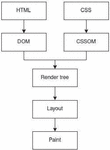
One reason for the rise of scripting is that it enables rich, responsive user interfaces for web applications. Without scripting, all transitions in UI state require page navigation [31], a process that involves resource fetching and a full reconstruction of the UI for every transition [4] (Figure 1). This is highly inefficient, particularly for small transitions. Using DHTML [33], a set of technologies which together enable dynamic modification of a document, the UI can be modified incrementally. When a UI state transition requires resource loading, this can be done asynchronously using the AJAX pattern [31].
At the core of DHTML is the Domain Object Model (DOM) [5]. DOM describes the structure of a document as a tree of nodes, and provides a set of APIs which can be used to dynamically modify that structure. DOM APIs are imperative, consisting of functions that enable querying, adding and removing nodes as well as modifying node attributes. Using DOM APIs, any DOM node tree which can be parsed from an HTML source can also be constructed using JavaScript.
A pitfall of DHTML is that DOM APIs are error-prone to use [28]. This may partly explain the increase in the use of JavaScript libraries, as many of them provide utilities for DHTML and AJAX, often providing library functions that wrap browser APIs and make them more convenient to use. Modern web frameworks go a step further, by defining a custom declarative syntax with which to develop applications. In this model, application code never directly calls DOM APIs. Instead, application code only describes the desired state of the UI, and the framework will dynamically generate DOM API calls to update the UI to match the desired state. Modern web frameworks are often used in single-page applications, where all page navigation is replaced with DHTML [26].
When using browser APIs directly or through a simple wrapper, the amount of script execution required to perform a UI update scales linearly with the complexity of the update. This is a desirable property for responsiveness. When DOM API calls are generated dynamically by a framework, the framework must perform work to determine exactly which calls are required for each particular transition, which causes additional overhead.
This presents an interesting problem from a performance point of view: there are potentially multiple different rendering strategies which can be used to determine the required API calls, and each strategy might be expected to have different performance characteristics. In a trivially simple UI, any strategy is likely to work well enough. It is therefore the scaling of costs that is of practical concern. Ideally, the cost of an update should depend only on the complexity of the update, just as when DOM APIs are used directly. A poorly scaling strategy might in the worst case cause noticeable delays on even small updates, defeating the purpose of using scripts in the first place.
To our knowledge, there is essentially no previous published research on the subject of declarative rendering strategies in the web application context. Previous research on web application performance has focused on the costs of an initial page load, where costs of resource loading may dominate [35], or in the performance of the browser’s content rendering process [27]. Scattered research on JavaScript libraries and frameworks exists, but these typically do not focus on performance aspects or differentiate between different types of libraries and frameworks [30], or discuss an older generation of frameworks [21].
Our contribution to this topic consists of a comparison of the rendering strategies used in Angular [1], React [8], Vue [15], Svelte [13] and Blazor [2], which are some of the most widely used and influential modern web frameworks. Using publicly available documentation, we have reviewed how their rendering strategies work and present a way to estimate their relative levels of performance. Additionally, we have implemented several benchmarks where we test expected differences in performance arising from differences in rendering strategies. The work is based on a thesis project under the scope of which the study was conducted [29].
The rest of this article is structured as follows. In Section 2, we will describe modern web frameworks in more detail. Section 3 introduces benchmarks which we have implemented to measure the selected frameworks’ rendering performance, the results of which will be discussed in Section 4. A final summary will be presented in Section 5.
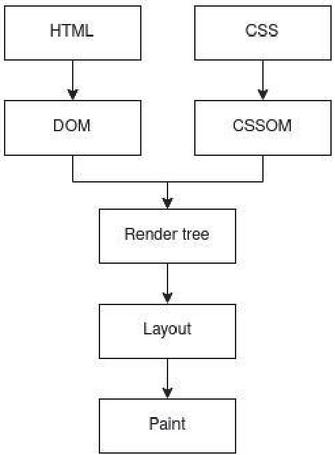
Figure 1 The critical rendering path used to render web pages in a browser.
2 Background
In this section, we present our findings from a review of Angular, React, Vue, Svelte and Blazor. We will first briefly explore the motivations behind using a declarative rendering model, after which we will discuss the rendering strategies used in these frameworks in detail.
2.1 Motivations for Using a Declarative Rendering Model
DOM APIs are error-prone to use. Ocariza et al. found that up to 80% of high-impact bugs in web applications are caused by errors in DOM manipulation [28]. This is explained by the exponential growth of UI state transitions as the complexity of an application grows. In an application with N valid UI states, where from each state there is a valid transition to a fraction k other states, the number of valid transitions is . DOM APIs are im-perative, and therefore when they are used directly, the application developer must define every transition and ensure none of them lead to invalid states. This easily leads to errors such as attempting to manipulate nodes which are not present in the DOM.
Web application developers have long used libraries and frameworks to simplify DOM manipulation. Previous generations of frameworks, the most widely used of which [17] include jQuery [24], MooTools [6] and Prototype.js [7], provide wrappers over DOM APIs which make them more convenient to use. They remain imperative, however, and therefore have fundamentally similar performance characteristics as direct DOM API use, and remain just as error-prone.
In modern web frameworks, the application developer only needs to describe the possible states of the application, while the transitions between states – DOM API calls – are dynamically generated by the framework. This frees the application developer from the need to manually define state transitions and potentially entirely eliminates the class of DOM manipulation errors identified by Ocariza et al. However, the work which a framework must perform to determine the required API calls for UI transitions represents additional overhead on top of DOM manipulation. The scaling of this overhead is the focus of subsequent discussion.
2.2 Frameworks
There exists a huge number of modern web frameworks which implement a declarative rendering model, and we have not attempted to conduct an exhaustive survey of them. Instead, we have selected a number of frameworks which are popular or widely used [11, 12] and show distinct approaches in their rendering strategies. We have listed the selected frameworks and the versions used in Table 1. Unless otherwise stated, all information presented below is sourced from the developer documentation of each framework.
Table 1 Introducing the reviewed frameworks
| Framework | Year Released | Version Reviewed |
| Angular | 2016 | 11.2.3 |
| React | 2013 | 17.0.1 |
| Vue | 2014 | 3.0.7 |
| Svelte | 2016 | 3.35.0 |
| Blazor | 2018 | 5.0.3 |
All the selected frameworks are based on JavaScript, with the exception of Blazor, which is a WebAssembly-based framework. Blazor applications are written in C# and executed within a .NET runtime that has been compiled to WebAssembly ahead of time. WebAssembly modules have no direct access to DOM APIs, and instead must use them through a JavaScript interoperability layer. This is a potential source of overhead which makes Blazor an interesting comparison with its JavaScript-based peers.
2.3 MVVM and Data Binding
The frameworks we have reviewed all follow some variant of the Model-View-ViewModel (MVVM) pattern [22]. MVVM is a declarative pattern, where the Model represents the application’s data source and the View the concrete GUI visible to the user. The View is built from a ViewModel, which contains a declarative description of the View along with any related data and custom logic. A central concept in MVVM is data binding: data within the ViewModel can be bound to the View so that any changes to them are automatically reflected in the View.
In web frameworks, typically the word “component” is used instead of ViewModel, but they are conceptually equivalent. In all frameworks we reviewed, the application is structured as a tree of components, where each component describes a subset of the DOM. Components can contain application state, which can be optionally shared with descendant components. Data bindings are used to define custom rendering logic: for example, a conditional rendering expression might be used to render or hide an element depending on the truthiness of a data binding’s value. In the frameworks we reviewed, data bindings are always one-way, flowing from application state to the UI but not the other way around. This ensures that DOM manipulation during a render loop will not cause changes to application state, guaranteeing that render loops can be performed in linear time [34].
2.4 Rendering Strategies
All frameworks we reviewed perform the same task, which consists of keeping the state of the DOM synchronized with the state of the component tree by creating and updating DOM nodes and their attributes. We found two distinct approaches to how this is achieved.
The first approach, used in React, Vue and Blazor, is based on explicitly solving the tree edit distance problem. This consists of comparing two trees and computing the minimum set of changes needed to transform one tree into the other [19]. In the general case, solving the tree edit distance problem has a time complexity of [32], but according to the authors of React, this can be simplified to by making certain assumptions which generally hold in the context of browser applications [9].
This approach is often called the virtual DOM (vDOM)-based rendering strategy, because the frameworks manage a data structure which represents a particular state the DOM, a ”virtual DOM” [10, 14]. In a vDOM-based framework, each component produces as its output a single vDOM node, which describes a set of DOM nodes. At any given time, it is possible to walk through the component tree to produce a new vDOM tree, which represents a desired state of the DOM based on current application state. This tree is then compared to a previously generated vDOM tree representing the current, not yet updated state of the DOM. The comparison produces the set of changes that must be applied to the previous tree in order to obtain the new one. This set of changes is then applied to the real DOM using DOM APIs.
The second category of frameworks, represented by Angular and Svelte, solves the tree edit distance problem implicitly. As with vDOM, each component defines a set of DOM nodes that should be rendered by an instance of the component. Unlike vDOM, at no point is there a separate step where the overall required changes to the UI are computed. Instead, each component directly modifies the portion of the DOM which it represents. This is based on dirty checking of data bindings: in addition to tracking current application state, each component keeps track of the values of all data bindings as they are currently represented in the DOM. Rendering consists of walking through the component tree, performing dirty checks on data bindings to see which bindings have changed, and applying changes to the DOM for each dirty binding found. The sum total of the changes is a solution to the tree edit distance problem.
In terms of performance, use of a virtual DOM potentially presents overhead not present when a binding-based rendering strategy is used. Although both strategies involve walking through the component tree, the vDOM-based strategy must in effect perform an additional loop: one over the component tree to produce a new vDOM tree, and another over the newly produced vDOM tree to compare it to the previous vDOM tree.
2.5 Performance Differences
All frameworks we reviewed perform DOM updates in a render loop that walks through the component tree. The performance costs of a render loop depend on input sizes and fixed costs. Input sizes can be measured precisely in the number of components that each loop must process, as well as the number of elements or data bindings processed per component. Fixed costs represent the amount of work which must be performed for each processed element or data binding. Fixed costs depend on implementation details that are not straightforward to compare, and we have therefore not investigated them in detail. Input sizes, on the other hand, can be directly compared, and here we found significant differences between frameworks.
We can distinguish two different types of work that a render loop may perform: creating new components and their associated elements, or updating existing ones. In the case of creating new components and elements, all relevant elements and components must be created, and therefore input sizes are equivalent regardless of rendering strategy.
In the case of updating existing components, a change may affect only a subset of components. However, because components can share their state with descendant components, a change in application state in a particular component can affect the output of other components as well. Frameworks must therefore adopt a strategy to ensure that all relevant components are processed when application state is modified. In the frameworks we reviewed, we found three distinct approaches to this problem, each with implications to the number of components that must be processed in each update loop.
The first approach, used by Angular, is to simply walk through the entire component tree exactly once. This ensures that all data bindings are checked and therefore all necessary changes are processed, but requires unnecessary work for any update that targets only a subset of the component tree. In Angular, it is possible to optimize this by manually indicating when components should not be re-rendered.
The second approach, taken by React and Blazor, is to walk through the subtree of the component which initiates the render loop. Components are only permitted to share their state with their descdendants, which ensures that components further up the component tree cannot be affected by changes in a component’s state. Therefore, this approach is also guaranteed to process all required components, but will still require unnecessary work for descendants whose output has not changed. As with Angular, both React and Blazor allow the application developer to manually designate when re-rendering a component can be safely skipped. Blazor in particular implements a default optimization of not re-rendering components if the component only contains primitive type inputs and those have not changed since the previous render.
The final approach, taken by Vue and Svelte, is to process only dirty components: components the output of which has changed. This is optimal, but requires some way to precisely determine ahead of time which components are dirty. Both frameworks achieve this by use of a limited reactivity system. In reactive programming, values can be declared as being produced through computations based on other values. Whenever a value changes, dependant values are automatically updated transitively by the runtime which implements the reactive programming model [18].
In the case of Vue and Svelte, a component’s output is treated as part of a dependency graph, where every value which affects the output is treated as a dependency of the component. Whenever any such value is mutated or reassigned, the reactivity system automatically marks the component as dirty and schedules it to be re-rendered. This works transitively across components which depend on inputs shared from a parent component, ensuring that all affected components are marked dirty automatically, and there is no need to check unaffected components.
Vue’s reactivity system is based on explicitly tracking dependencies at runtime using proxies, a special type of JavaScript object which enables intercepting access to other objects at runtime [20]. Svelte’s reactivity system, in contrast, tracks dependency graphs only at compile time, and works by generating imperative code which at runtime updates dependency graphs whenever values are reassigned or mutated [23]. Functionally, the two approaches are equivalent, but Svelte’s approach has potentially lesser runtime costs.
The other aspect of input sizes is the number of elements which must be processed for each component. A component’s output can be divided into static and dynamic contents, where static content will never change after a component’s initial render, whereas dynamic content – content which depends on data bindings – may change. Of the frameworks we reviewed, we found that React and Blazor process both static and dynamic content on each render, whereas all the other frameworks process static content only on the initial render of a component.
Differences in input sizes determine the scaling in costs of each rendering strategy. Strategies which are unable to automatically determine dirty components scale in cost with the size and complexity of the entire component tree and therefore suffer from a similar performance profile as page navigation. Rendering strategies which do not optimize the processing of static content will suffer an additional performance cost factor, the impact of which depends on the ratio of dynamic versus static content found in the processed components.
In conclusion, input sizes in update loops present a potential way to estimate the relative levels of performance of different rendering strategies. Use of a virtual DOM represents another potential source of overhead due to the need to perform an additional loop. In Table 2, we have summarized the frameworks we have reviewed along these aspects.
Table 2 Summary of factors affecting performance in the reviewed frameworks
| Framework | Components Processed | Elements Processed | Virtual DOM |
| Angular | All | Bindings only | No |
| React | Subtree of updated component | All | Yes |
| Vue | Dirty components only | Bindings only | Yes |
| Svelte | Dirty components only | Bindings only | No |
| Blazor | Subtree of updated component | All | Yes |
3 Benchmarks
This section describes a set of benchmarks we have implemented to measure performance differences between frameworks. We will first describe the methodology and aims of the benchmarks, and then present the results.
3.1 Methodology and Aims
Given the differences outlined in Table 2, it should be expected that performance differences between frameworks would manifest themselves particularly when applying updates to a small number of components with large subtrees or when updating components which contain a high ratio of static to dynamic content. The primary aim of our benchmarks is to verify the existence of these differences.
From the user’s perspective, the delay between action and response corresponds to a full render cycle by the browser, which consists of script execution and partial re-evaluation of the critical rendering path (Figure 1). Typically, this is what benchmarks on frameworks measure [25]. This is an inaccurate measure of the work performed by frameworks, however, which consists exclusively of script execution. We have therefore chosen to measure script execution in specific in addition to the duration of the full render cycle. All benchmarks were implemented using Chrome Devtools Protocol [3], which allows precise tracking of script execution using CPU polling.
In each benchmark described in this chapter, we have implemented an application identically with each framework. We then perform a particular action and measure the time taken for script execution in the render cycle that follows the action. Each scenario measures the costs of a particular aspect of rendering by varying the size and shape of the component tree and the actions performed. A total of five test scenarios were implemented. Each test was repeated 10 times, and the results presented are the mean values from 10 samples.
The purpose of these benchmarks is only to measure the relative differences between frameworks. We present the results measured in absolute terms as measured in milliseconds, but because of the simplicity of the components we use, they do not represent the expected performance of a real-world application with a component tree of equivalent size.
3.2 Results
As outlined in the previous section, we expect the greatest performance differences to arise when updating content. When creating components and elements, performance differences should arise purely from fixed costs, which we have not investigated. These differences can still be measured, however, which is the purpose of the first two benchmarks.
In the first test scenario, we measure the cost of creating static elements. The implementation consists of a single component which renders N static elements within a single component. Table 3 displays the time taken for script execution on this task.
Table 3 Script execution time (ms) when creating N static elements
| N | Angular | React | Vue | Svelte | Blazor |
| 100 | 3 | 2 | 1 | 1 | 3 |
| 500 | 9 | 9 | 3 | 2 | 8 |
| 1000 | 16 | 11 | 6 | 3 | 13 |
| 5000 | 85 | 77 | 28 | 14 | 61 |
| 10000 | 177 | 200 | 47 | 24 | 123 |
| 25000 | 844 | 956 | 95 | 63 | 371 |
| 50000 | 2520 | 3559 | 173 | 98 | 964 |
The second test scenario measures the cost of creating components. In this case, N components are created in the shape of a binary tree, where each non-leaf component contains exactly 2 children. The results are shown in Table 4.
In the remaining test scenarios, we measure the cost of update actions. The following two scenarios utilize the same component tree, which contains N components in the shape of a binary tree. The two scenarios differ only in which component is updated. The results of updating the root compo-nent of the component tree are shown in Table 5. Table 6 shows the results of updating a leaf component. No other components are updated in either scenario.
Table 4 Script execution time (ms) when creating N components as a binary tree
| N | Angular | React | Vue | Svelte | Blazor |
| 128 | 20 | 7 | 16 | 3 | 17 |
| 512 | 75 | 32 | 53 | 10 | 59 |
| 1024 | 120 | 55 | 84 | 22 | 128 |
| 4096 | 216 | 137 | 223 | 83 | 485 |
| 8192 | 297 | 233 | 313 | 142 | 966 |
| 16384 | 469 | 394 | 485 | 233 | 1870 |
| 32768 | 774 | 733 | 897 | 482 | 3644 |
Table 5 Script execution time (ms) when updating the root component of a component tree of N components
| N | Angular | React | Vue | Svelte | Blazor |
| 128 | 3 | 7 | 1 | 1 | 3 |
| 512 | 12 | 23 | 1 | 1 | 3 |
| 1024 | 14 | 42 | 1 | 1 | 2 |
| 4096 | 32 | 92 | 1 | 1 | 3 |
| 8192 | 32 | 148 | 1 | 1 | 3 |
| 16384 | 43 | 211 | 1 | 1 | 2 |
| 32768 | 103 | 379 | 1 | 1 | 3 |
Table 6 Script execution time (ms) when updating a leaf component in a component tree of N components
| N | Angular | React | Vue | Svelte | Blazor |
| 128 | 3 | 1 | 1 | 1 | 1 |
| 512 | 13 | 1 | 1 | 1 | 1 |
| 1024 | 14 | 1 | 1 | 1 | 1 |
| 4096 | 33 | 4 | 1 | 1 | 3 |
| 8192 | 33 | 3 | 1 | 1 | 5 |
| 16384 | 44 | 5 | 1 | 1 | 4 |
| 32768 | 104 | 4 | 1 | 1 | 8 |
In the final test scenario, we measure the cost of updating components which primarily render static content. Again, the component tree contains N components in the shape of a binary tree. In the previous scenarios, we used components which only output at most a single data binding and a single static element. In this scenario each component produces as their output 50 static elements, in additional to containing two data bindings for a 25:1 ratio of static to dynamic content. The benchmark measures the time taken to update all components in the entire tree. The results are shown in Table 7.
Table 7 Script execution time (ms) when updating the entire component tree of N components where each component contains primarily static content
| N | Angular | React | Vue | Svelte | Blazor |
| 128 | 4 | 34 | 20 | 2 | 28 |
| 256 | 8 | 44 | 32 | 3 | 60 |
| 512 | 17 | 66 | 42 | 5 | 101 |
| 1024 | 27 | 101 | 72 | 10 | 250 |
| 2048 | 29 | 235 | 91 | 20 | 502 |
| 4096 | 44 | 289 | 149 | 54 | 1020 |
| 8192 | 238 | 841 | 311 | 80 | 2013 |
4 Discussion
In this section, we will discuss the results of the benchmarks. First, we will discuss the results of each benchmark in turn, and then offer our interpretation of the validity and applicability of the results.
4.1 Analysis of the Benchmarks
An overall impression of the results is that they are in line with what would be expected given the characteristics of each rendering strategy as outlined in Table 2. There are, however, unexpected results as well.
In the first two benchmarks we measured the cost of creating elements and components. Based on the rendering strategies used by each framework, we would not expect fundamental differences to be found here. Two things stand out from the results, however.
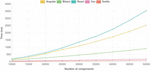
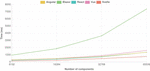
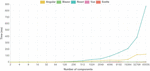
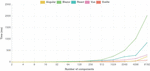
Firstly, Angular and React exhibit nonlinear performance costs when rendering a single component containing a large number of child elements. This becomes most obvious when more than 10000 elements are rendered in a single component, as seen in Figure 2. This effect disappears when no single component has a large number of child elements or components, as shown in Figure 3.
Secondly, it appears that there are significant differences in fixed costs. Blazor is a clear outlier with significantly worse performance than its JavaScript-based competitors. Angular, React and Vue post comparable results, but the most performant framework, Svelte, has an edge of at least 50% over its competitors, as seen in Table 8. While we expected Svelte to perform well when updating components, the reasons for its superior performance here must be explained by fixed costs rather than input sizes.
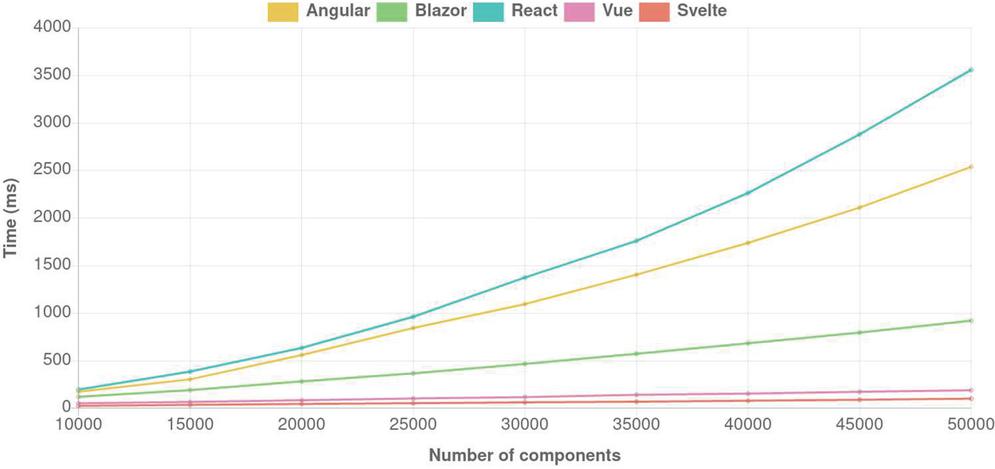
Figure 2 Script execution time (ms) when rendering N elements in a single component.
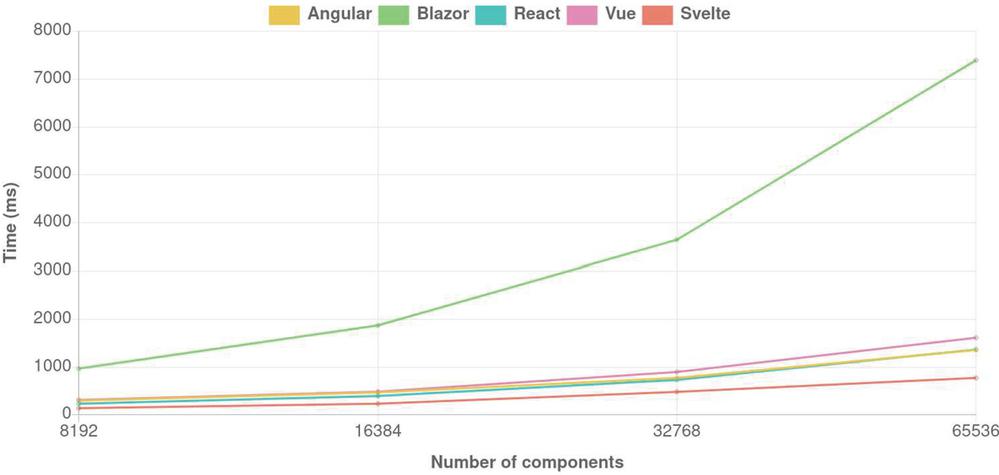
Figure 3 Script execution time (ms) when rendering N components as a binary tree.
Table 8 Relative costs of script execution when rendering N components as a binary tree
| N | Angular | React | Vue | Svelte | Blazor |
| 128 | 6.7 | 2.3 | 5.3 | 1 | 5.7 |
| 512 | 7.5 | 3.2 | 5.3 | 1 | 5.9 |
| 1024 | 5.5 | 2.5 | 3.8 | 1 | 5.8 |
| 4096 | 2.6 | 1.7 | 2.7 | 1 | 5.8 |
| 8192 | 2.1 | 1.6 | 2.2 | 1 | 6.8 |
| 16384 | 2.0 | 1.7 | 2.1 | 1 | 8.0 |
| 32768 | 1.6 | 1.5 | 1.9 | 1 | 7.5 |
To put the results in context, we can compare script execution times to the duration of the full render cycle. Table 9 contains for each framework the duration of the full render cycle in the component creation scenario, including script execution times. This is the true measure of rendering costs as it appears to a user. The relative differences here are significantly smaller than if we only consider script execution times.
Table 9 Duration of a full render cycle (ms) when creating a binary tree of N components
| N | Angular | React | Vue | Svelte | Blazor |
| 128 | 34 | 14 | 24 | 7 | 23 |
| 512 | 117 | 45 | 72 | 22 | 74 |
| 1024 | 204 | 77 | 115 | 53 | 153 |
| 4096 | 556 | 249 | 340 | 198 | 585 |
| 8192 | 992 | 464 | 549 | 375 | 1172 |
| 16384 | 1878 | 858 | 953 | 696 | 1407 |
| 32768 | 3654 | 1669 | 1836 | 1407 | 4446 |
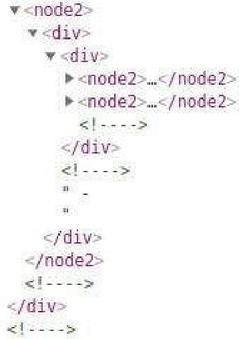
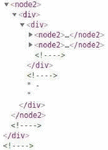
Figure 4 Comment nodes inserted by Angular in the DOM.
The outlier here is Angular, where the difference in the cost of a full render cycle compared to other frameworks is in fact significantly greater than the difference in script execution times alone. This appears to originate from the fact that Angular generates comment nodes in the DOM when con-ditional rendering is used (Figure 4), which causes a significant increase in the size of the DOM in this particular benchmark. While comment nodes do not contain any meaning for the document’s structure or content, they increase the size of the DOM node tree and consequently increase the cost of render tree construction. We found that Blazor exhibits similar behaviour under other circumstances, but not to an extent which affected the results.
When components are updated, we expect to see the best performance from the frameworks that have to process the least number of components in the update loop. This is exactly what we see in the results as well. When updating a leaf component, Angular stands out as the only framework with a less-than-trivial rendering cost, having identical performance regardless of whether a leaf or a root component is updated, as seen in Tables 5 and 6. Measured in absolute terms, the cost is still relatively low, but this might not be the case in a real-world application with more complex components to ren-der. In effect, Angular’s rendering strategy places a minimum cost on every update that scales linearly with the complexity of the view, which may make it unsuitable for applications with complex views and real-time responsiveness requirements.
As expected, updating the root component also confirms the costs of React’s rendering strategy which must re-render the entire subtree of the updated component, as seen in Figure 5. The relative performance difference to the best performing strategies is dramatic, and measured in several orders of magnitude. Blazor’s default optimization of not re-rendering components with unchanged inputs ensures that it performs well here, but if the child components were to contain reference type inputs, we would witness a curve similar to that of React.
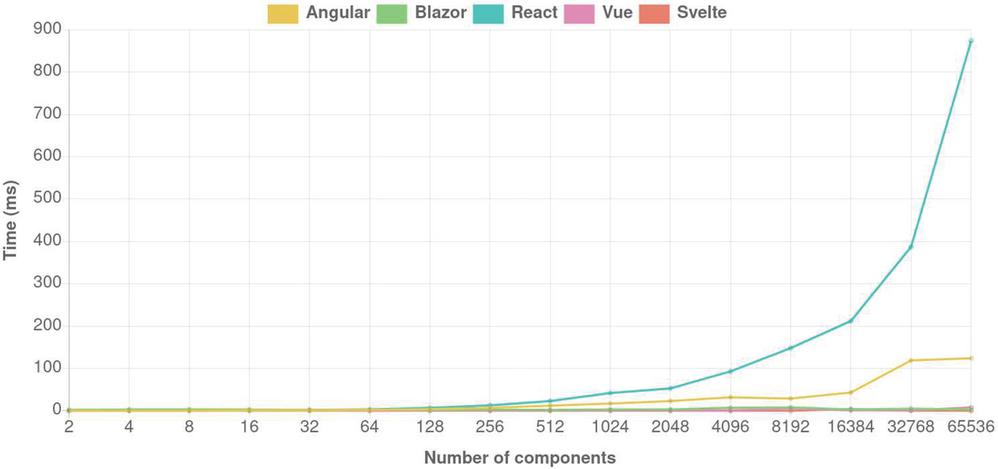
Figure 5 Script execution time (ms) when updating the root component of a component tree with N components.
Again, it is useful to put these results in context by comparing script execution times to the duration of a full render cycle. The most striking differences are found when the root component is updated, with the full render cycle costs shown in Table 10. Even though the differences are smaller than if only script execution costs are considered, there is still an order of magnitude of difference in the full render cycle duration between React and Svelte. Because the changes made to the DOM are very minor, critical path evaluation is quick, and script execution costs become the dominant factor in the duration of the render cycle.
Table 10 Duration of a full render cycle (ms) when updating the root component in a tree of N components
| N | Angular | React | Vue | Svelte | Blazor |
| 128 | 8 | 12 | 4 | 7 | 5 |
| 512 | 17 | 32 | 9 | 8 | 6 |
| 1024 | 26 | 47 | 5 | 4 | 9 |
| 4096 | 53 | 105 | 13 | 10 | 20 |
| 8192 | 60 | 166 | 20 | 12 | 28 |
| 16384 | 98 | 237 | 26 | 22 | 41 |
| 32768 | 224 | 439 | 48 | 24 | 51 |
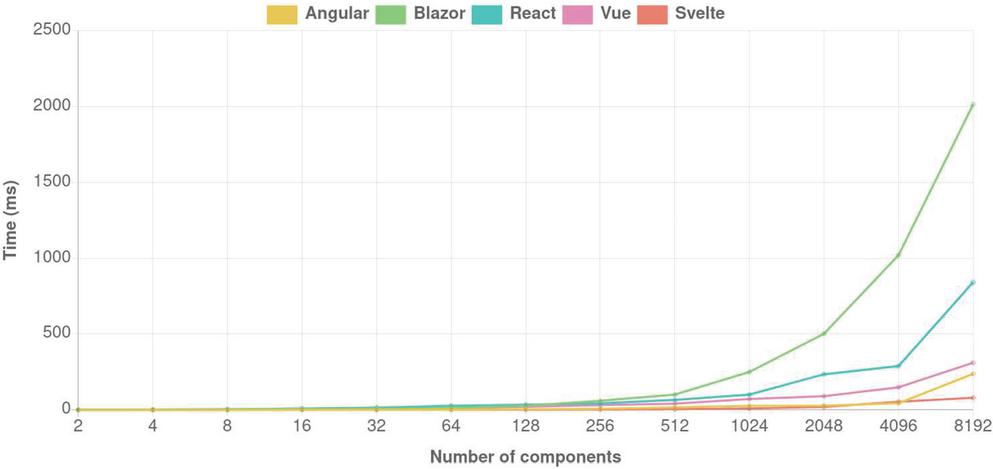
Figure 6 Script execution times (ms) when updating all components in a component tree of N components where each component contains primarily static content.
When updating static content, we would expect to see a significant advantage for frameworks which only process data bindings on updates, not static content. This is exactly what we see, with React and Blazor in particular again having a significant disadvantage due to their inability to differentiate between static and dynamic content. This difference is very significant, reaching an order of magnitude as shown in Figure 6 and Table 11. Svelte is again the best performing framework overall, although the absolute difference to Angular and Vue is small enough when the number of components is low that Angular is shown to outperform Svelte when N 4096.
We can again compare script execution times to the duration of the full render cycle, which is shown in Table 12. Here, layout costs are somewhat significant due to a large number of changes in the DOM, but costs are still dominated by script execution. Although the relative costs differences are smaller, they are still very significant when comparing Blazor and React to the three other frameworks which process only dynamic content.
Table 11 Relative costs of script execution when updating all components in a tree of N components containing primarily static content
| N | Angular | React | Vue | Svelte | Blazor |
| 128 | 2.0 | 17.0 | 10.0 | 1 | 14.0 |
| 256 | 2.7 | 14.7 | 10.7 | 1 | 20.0 |
| 512 | 3.4 | 13.2 | 8.4 | 1 | 20.2 |
| 1024 | 2.7 | 10.1 | 7.2 | 1 | 25.0 |
| 2048 | 1.5 | 11.8 | 4.55 | 1 | 25.1 |
| 4096 | 0.8 | 5.4 | 2.8 | 1 | 18.9 |
| 8192 | 3.0 | 10.5 | 3.9 | 1 | 25.1 |
Table 12 Duration of a full render cycle (ms) when updating all components in a tree of N components containing primarily static content
| N | Angular | React | Vue | Svelte | Blazor |
| 128 | 11 | 43 | 29 | 7 | 41 |
| 256 | 31 | 67 | 56 | 13 | 72 |
| 512 | 47 | 91 | 67 | 29 | 126 |
| 1024 | 72 | 142 | 106 | 56 | 303 |
| 2048 | 115 | 295 | 152 | 82 | 605 |
| 4096 | 211 | 419 | 270 | 174 | 1213 |
| 8192 | 577 | 1068 | 542 | 387 | 2396 |
4.2 Summary of the Results
The differences in rendering strategies outlined in Table 2 indicate that certain strategies can automatically determine which components are dirty and process only those, while others may need to process components which remain unchanged since the previous render loop. These differences imply that frameworks of the latter type may in some circumstances perform several orders of magnitude more work than those of the first type. The benchmarks we have implemented confirm these differences.
Blazor, the sole WebAssembly-based framework which we reviewed has significantly worse performance than any of its JavaScript-based competitors, including React which has an identical rendering model. We cannot determine if this is due to factors specific to Blazor or a weakness inherent to WebAssembly. The need to mediate access to DOM APIs through a JavaScript layer undoubtedly causes at least some of the overhead seen in the results.
In Section 2, we outlined that one of the problems with page navigation, aside from the need for resource loading, is that the cost of a transition in the state of the UI depends on the complexity of the entire UI, which makes small transitions particularly expensive. Frameworks which are unable to automatically determine dirty components suffer from essentially the same problem. The indication is that such frameworks may be unable to reliably provide a responsive user experience as the complexity of the UI grows, and will at a minimum require manual optimization of a kind that is performed automatically by other frameworks.
These differences in performance are most likely to be encountered when components containing large subtrees are updated. A case where this is likely to be of practical concern is applications that render large lists. When the component containing a list is updated, such as when items are added or removed, certain rendering strategies will process every item in the list, and performance differences similar to those we have measured can be expected to appear. Frameworks which process static content on every render loop are likely to suffer from the worst performance.
Of the frameworks we reviewed, the ones which are able to automatically determine dirty components do so using a reactivity system. There appear to be no unavoidable drawbacks to using such a system. Although Vue’s proxy-based solution may have associated runtime costs, Svelte’s compile-time reactivity system is functionally equivalent, and Svelte consistently has the best performance of all the frameworks we tested across all the benchmarks.
Overall, we can identify the following factors as producing improved performance:
• Use of a reactivity system to automatically detect dirty components
• Use of an optimizing compiler to generate component update code which ignores static content
• Use of data binding-based rendering, rather than virtual DOM
The relative performance of the rendering strategies we have reviewed can be approximately estimated based on input sizes in update loops. We believe this to be a valid and practically useful approach to characterizing and comparing script-based rendering strategies in the browser application context in general.
4.3 Validity and Applicability of the Results
All tests were performed on a desktop computer with a Ryzen 5 3600 CPU and 16GB of RAM. The results are not directly applicable to devices with different specifications. The relative results of each framework should be similar, however, as they arise from the differing amounts of work each framework must perform.
The components used in our scenarios are necessarily very simple. In a real-world application, the number of components would likely seldom reach the higher ends of the ranges we have tested, while each individual component’s complexity should in almost all cases be higher. These and other factors which the tested components do not account for will likely increase the costs of rendering individual components. This is likely to increase costs particularly for rendering strategies which do not optimize static content or which perform expensive dirty checks.
The components used in our benchmarks use no custom styling at all and use only the simplest of elements with minimal attributes. Although we have brought up the proportion of script execution costs vs. full render cycle costs where it seems relevant, it is likely that the aspects of rendering not related to script execution would be much more expensive in a real-world application due to more complex layouts. Our benchmarks hence do not represent the relative importance of optimizing script execution compared to other factors.
The results from our benchmarks represent only relative performance differences between frameworks under the specific conditions in each test scenario. We cannot, based on our tests, determine what constitutes a complex enough UI or component tree that performance costs arising from script execution are likely to cause noticeable delays for most users.
5 Conclusions
Page navigation requires the browser to fetch resources and to fully re-render a web page in order to facilitate transitions in the state of the UI. This is often an inadequate approach for applications with rich user interfaces and real-time interaction requirements. Using browser APIs to dynamically modify the document overcomes these shortcomings, but is itself fraught with complexity due to the difficulty of managing state transitions in a complex application. Modern web frameworks solve this problem by providing a declarative abstraction over rendering which reduces the difficulty of managing the state of the UI.
The rendering strategies used in modern web frameworks vary not only in their technical implementation, but in their performance characteristics. These characteristics may not be obvious to the application developer using such a framework, yet can have significant consequences for the runtime performance of any application implemented using it. When choosing a framework for building a web application, it is therefore crucial to understand the fundamental characteristics of its rendering strategy.
In our review of Angular, React, Vue, Svelte and Blazor, we found that there are major differences particularly in the ways they update existing content. While some frameworks are able to limit an update loop to concern only those parts of the application which actually need to be updated, others may need to process unaffected components on each update. Similarly, some frameworks are able to significantly optimize rendering of static content by only rendering it once, whereas others must process it on every update.
By benchmarking the frameworks in various situations, we find that these theoretical differences translate directly into differences in practical performance, often with an order of magnitude or more of difference between different strategies. Moreover, we find that there are significant differences even in fixed costs of creating components and elements. Overall, we find that significant performance gains are obtained through using a compiler to optimize rendering of static content, implementing a reactivity system to accurately track which components need to be updated, and updating the UI based on individual changes to data bindings rather than explicitly computing the steps required to update the UI to the desired state.
The modern browser is the most ubiquitous application platform in existence today. Given the ease of sharing content on the Web and the browser’s availability on a huge variety of devices, this is unlikely to change soon. As the use of scripting continues to increase, web application performance becomes an increasingly pertinent question particularly on resource constrained devices. A better understanding of the tools used to produce content, including their performance characteristics, is therefore a necessity for ensuring that the Web remains a platform accessible to all.
References
[1] Angular. https://angular.io/. (May 26, 2021).
[2] Blazor |build client web apps with c# |.NET. https://dotnet.microsoft.com/apps/aspnet/web-apps/blazor. (May 26, 2021).
[3] Chrome DevTools protocol. https://chromedevtools.github.io/devtools-protocol/. (May 26, 2021).
[4] Critical rendering path – web performance |MDN. https://developer.mozilla.org/en-US/docs/Web/Performance/Critical\_rendering\_path. (Feb 17, 2021).
[5] DOM standard. https://dom.spec.whatwg.org/. (May 26, 2021).
[6] MooTools. https://mootools.net/. (May 26, 2021).
[7] Prototype JavaScript framework: a foundation for ambitious web applications. http://prototypejs.org/. (May 26, 2021).
[8] React – a JavaScript library for building user interfaces. https://reactjs.org/. (May 26, 2021).
[9] Reconciliation – react. https://reactjs.org/docs/reconciliation.html. (Feb 19, 2021).
[10] Render functions & JSX – vue.js. https://vuejs.org/v2/guide/render-function.html\#The-Virtual-DOM. (May 04, 2021).
[11] Stack overflow jobs. https://stackoverflow.com/jobs. (May 26, 2021).
[12] State of JS 2020: Front-end frameworks. https://2020.stateofjs.com/en-US/technologies/front-end-frameworks/. (May 26, 2021).
[13] Svelte cybernetically enhanced web apps. https://svelte.dev/. (May 26, 2021).
[14] Virtual DOM and internals – react. https://reactjs.org/docs/faq-internals.html. (May 04, 2021).
[15] Vue.js. https://vuejs.org/. (May 26, 2021).
[16] W3techs: Historical yearly trends in the usage statistics of client-side programming languages for websites, April 2021. https://w3techs.com/technologies/history\_overview/client\_side\_language/all/y. (Apr 23, 2021).
[17] W3techs: Historical yearly trends in the usage statistics of javascript libraries for websites, April 2021. https://w3techs.com/technologies/history\_overview/javascript\_library/all/y. (Apr 23, 2021).
[18] Engineer Bainomugisha, Andoni Lombide Carreton, Tom van Cutsem, Stijn Mostinckx, and Wolfgang de Meuter. A survey on reactive programming. 45(4):1–34.
[19] Philip Bille. A survey on tree edit distance and related problems. 337(1):217–239.
[20] Tom Van Cutsem and Mark S Miller. Proxies: design principles for robust object-oriented intercession APIs. page 14.
[21] Andreas Gizas, Sotiris Christodoulou, and Theodore Papatheodorou. Comparative eval-uation of javascript frameworks. In Proceedings of the 21st International Conference on World Wide Web, WWW ’12 Companion, pages 513–514. Association for Computing Machinery.
[22] John Gossman. Introduction to model/view/ViewModel pattern for building WPF apps. https://docs.microsoft.com/en-us/archive/blogs/johngossman/introduction-to-modelviewviewmodel-pattern-for-building-wpf-apps. (Feb 25, 2021).
[23] Li Tan Hau. Compile svelte in your head (part 1). https://lihautan.com/compile-svelte-in-your-head-part-1/\#compile-svelte-in-your-head. (Mar 31, 2021).
[24] JS Foundation js.foundation. jQuery. https://jquery.com/. (May 26, 2021).
[25] Stefan Krause. krausest/js-framework-benchmark. https://github.com/krausest/js-framework-benchmark. (May 26, 2021).
[26] Ali Mesbah and Arie van Deursen. Migrating multi-page web applications to single-page AJAX interfaces. In Proceedings of the 11th European Conference on Software Maintenance and Reengineering, CSMR ’07, pages 181–190. IEEE Computer Society.
[27] Leo A. Meyerovich and Rastislav Bodik. Fast and parallel webpage layout. In Proceedings of the 19th international conference on World wide web, WWW ’10, pages 711–720. Association for Computing Machinery.
[28] Frolin Ocariza, Kartik Bajaj, Karthik Pattabiraman, and Ali Mesbah. An empirical study of client-side JavaScript bugs. In 2013 ACM / IEEE International Symposium on Empirical Software Engineering and Measurement, pages 55–64. ISSN: 1949-3789.
[29] Risto Ollila. A performance comparison of rendering strategies in open source web frontend frameworks. 2021.
[30] Amantia Pano, Daniel Graziotin, and Pekka Abrahamsson. Factors and actors leading to the adoption of a JavaScript framework. 23(6): 3503–3534.
[31] L. D. Paulson. Building rich web applications with ajax. 38(10):14–17. Conference Name: Computer.
[32] Mateusz Pawlik and Nikolaus Augsten. Efficient computation of the tree edit distance. 40(1):1–40.
[33] Antero Taivalsaari, Tommi Mikkonen, Kari Systä, and Cesare Pautasso. Web user interface implementation technologies: An underview:. In Proceedings of the 14th International Conference on Web Information Systems and Technologies, pages 127–136. SCITEPRESS – Science and Technology Publications.
[34] Victor Savkin. Change detection reinvented. https://www.youtube.com/watch?v=jvKGQSFQf10. (Feb 25, 2021).
[35] Zhen Wang, Felix Xiaozhu Lin, Lin Zhong, and Mansoor Chishtie. Why are web browsers slow on smartphones? In Proceedings of the 12th Workshop on Mobile Computing Systems and Applications – HotMobile ’11, page 91. ACM Press.
Biographies

Risto Ollila is a software engineer at Intruder Systems Ltd. He earned his B.Sc degree in computer science at the University of Helsinki in 2017 and will receive his M.Sc. from the same institution in 2021.

Niko Mäkitalo is a researcher at the University of Helsinki. His primary focus of research has been on novel web technologies, pervasive systems, Fog/Edge computing, and software architectures, focusing on coordinating IoT devices. Lately, Mäkitalo has focused on WebAssembly technology outside the web browser for enabling liquid software behavior. Mäkitalo has a Phd in Computer Science from the Tampere University of Technology.

Tommi Mikkonen is a Professor of Software Engineering at the University of Helsinki, Finland. He received his PhD from Tampere University of Technology, Finland. His research interests include Web engineering, IoT, and software architectures.
Journal of Web Engineering, Vol. 21_3, 789–814.
doi: 10.13052/jwe1540-9589.21311
© 2022 River Publishers